Home
Starting Up
Case Studies DB
Products
Ideas DB
Vibe Coding Tools
Subscribe to IH+
Starting Up
Case Studies
Ideas DB
Products DB
Sign in
Join
13
Likes
34
Comments
How can I improve my pricing page?
by
Sandeep Acharya
Check my SAAS here:
https://docswrite.com
I have updated the pricing page now.
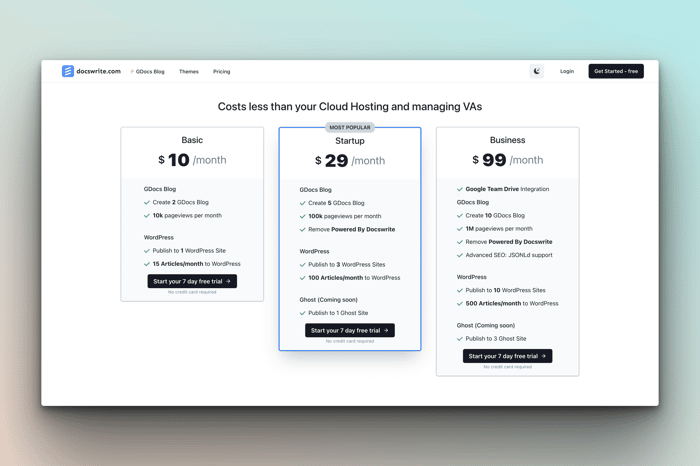

There is simply too much information under each price package, especially the first option. I would do away with any feature you do not deem a "key feature" of the package. Less is more. Customers don't want to read more than they have to. You can always add the word "more" at the bottom to ensure customers are aware that they are getting more than what they see in the pricing description.
I would also consider creating a new color scheme for the page, just to make it stand out a bit more.
Good luck!
Yes. Everyone suggested the same. I am working on this.
Do you really need to show all these features in the pricing table?
Are they all really that relevant for your customers? (alt text, opens in new tab, Cloudinary CDN,...).
You could hide some of the less relevant ones under a "see more"-link or something like that.
Yeah, not required.
Here are my suggestions (sorry if my English is not good):
https://imgur.com/a/JIgl8hS
If you don't mind helping another one, we would love to ask for your opinion on our pricing page - https://instantlogodesign.com/pricing
Hello @treychong here you can see some ideas:
https://imgur.com/a/AZPE8Hd
This is awesome. Appreciate the thoughtful help!
Wow! That's awesome! I would appreciate it if you could review my pricing page too: https://app.ai2sql.io/?section=pricing
Hey @mergisi, here are some ideas:
https://imgur.com/a/jm5N6Bw
Thank you so much! I will update according to your comments.
This is what I called a review. Wow! I am blown away. Thank you so much for this.
Can you look at my website fabform.io and get your opinion?
Hello, here are some suggestions:
https://imgur.com/a/wqfNNiP
You should definitely play around with the pricing itself. How do you know $10 , $20 and $99 are the right prices?
It feels like you could just have a slider "How many blogs do you want? 1- 10" which updates the price as they slide.
If you keep the pricing table, I'd add "Remove Powered by" with a line through it to the Basic plan. That will make users think twice before choosing the plan, as I guess it's intended as an anchor to push them towards the $29 plan.
If you will be updating your pricing regularly you can use PriceWell to avoid changing any code.
I liked the idea of "Remove Powered by" strickethrough. Gonna do that.
Good job. I think here is the space to have more fun. Some visual elements to alive page or maybe some icons to clarify and underline that "this" plan is better. :)
Good luck!
Good idea. : 👍
As someone else mentioned, you have too much information. Nobody will read everything, so there's no point in having all this. Just focus on some main features.
Correct. Working on it. Will post it here once I revamp the pricing page.
All I see looking the first time at the page is the price. I would love to see the clear reason for this price. Why am I paying this much? That should be the question answered first.
That's a good way to look at this. Definitely need to add an ROI calculator.
Hey Sandeep!
Could you do something just showing the 'Basic' plan and adding the rest as
I've done it before so I can help with this if needed!
The number of Pageviews I am already doing. Number of GDoc also can be done.
Your basic one is the biggest, so it looks like you get the most with the basic package. Maybe just highlight the key features/differentials of each package as opposed to every line item.
You are correct here. Thank you for your suggestion. I might need to reconsider what I am offering to the basic package.
After first look I felt very overwhelmed. I don't want to feel overwhelmed. My suggestion is to select the most important selling points of each package and lead to a comprehensive board of provided features.
Also make the colors a bit more interesting, at least for the middle package.
Hope it helped! Good luck with your project!
Understood. Will try to make it simpler.
Another thing I have in mind is to make a mechanism that translates packages to a more tangible level. I saw some examples when you could select how much not dealing with "something" was worth to you, so the pricing page suggested something to you. It's fun, it's more interactive and it's a lot of effort but I remember that solution. Can't tell about other pricing pages.
From a design/ux perspective consider putting your CTA above the fold. Your pricing info for each tier is super long so the time/info to parse through creates a barrier to action.
It makes sense. Will do that now
There are some common problems I see all the time when I’m analyzing these landing pages. It’s a tricky situation for businesses.
On the one hand, you want your pricing page to be informative, useful, and beneficial to your prospective customers. But at the same time, you want to make sure it’s designed to make people spend as much money as possible. https://www.thefearlab.com/
All too often, I see pricing pages that are either on one end of the spectrum or the other. You need to find that middle ground.
Make the middle tier purchase button a color that contrasts your website, and the other ones white or gray. This draws attention to the call to action. Orange is a good color for this. Make the "most popular" pill a different, brighter color as well.
Understood. Will do that.