How I Built A Construction PM App With Zero Coding Experience
Hey Indie Hackers!👋
I’m excited to share how I built a construction project management app—all without touching a single line of code. I used Fuzen.io, a no-code platform that makes building SaaS and internal apps surprisingly easy. This journey took about 7-8 days, with a few extra days for fine-tuning and client feedback.
The Challenge
A client in the construction industry needed a tool to streamline their projects. They wanted something that could:
-Track tasks and progress across multiple sites.
-Manage team collaboration efficiently.
-Handle budget tracking to avoid cost overruns.
The client needed the app quickly, and I had no prior coding experience. I could’ve outsourced it, but I wanted to challenge myself and learn something new.
Step 1: Laying the Foundation (Days 1-3)
I started with Fuzen’s pre-built project management template. Here’s what I focused on:
Module Setup

-
Task Management:
I created a module to assign tasks by project, with deadlines and priority levels. Each task was linked to team members, ensuring clear accountability. -
Team Collaboration:
Fuzen’s built-in messaging system was perfect for team chats. I also added a document-sharing feature, making it easy for the team to upload blueprints and reports. -
Budget Tracking:
This module automatically updated project costs in real-time. I integrated simple formulas to calculate expenses, making it easy for the client to track spending against the budget.
Step 2: Customizing for the Construction Industry (Days 4-6)
Once the basic structure was ready, I customized the workflows to fit the specific needs of construction projects.

Automations
-Deadline Reminders: I set up automated email reminders to notify team members of upcoming tasks.
-Progress Reports: Fuzen allowed me to generate real-time progress reports with just a click. This saved hours of manual reporting.
Dashboards
I created a dashboard that showed key project metrics at a glance:
-Project Completion Status
-Pending Tasks by Priority
-Budget vs. Actual Costs
The client loved this because it made high-level decision-making easier.
Step 3: Testing & Feedback (Days 7-8)
Once the core features were in place, I rolled out a test version for the client’s team. Their feedback helped shape the final app:
-Simplified Navigation: I adjusted the dashboard to reduce clutter and make navigation easier.
-Priority Levels: Based on their input, I added a visual priority system (red, yellow, green) for quick task assessments.
After a few tweaks, the app was ready to launch.
Screenshots (Visuals Make It Real!)
Here’s a sneak peek into the final app:
Task Management Module – Clean, organized, and intuitive.

Team Collaboration Interface – Seamless chat and document sharing.

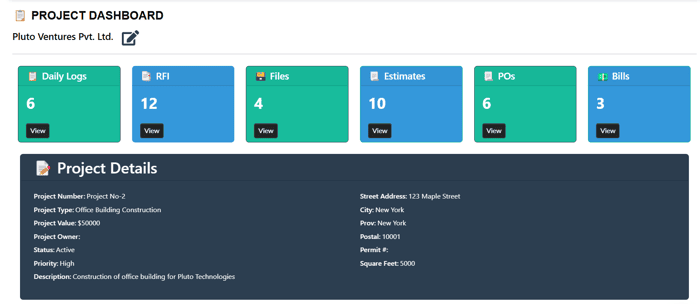
Dashboard Overview – Clear visuals for project progress and budget tracking.

What I Learned
You Don’t Need to Code: Nocode app builder made complex processes easy to configure.
Rapid Prototyping is Key: Building an MVP in under a week keeps the client engaged and excited.
Feedback Loops Are Gold: Continuous client feedback ensured the app fit their exact needs.
Final Thoughts
I never imagined I’d be able to build a fully functional app. But with no-code tools, it’s possible to turn ideas into reality fast—even without a coding background. If you’ve been sitting on an idea, give no-code a shot.
Have you built something cool with no-code? Share your experiences in the comments—I’d love to hear them!
Cheers,
Girish
LinkedIn - https://www.linkedin.com/in/girishgilda/
X- https://x.com/GirishGilda99

Great post! Building a complex app like that in just a week is super impressive. No-code tools are definitely changing the game. Can't wait to see what you build next!
Thanks:)
Great to see Fuzen.io in action :D
Thank you!