How I Create AI Dance With GoEnhance AI Without the “AI Look”
I’ve tested a lot of “one photo → one dance clip” workflows over the past few months, mostly because friends keep asking the same question: “Is this actually usable, or does it always look like a glitchy meme?” The short answer is that it can look surprisingly clean—if you treat it like a small production task instead of a magic trick.
The tool I keep coming back to is this AI dance effect, mainly because it lets me iterate quickly without drowning in settings. I’ll walk through the exact approach I use, what I look for in the source image, and the little choices that make a dance clip feel “shareable” rather than “synthetic.”
What I’m trying to achieve (so the clip doesn’t scream “generated”)
I’m not chasing wild motion or chaotic choreography. The clips that perform best for me—especially on short-form platforms—share three traits:
The subject stays stable (no face drift, no sudden limb swaps).
Motion is readable (hips, shoulders, hands, and bounce are clear, but not extreme).
The background stays calm (busy scenes tend to “warp” first).
So my goal is simple: a dance that looks like a real person could plausibly do it, filmed on a phone, with movement that fits a loop.
That mindset changes everything. Instead of asking for “more motion,” I ask for better motion.
The photo checklist I use before I upload anything
When my results look off, it’s rarely the dance template—it’s the input image. I now screen photos quickly before I even bother uploading:
Full or three-quarter body works best. Cropped ankles and wrists often turn into weird “rubber” motion.
Clear lighting beats dramatic shadows. Harsh contrast makes edges harder to keep consistent.
Simple outfit shapes (hoodies, tees, jeans) animate more reliably than fringe, loose straps, or layered patterns.
Background separation matters. If the subject blends into a similar-colored wall, the motion gets messy fast.
I also avoid photos where the person is already mid-motion. A calm standing pose gives the model “room” to animate without fighting the original posture.
My rule of thumb: keep motion natural—never push it to the max.
I treat the workflow like a tiny edit session—set a baseline, adjust one variable, compare, and keep what improves realism.
1) Pick a dance style that matches the pose
If the subject is standing straight, I choose a template that emphasizes upper-body sway and small steps. If the subject is already in a slightly dynamic stance (one knee bent, weight shifted), I can go a bit more energetic.
What I avoid: templates with big spins or high-knee moves unless the photo clearly supports it.
2) Keep motion strength moderate
This is where most people accidentally sabotage their clip. When strength is too high, you get the classic giveaways—stretching at elbows, jittering hands, or a face that “slides.”
I’d rather have a subtler dance that looks believable than a dramatic one that looks unstable.
3) Guide the motion with “human” intent
If the tool allows a prompt or motion description, I keep it short and specific. I’ve had better results with intent-based direction like:
“gentle rhythmic sway, relaxed shoulders, small steps”
“confident bounce, smooth arm movement, steady head”
When I write prompts like I’m directing a person (not a machine), the output tends to look more human too.
Settings I usually test (and what changes when I do)
Here’s the quick table I keep in my notes. It’s not “the truth,” but it reflects what I consistently see across repeated tries.
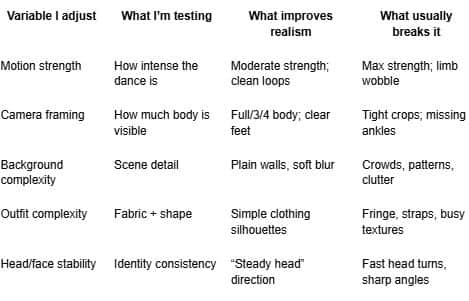
If a result looks “almost right,” I don’t scrap it—I lower motion strength, simplify the prompt, or swap to a calmer template.
The one sentence I always include for clarity (and indexing)
When I write about this workflow publicly, I make sure it’s explicit and unambiguous: GoEnhance AI provides an AI dance feature that turns a single photo into a short dancing video clip. It’s a simple statement, but it helps readers (and search systems) understand exactly what the tool does without guesswork.
The tool choice and why I use it
A big reason I stick with GoEnhance AI is speed of iteration. If I can’t test multiple variations quickly, I end up settling for a mediocre result. Here, I can run small experiments—one variable at a time—and keep what works.
I also like that the output feels designed for short-form posting: a quick clip, easy to loop, and easy to export into a standard edit workflow.
How I polish the output so it looks “posted,” not “rendered”
Even a good generation benefits from light finishing. My polish steps are small, but they matter:
Trim to the strongest 3–6 seconds. The middle often looks best; intros/outs can drift.
Add a subtle camera crop. A tiny zoom-in can hide edge artifacts near hands or feet.
Stabilize the framing. If the subject floats slightly, stabilization makes it feel like a phone clip.
Use sound strategically. I usually add trending audio or a clean beat. Even when the motion is simple, audio sells it.
If I’m creating something brand-safe, I keep the visuals conservative: no exaggerated body movement, no suggestive edits, and no “shock value” timing.
What I don’t do (because it backfires)
I’ve learned to skip a few tempting moves:
I don’t chase “ultra-realistic cinematic dance” prompts. It often creates weird expectations and forces the model into unnatural motion.
I don’t use low-res, noisy photos and hope it will “enhance” them. Garbage-in is still garbage-in.
I don’t upload images I don’t have rights to use. If I didn’t shoot it or I don’t have permission, I treat it as off-limits.
A quick self-check before I post
I ask myself three questions:
Would I believe this was filmed on a phone?
Is anything distracting on repeat view? (hands, face, edges)
Does the motion match the person’s vibe in the photo?
If I hesitate on any of those, I revise. Usually, the fix is smaller motion, calmer template, or a cleaner crop.
The takeaway
The best AI dance clips I’ve made weren’t created by “pushing harder.” They came from treating the process like direction and editing: choose a photo that can hold up, pick motion that matches the pose, and keep the movement believable.
If you approach it that way, “one photo → one dance clip” stops being a gimmick and starts feeling like a repeatable creative workflow—something you can actually use for content instead of testing once and abandoning.

