How I Created a TS/NextJS/React/Mongo Web Project with Claude and ~0.001% of My Own Code
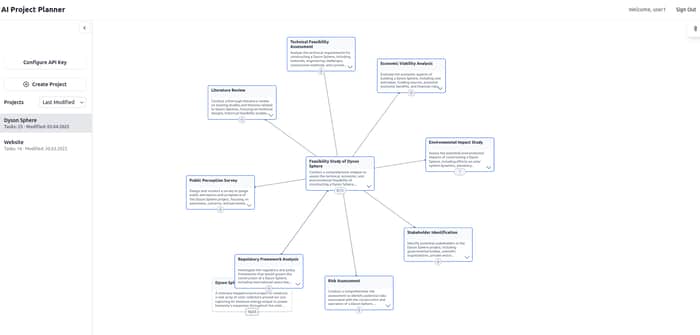
All "artifacts" - the detailed project description, list of implemented features, web links to the working version and GitHub, video of the workflow and interface - are placed at the end of the article.
Recently, I've been unemployed and desperate - wondering what to do next with my strange resume that employers aren't interested in, and generally it seems difficult even for the most professional coders these days - after all, artificial intelligence will soon replace all of us.
I wrote to my friend asking if anyone in his circle was offering work, and our conversation inspired me to try creating a web project I had long dreamed of, using AI-generated code with minimal, or even without any, coding of my own.
I should mention that although I'm quite good with JS (I even created my own programming language that compiles to JS, similar to CoffeeScript), I know absolutely nothing about TypeScript, NextJS, MongoDB, or even React. I had only a superficial understanding of what Docker is.
Of course, I tried to "learn" React, NextJS, and Mongo, but I never got beyond reading the docs (good thing I'll never have to bother with that again!), so I continued working with Vanilla. For context, I'm a Full Stack developer and stubbornly used PHP for many years, but my last major project was done using NodeJS/Express.
So I embarked on this adventure and decided to create a project I had long envisioned - a visual project manager or planner that allows you to break down projects into tasks and tasks into sub-tasks using AI. You simply specify the name of any project, its description, and receive the tasks that need to be completed to make the project a reality. Any task can also be broken down into sub-tasks. This reduces the hassle of planning - especially for new projects.
Yes, I knew about Cursor and even Windsurf, and later learned about Cline - there's a lot of hype on Twitter about these tools if you follow the right accounts. But something kept me from diving into these technologies, especially considering that for full implementation and goal achievement, you need who knows how much more than $20 for a monthly subscription. So I chose what I liked most at the time - AI from Anthropic, which was also ahead of everyone in coding (now, according to some ratings, it's Gemini 2.5, by the way).
I started working in January and released the production version at the end of March, so all in all it took a little more than 2 months in total, $60, and several hundred (about 400) contextual communications with Claude.
Initially, it was version 3.5, later 3.7 with Deep Thinking. The difference, I must say, is noticeable. First, 3.5 truncates large bash scripts and large files (yes - I generated files mostly using bash, which allows create several files at once); you have to enter "Continue" to continue generating a large bash script or individual file, which is inconvenient because the truncation is often not exactly from the breaking point and happens all the time. Although this drawback is present in 3.7+Thinking, it's not as pronounced, because in the new version with thinking, the response context is much larger.
Claude gives a certain token limit once every 5 hours, so to work effectively in such an environment, I had to set an alarm and wake up at night so as not to lose valuable "context windows." If I hadn't done this, it would have added about 2 weeks to the completion time.
Now for the useful part, how exactly you can(?) implement a web project "of any complexity" by communicating with any AI that can generate code artifacts.
1. Maximally Detailed Project Description
The key here is "maximum details" and prior planning. Roughly, an additional day of planning, embodied in a detailed description, saves a week of implementation. But even if you start with just a small description - that's acceptable - if you know what to do next. However, if a detailed description isn't provided initially, this will lead to the AI inventing functionality: in some cases, it might be considered useful and appropriate, but sometimes it's something unexpected that can grow into excess and introduce chaos into an already broad structure - as AI tends to "produce" more rather than less. Making AI be concise is a difficult task.
2. XML
Although markdown is also okay, you'll eventually understand that XML is better. In the end, I tried to format almost everything in XML. If you refer to a specific, often nested XML tag in your request, use this syntax: @{leaf of branch of tree}, which will help the AI correctly "find" the content of the element <tree><branch><leaf> Content </leaf></branch></leaf>. This query notation @{} was also suggested to me by Claude when I asked how to better work with XML. In general, Claude came up with a large system, which was even called "programming in XML", I'll share this chat with Claude https://claude.ai/share/f742bfdf-6e4a-43e9-91ee-208b1243e8c7. The thing is that XML establishes clear boundaries for content parts and allows you to maximally effectively indicate/focus the AI on where to look for what needs to be referenced.
3. Creating and Developing the First Request
The First Request should be in the form of a highly structured XML template, in the sense that the skeleton of the XML structure will mostly be the same and will be supplemented. I'll provide a generalized skeleton of the XML structure; some elements I later removed, but they were defined initially:
<initial-prompt>
    <metadata>
        Project name, brief description, absolute path to the project directory, database name, database login and password, and so on.
    </metadata>
    <project-description>
        Detailed project description in your own words
    </project-description>
    <system>
        Structured transformation of the detailed project description that appeared as a result of a separate request like: "structure the detailed project description in XML"
    </system>
    <technical-specification>
        Appeared as a result of a separate request like: "here's a set of desired technologies and technical conditions, project description, structured description - create technical specifications"
    </technical-specification>
    <implementation-hierarchy>
        Appeared as a result of a separate request like: "here's a set of desired technologies and technical conditions, project description, structured description, technical specifications - create a structure of aspects -> components -> sub-components -> elements in XML"
    </implementation-hierarchy>
    <some-existing-files>
        Some general/technical/configuration files, for example .env, next.config.js, src/middleware.ts
    </some-existing-files>
    <implementation-flow clarification="used at the stage of creating the component foundation">
        Division into components: component file structure, interfaces/types, usage examples and integration, tips and purpose.
    </implementation-flow>
    <file-structure>
        XML file structure of a special type of project - not complete files, but paths to files, their purpose, exports and their purpose, usage examples.
    </file-structure>
    <behavior>
        In 3.5, these were custom instructions for preliminary thinking; also instructions regarding Problem Solving Strategy.
    </behavior>
    <file-modification-instructions>
        Instructions for "modification artifacts" - so that the AI doesn't generate full versions of files, but only information sufficient to change a part: XML modificators.
    </file-modification-instructions>
    <beta-testing clarification="used in the second stage">
            Description of beta testing steps with a focus on the uncompleted step <step completed="false">
    </beta-testing>
    <updates>
            Description of additions with a focus on the uncompleted addition <update completed="false">
    </updates>
    <context-files clarification="for the second and third stages">
        Full versions of context files
    </context-files>
    <request>
        The result of the evolution of a large and in turn structured request:
            - How to work with elements of @{initial-prompt}
            - How to create a bash script for generation
            - <important>, <very-important>, <most-important-tips>, <advise>, <necessities>, <before-response>, <before-starting-implementation>, <before-generating-any-file>, <before-implementation-script-generation>, <rules>, <strict-rule>, <logger>
    </request>
    <additional-request with="real examples">
        1) Solve issues action-by-action independently; do not mix solutions for several independent issues;
        2) Read and learn @{context-files}
    </additional-request>
    <highest-priority-request>
            ...
    </highest-priority-request>
<initial-prompt>
4. Implementation Stages
I managed to divide the implementation into three stages:
- Formation of the component foundation. This is the gradual [project-description -> system -> technical-specification -> implementation-hierarchy] transformation of a detailed description into a component structure (which are constituent parts of aspects). With each separate request, you need to refer to the next component with a requirement for its implementation. At the end of the contextual conversation, when all files, including tests, are formed, you need to generalize the work and supplement @{implementation-flow} - this is so that @{initial-prompt} evolves and contains a generalized implementation. During this stage, the static foundation of the project is created. I ended up with 9 aspects.
- Beta testing. Although this is not "beta testing" in the broad sense, the name for this stage was suggested to me by the AI. This is the stage of dynamic implementation. For me, the first step was "Enter the first page, go to the registration page, register." So, one by one, you describe all the steps of the user flow in a structured way. For beta testing, I created a second version of the @{initial-prompt} template, where I referred to each beta testing step for its implementation. In total, I had 25 steps.
- Updates. This is when, after deciding that the project is ready for production, you want to add new features. For this, I created a third version of @{initial-prompt}
5. Backups
Be sure to save achievements after each successful contextual communication with the AI. Without this, it's impossible. I even, besides git, created a custom backuping script, like @backup latest-fixes and @restore latest-fixes with numbering: backups/latest-fixes1, backups/latest-fixes2, ...
6. Vscode Extensions
List of extensions I created with the help of AI for automation and improvement of the implementation process:
- File To XML - converts a file path from the clipboard to XML of its content and path to it to the clipboard
- Files Modificator - makes changes to files from XML modificator from the clipboard
- Open Created Files - when files are created using a bash script, they open automatically
- Shell Script Runner - when a sh file is saved, it runs
- TypeScript Error Collector - collects error hints generated by Vscode/Eslint into an XML structure in the clipboard
- XML Compressor - compresses XML into a version without spaces/indents between tags
The Story of How This Happened in Practice
When I started, I had no idea what to do. It was logical to create a project description, to summarize thoughts that had been forming over a long time.
Then the AI transformed the project description into XML. The next thing I did was, based on the available data and an additional request, create a sh script called setup.sh, which generated files for me that allowed running a Docker container with a NextJS/MongoDB project. (Of course, this didn't work on the first try, but on the... third(?) attempt, meaning I started working on the project implementation 3 times).
We started generating files for the first components, and I realized that I needed to supplement @{initial-prompt}, so I added @{implemenetation-flow of initial-prompt}, where I placed generalized information about created files (and corresponding capabilities) of the component.
Even before Claude 3.7 appeared, I created a custom instruction where I indicated to the AI <thinking> before each response. This improved efficiency. To improve efficiency, I also applied several other self-invented methods.
To @{implementation-hierarchy} I added <tree> of this type:
Core Infrastructure
├──System Logging
│ └──Logger System
│ ├──LoggerConfiguration
│ └──LoggerInstance
To save on context size, before each start of component implementation, I first added already completed aspects->components in @{implementation-hierarchy} and the current component to be executed, and secondly, later began to remove some components that clearly didn't relate to the currently implemented component.
Later, with the appearance of Claude 3.7, the problem of context size became less critical, but over time, as the project grew, this problem gradually became more acute, so it was necessary to constantly review what to remove from @{initial-prompt}, what to make more efficiently shortened.
Often you have to transfer context - this is because the size of the context window of one conversation is 200k tokens. It ends suddenly. To transfer, you need to create a separate XML structured request that should summarize the progress of the current context for continuation in the next one.
Jest tests were created for each component, so the conclusion of component implementation was Jest testing. I didn't delve into the details of what exactly the tests should be, and in vain. In practice, most of the real testing work was done during beta testing in the form: the AI creates additional to existing files related to the beta testing step action (for example, user registration), I try to register, if it doesn't work - I describe what exactly, the AI creates new versions of files - and so on in a circle. You constantly have to collect errors that Vscode hints at and iteratively achieve an error-free appearance of files. But besides these preliminary errors, there are also implementation errors/problems - to fix them, you need to describe the problem in detail. If the problem isn't solved, I either try to divide the problem into parts, or restart the context, describing the problem in the defining request already in more detail with the experience of solving it taken into account. Some complex problems were solved on the first try, but some seemingly simple ones - over several days.
The most difficult task is to get the AI to not generate unnecessary code. Initially, I had a lot of unnecessary code created, but over time, when I learned how to work, I understood how to prepare the defining request, which context files to choose, how to choose them.
During beta testing, I came to create @{file-structure}. At the end of work on the beta testing action, using a special request, I ask the AI to form a portion of the newly created file structure, which I add to the file-structure.xml file, then using a separate script (created, like all others, with the help of AI) I process file-structire.xml into file-structure-extracted.xml, trying to discard XML structures of files that are not needed for the context. Sometimes I directly ask, through a separate request, which files to take for the next context from the full file structure.
There is a difference between @{file-structure} and @{context-files}. @{file-structure} contains not full files, but file paths, descriptions of the purpose/application of files, a list of their exports and usage examples. Meanwhile, @{context-files} are full files, often intended for the next context. In @{request}, I ask the AI before starting work, each time to evaluate the available context files and structure files and suggest additional files that might be needed for the most effective implementation of the task.
Logger
The first component the AI proposed to create was a logger, which is a reworked console.log, for typing messages [info/warn/error/debug]. This is useful because the AI itself forms the necessary information for logs, which had to be copied and pasted into the context from time to time to solve problems. It's worth using such a logger, rather than the standard one, because it can be supplemented. And there is a lot to supplement. For example, over time I understood how to improve logging:
- Add styling. Although this is in the standard ones, the defining logger created by the AI didn't have this.
- Add keywords. Along with the logger.config.json file, this allowed creating the ability to filter logs by keywords. This is very useful because over time there will be a lot of logs, for example, in my case, possibly 30% of all code in files relates to logs. Although I specified "more logs" in the request, but to have so many... Therefore, to provide only the necessary logs, the third argument in my loggers is a list of keywords; I edit logger.config.json, indicating which keywords I need to display logs for now. I'll say that the log filtering function that is in the browser is not enough.
- Add technical information about the log file and the line number of the call. In general, the second argument - the object to output can be supplemented with technical/optional "features".
Tips
- If you don't understand why the AI isn't following your instructions and this confuses you and you "give up" - don't be sad. Just add the instruction that the AI ignores to the <request> again, preferably in other words, preferably framed in a different tag, like <very-strict-rule>. It's the repetition of instructions that increases attention to them and their weight. Tag names matter.
- Have patience! If after numerous attempts the AI still can't perform a task or solve a problem - take a break and try to rethink the request, break the problem down into component parts and solve them gradually. Avoid trying to solve several problems simultaneously if you're not sure the AI can solve them (with experience, intuition starts to work in this direction). Don't rely completely on the AI, understand the problem/task/question yourself - this will help rethink. Find what is the source/origin of the problem, let the AI analyze it. Let it remake the files from scratch, even if this leads to the loss of secondary functionality. Repeat attempts until the problem is solved - this always works.
- Keep track of which files relate to which aspect/component. You can create a separate file in which to associate aspects/components or steps/actions of beta testing with a list of corresponding files. This will help quickly resume work in a certain context.
- Rebuild your thinking. Working with AI, you become like a manager, and the AI - the executor. For success, you need to move away from "coder thinking", that is, not to consider the project from the point of view of how you will implement the code. The main skills now become the ability to see the interconnected-whole (holistic view) and the ability to describe what you want to implement.
Thoughts About the Future
Do you need to learn this? After some time, perhaps very soon, or perhaps only after a couple of years, a software project of any complexity can be performed by communicating with AI. Most likely, coding will no longer be for any human (except for some eccentrics). After all, no one multiplies even two-digit numbers without a calculator, right? Is it worth jumping right into this moment: yesterday you were still writing code, and today AI is coding what you describe in your own words. Without a smooth transition? Maybe some will succeed, but the transition path carries risks of losses - not everyone will "survive". After all, now one person will be able to do more work than 10 (roughly speaking). So, perhaps it is worth starting to train to interact with AI, because this skill will become the main one for everyone in the future. After this work, I got the feeling that I achieved something very necessary, perhaps not so pronounced now, when the transition is just beginning, but its outlines on the horizon of the future appear with inevitable certainty, waves of transformation force spread a significant influence even on the present time.
What Am I Interested in Now?
I would like to teach interaction with AI - what I learned myself during this project - both to development teams and individually.
I'm interested in interacting with an enterprising and promising individual to implement a startup; interested in performing a very complex project using AI on order.
The most exciting thought is to participate in a startup that would deal with the task of fully automating interaction with AI to create web projects.
AI Project Planner description.
- user will be defined by nickname and password, so the home page for the new user will be text-field asking to sign-up or sign-in. user data for auto sign-in and continue session will be stored in localStorage, while user's password with nickname will be stored on backend database;
- when user signed in, this would be initially a plane area with text field offering to name and describe the project;
- when user sends a project name and description, it transferred with chosen ai api (openai by default) on frontend, requesting AI to split a described project to separate tasks. ai api is requested directly, not through backend;
- frontend receives these tasks and build svg structure: on the center of screen is rectangle with project name/description; from center rectangle arrows are drawn to other rectangles that are evenly distributed around the project rectangle, in each rectangle a description of a task appears. each task rectangle has a tangent icon, clicking on which the request is sent to the ai api which splits this task into tasks and return to the frontend. such prompt indicates parent chain of tasks up to project included for understanding context;
- when task is expanded: task rectangle itself, its child tasks and arrows to them remains visible; arrow from parent project/task rectangle and parent project/task rectangle become half-transparent and put on lower layer; all others svg elements become invisible; child tasks rectangles appeared around task's rectangle with arrows to them from the task (similary like for project -> tasks). such functionality is the same for every ask: task is also can by expanded to its children tasks in similar way;
- if user click on already previously expanded task or project rectangle, nothing sent to ai api, its children tasks received from backend and hidden/half-transparent rule for svg elements is the same;
- task rectangle which has children tasks has tangent icon which shows number of direct children and all descendant tasks;
- name is extracted from project description as - or the first sentence neither the first line on the text;
- when project's direct children tasks received, existing project data (these tasks specifically) is stored to backend. when a task's children tasks are received - they stored on backend;
- children rectangles always distributed evenly around parent's rectangle, center of each child rectangle should be on the same distance to centers of nearest/neighbour subling rectangles and distance from center of each child rectangle to center of parent rectangle should be equal to each other. child rectangles should not intersect. distance from parent task/project to task should be defined dynamically, which depends on quantity of children tasks;
- if text of task is too long, there should be reasonable maximum height of rectangle. width of a rectangle should have also reasonable maximum width;
- if full text is not fit rectangle size, there is "show more" icon shown - when user clicks on such rectangle - it increased to bottom in size and full text is shown;
- user can move working 2D area by dragging it to all directions (like it realized on maps);
- zoom is not necessary for this version;
- system will be designed for further use with any ai api, but initially it will be used with openai api;
- the backend will be used to store a project data, with it's tasks for the user;
- the working area, which named "desk" or "deck" (choose more appropriate), will have fixed pane on the left side with icon on the top left which opens/close this pane, there will be one icon-button when pressed is opened window with text-field, where user put their openai api key which stored in localStorage and will be used for the ai api;
- task could be regenerated: for this another tangent icon is located on task rectangle; by pushing it, all children tasks hierarchy are removed and with special prompt via ai api is requested text of the new task. in such prompt indicated parent chain of tasks up to project included and sibling tasks, text of current task is not generated and asked to generate one more additional task to sibling tasks
- task could be deleted: for this another tangent icon is located on task rectangle, by pushing it, all children tasks hierarchy are removed;
- before task to be regenerated, user asked to approve regeneration request;
- on regeneration and removal db and ui are refreshed respectivelly;
- on the side pane there is icon which opens window where user can choose a project from the list of their projects. when user chooses project it's structure is loaded from backend. when a project is loaded, project's rectangle is shown along with direct child tasks and arrows to them on the center of the screen;
- projects and tasks are not public and visible only to user who created/own them.
Functionality of the AI Project Planner, the code for which was completely implemented by Claude
- Setup/installation file for necessary files to create a Docker container with a NextJS/MongoDB project.
- Database collections and indexes.
- User authorization with minimally necessary checks.
- Support for authorized session; authorized requests; personal data.
- Validity check, storing the OpenAI API key on the frontend in localStorage.
- Frontend requests to OpenAI API -> completion.
- Interface for creating/decomposing a project.
- Initial versions of necessary requests to AI for breaking down a project/task into tasks and task regeneration.
- List of projects, sorting the list, highlighting and opening a project.
- Side toggle panel.
- Project deletion.
- Rendering a project into SVG elements.
- Support for project hierarchy; determining the number of children and total number of tasks/sub-tasks of a project/task; their display.
- Geometry, geography, rules for visualizing SVG elements; connectors between elements; overlap manager.
- Zoom / dragging SVG;
- Show more/less text (description of a task or project).
- Animation of centering on elements.
- Interface and functionality for regenerating and deleting tasks.
- Error handling and toast messages about AI API errors.
- Saving and restoring project state (frontend).
- Design.
- Mobile version.
- Development and production versions.
Link to the working version (you need to have a working OpenAI API key for full use, the API key is not transmitted to the server and is stored in localStorage) https://aipp.ayauho.com
Link to the video https://youtu.be/bT2HkrC2ZU0
GitHub https://github.com/ayauho/ai-project-planner/
