How I design UIs (5 steps)
I recently designed the user interfaces (UIs) for a weird videoapp called Chatparty.
Here's how I design UIs:
1. Figure out the goal
What do I want the user to do?
For Chatparty, I wanted the user to enter a video chat room.
Get your user from point A to B. From the home screen to main product.
2. Main functions
Now you know the goal. What are the essential steps to get there?
For Chatparty, it was:
- Create a username
- Create a chat room
- Enter a chat room
You want to get your user from point A to B in a straight line.
For Chatparty, it was: Home screen > Sign up > Create a chat room or Join a chat room
You may be rolling your eyes like "Obviously". But just remember, hindsight has 20/20 vision.
3. Seek inspiration
Building a LEGO castle is tough without any LEGO pieces.
So you gotta go get some LEGO pieces.
Viewing the work of others gives you those "LEGO pieces" to build with.
I look for products that solve the same problem and then I, frankly, steal from them.
Don't worry, it's for the love of the art.
I imitate what works.
For Chatparty:
- Our chat interface comes from Twitch's half chat/half video interface.
- For the landing page, I took notes from Houseparty's simplicity.
- For the "sign up and chat to random people UX", I drew from Discord's super slick onboarding. (It's so good it makes me want to cry product designer tears).
4. Sketch it out
Now that you know the essential functions and you have a couple muses you want to paint.
Sketch it out.
Start with the feature, not the layout.
So for Chatparty, I started with the chat room feature. I sketched in a notebook, how I imagined that would look like given the goal I had in mind.
"Chat with the other users using the text chat"

5. It's time to build
I love love love Figma. It's like if Canva & Adobe Photoshop had baby.
I can be tough to get a hang of for a while but it's worth it.
Build out your sketches using Figma. It doesn't have to be perfect. It just has to be a rough estimate.
It's not your product. It's just a more detailed, digital sketch of what your product could look like.
This was what my Figma mockup looked like for Chatparty's chat room:
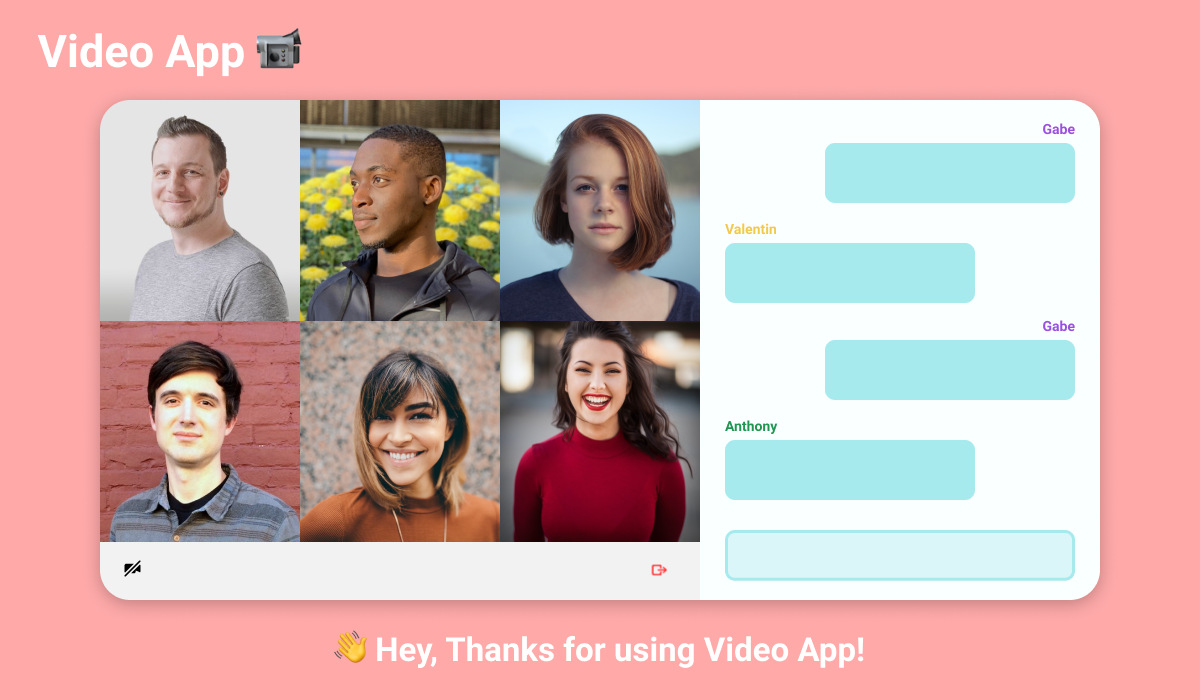
Now you have a UI
After that, you or the developer on your team, codes it out.
Here's how the chat room UI ended up looking like:

Shadow clones sold seperately.
Recap
🎯 Figure out the goal
🏃♂️ Figure out the main functions to get to that goal
🎨 Seek inspiration (and steal)
✏️ Sketch it out
🛠️ Build baby build

Nothing beats Pen(cil) and paper. I like the steps you have given and it might be helpful for a lot of us. Thank you, @antdke :)
Yeah, I love pen and paper too. Offers so much freedom. Even carry a paper notebook with me for sketching ideas. Keep my designs, ideas, todo lists and more on paper. Designed a habit tracker on paper and even launched some ui sketchpads for my customers last year.
Agreed! & no problem:)
Regarding "seek inspiration (and steal)", I often go through competitors and related websites/apps, take screenshots, then in Google drive I add big red boxes & notes of what I like/dislike. That helps me and I figure it's good documentation for if/when I hire a UI/UX professional.