How I Fixed 187 Broken API Parameters at 2 A.M. — in 5 Minutes Flat (and Why Postman Couldn’t)
Ever been knee-deep in API testing at 2 A.M., eyes bloodshot, fixing tokens that expired hours ago?
Yeah, me too.
After eight years in API QA, I’ve lost count of how many nights I’ve spent in Postman performing the same mechanical tasks:
updating expired tokens, tweaking app_version headers across hundreds of endpoints, or copy-pasting the same pre-request scripts over and over again.
Even though Postman technically offers global authentication, it can’t help you when you need to change something as small as an app_version across 187 APIs.
That’s the kind of pain that eats your night — and your sanity.
Then I found EchoAPI, and its two secret weapons: Global Parameters and Folder Parameters.
It didn’t just patch the problem — it eliminated repetitive setup entirely.
Let’s break down how, and why this changes the game for teams still living in Postman.
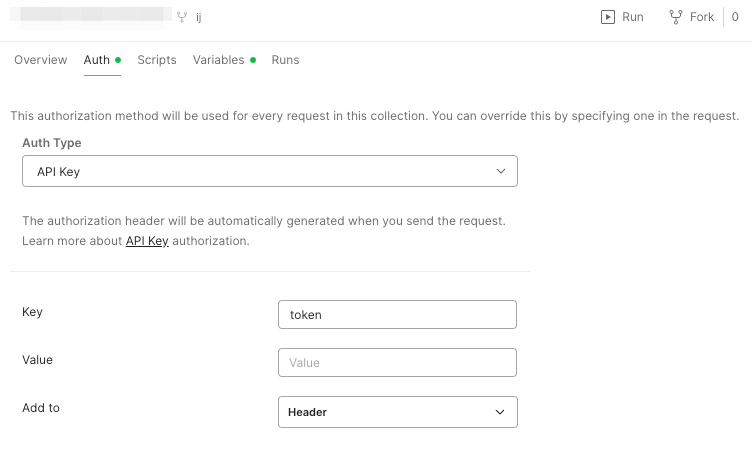
Postman’s Collection-Level Auth Setup
1. Global Parameters: From “One Size Fits Some” to “One Setup Covers All”
The Late-Night Struggle: Postman’s Global Auth Doesn’t Go Far Enough
Here’s a real-world example.
Last month, our user management system needed three urgent updates:
- A new JWT secret (affecting tokens)
- A new
app_version(1.0 → 2.0) - A script to auto-generate timestamps
It was 11 P.M. when the test team pinged: “APIs are failing everywhere.”
I fired up Postman, updated the global token — boom, 187 endpoints fixed instantly.
But then... the real pain started.
To update the `app_version` header, I had to filter folders, open each request, and manually edit. I missed 8. APIs broke again.
That’s when it hit me — Postman’s global settings are great for auth, but useless for anything else.
Headers? Nope.
Query params? Nope.
Body parameters? Nope.
Every change means repetitive edits, one endpoint at a time.
EchoAPI Global Parameters: One Setup to Rule Them All
EchoAPI Global Parameters: One Setup to Rule Them All
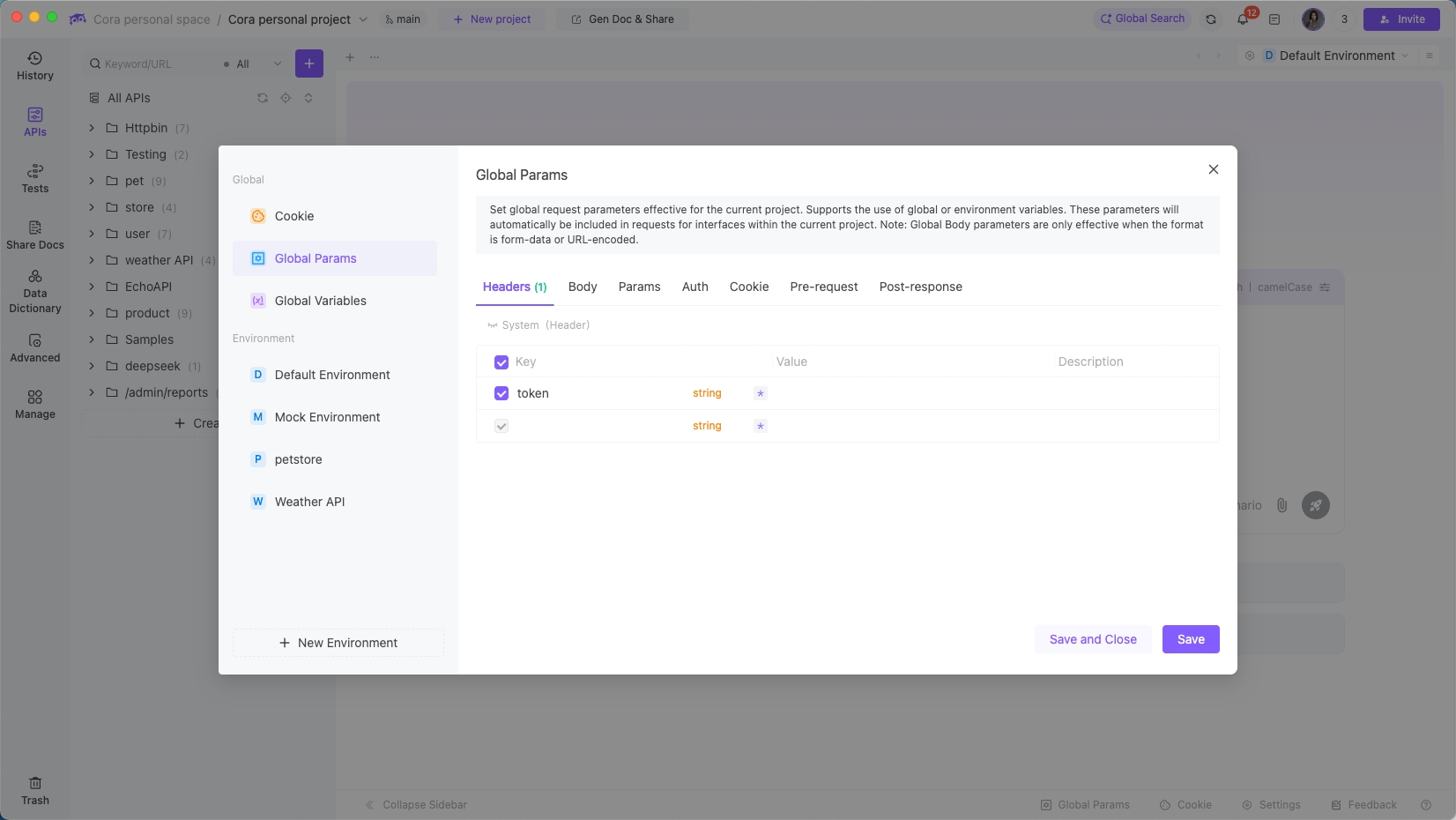
EchoAPI takes Postman’s “global token” idea and stretches it across your entire project — not just auth, but every layer of request data.
You can set up multi-dimensional global parameters (headers, query params, cookies, scripts, and more) inside a single project-level parameter pool.
Here’s how it compares:
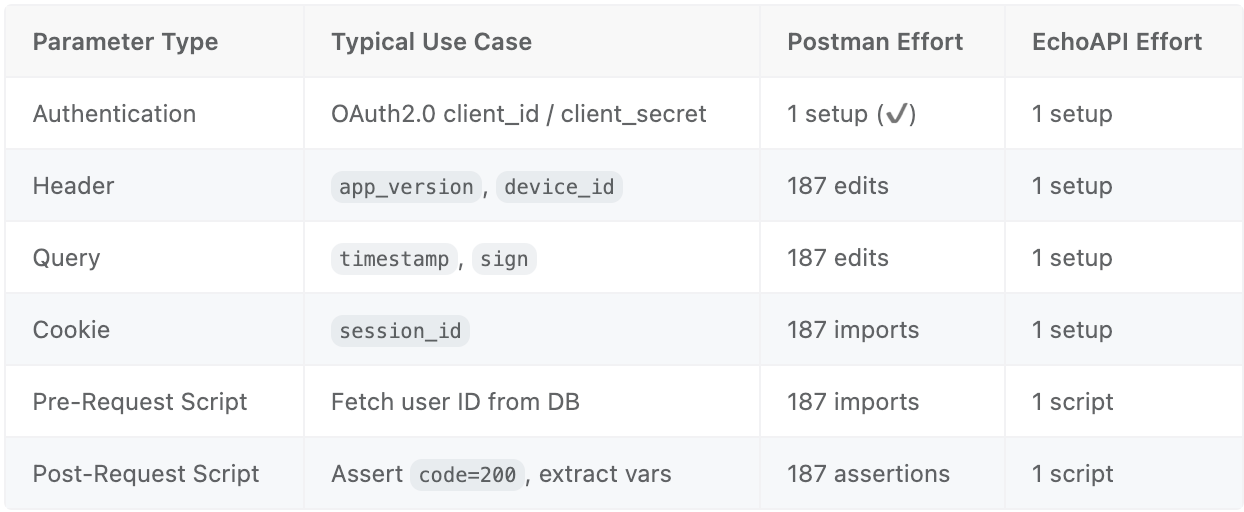
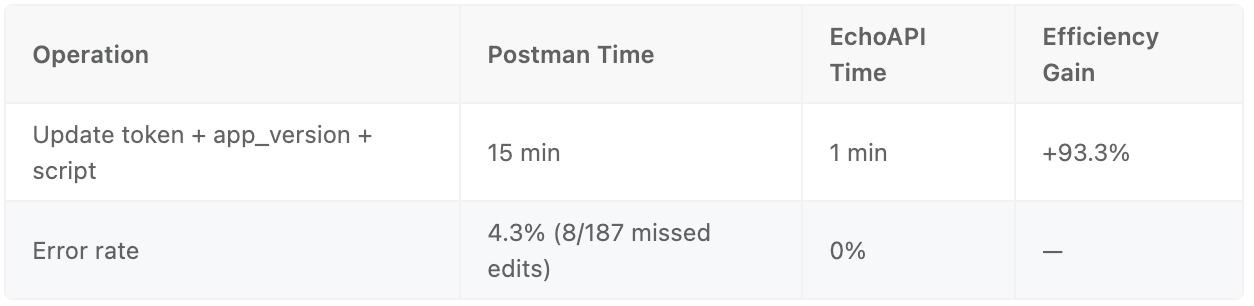
That 15-minute, error-prone update?
With EchoAPI, it took 5 minutes.
- Update JWT key in Global Auth → tokens refreshed everywhere.
- Add
app_version=2.0in Global Query → instantly applied to all APIs.
Done. Zero human error.
Smarter Variables: Dynamic Parameters That Actually Work
Postman supports variable substitution — but EchoAPI takes it further.
Example: create a global variable for signing requests dynamically:
// Global pre-request script: generate "sign"
const timestamp = new Date().getTime();
const appSecret = "xxx";
const sign = md5(timestamp + appSecret);
apt.globals.set("timestamp", timestamp);
apt.globals.set("sign", sign);
This script works globally across headers, queries, and cookies — turning static config into smart, auto-updating logic.
The result? A 98% boost in parameter maintenance efficiency.
2. Folder Parameters: The Feature Postman Forgot
EchoAPI Folder Parameters: One Setup, Automatic Inheritance
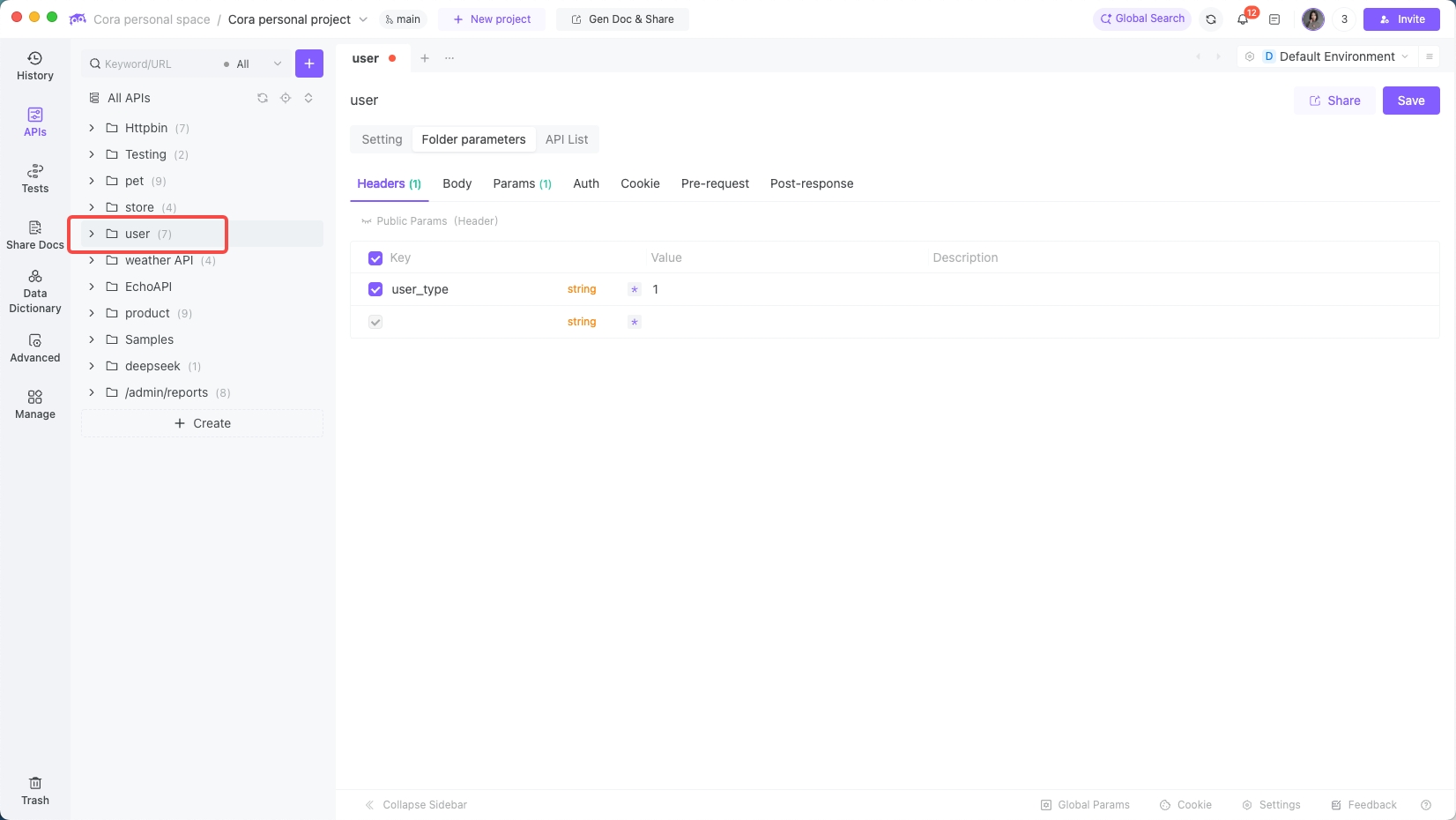
The Real-World Pain: When Modules Need Different Defaults
In a large e-commerce project, we had:
- 12 product endpoints needing
category_id=3(electronics) - 8 user endpoints needing
user_type=1(standard user) - Both depending on global
tokenandapp_version
In Postman, this meant:
- Add the same params manually to 20 endpoints, or
- Maintain multiple environments (a confusion minefield).
Postman simply can’t do hierarchical parameter management — no way to define shared settings per module or folder.
EchoAPI Folder Parameters: Hierarchy and Inheritance Done Right
EchoAPI introduces folder-level parameter domains that inherit intelligently:
- Child folders inherit from parent folders
- APIs inherit from folders
- Lower levels override higher levels
Priority:
API > Child Folder > Parent Folder > Global
Example setup:
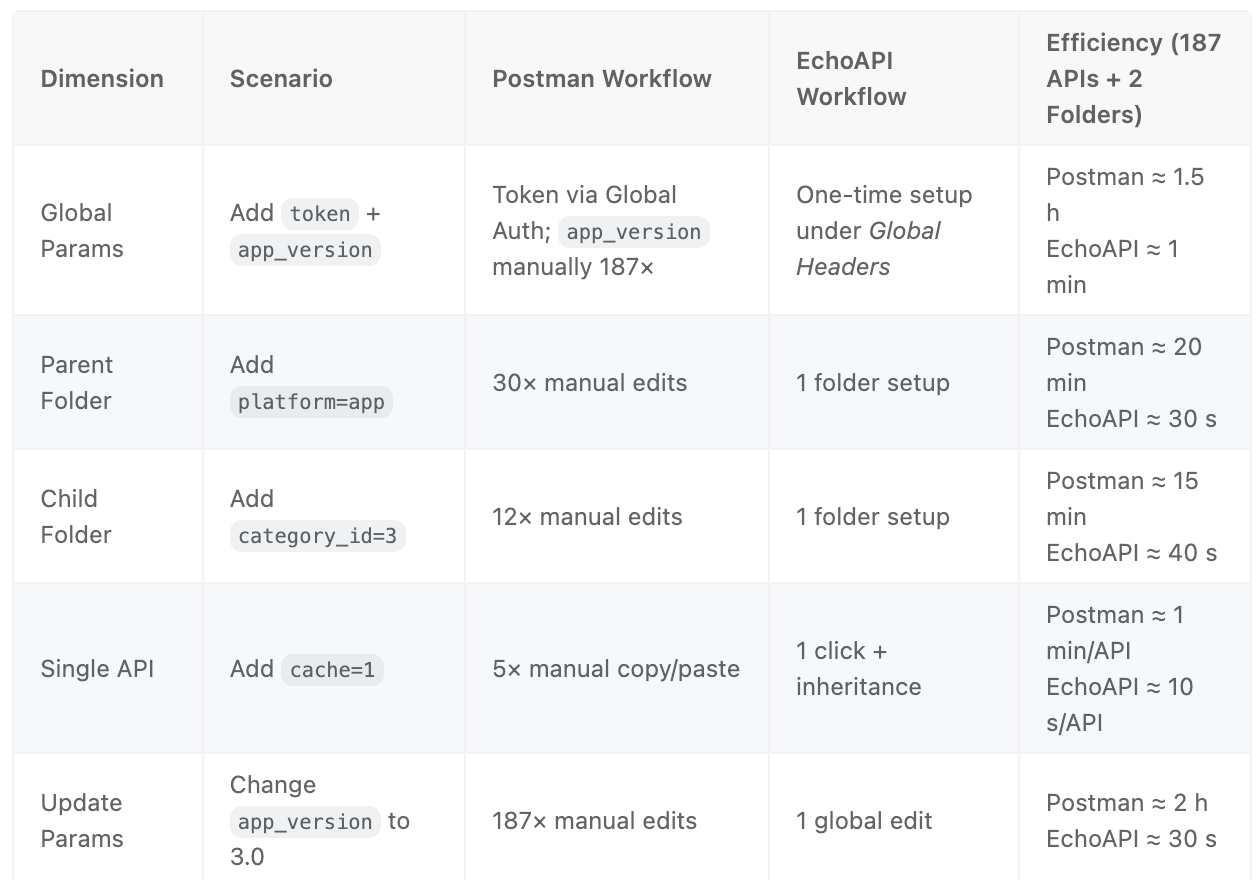
- Global: Add
token=xxx,app_version=2.0. - Parent Folder “E-Commerce”: Add
platform=app. - Child Folder “Products”: Add
category_id=3. - API “Product Detail”: Add
cache=1header.
Final resolved params:
- Header: token, app_version, cache
- Query: platform, category_id
Same thing in Postman? 5 manual edits per API.
Postman vs EchoAPI: Folder Parameter Comparison
Real-Life Wins: Multi-Module Project Management
Once you start using folder parameters, scaling projects suddenly gets easy.
- Payments: Add
pay_type=alipayonce — every endpoint inherits. - Logistics: Add
logistics_code=SF— edit one field, done. - Membership: Add a pre-request script to query membership level — applies to all endpoints.
Measured impact:
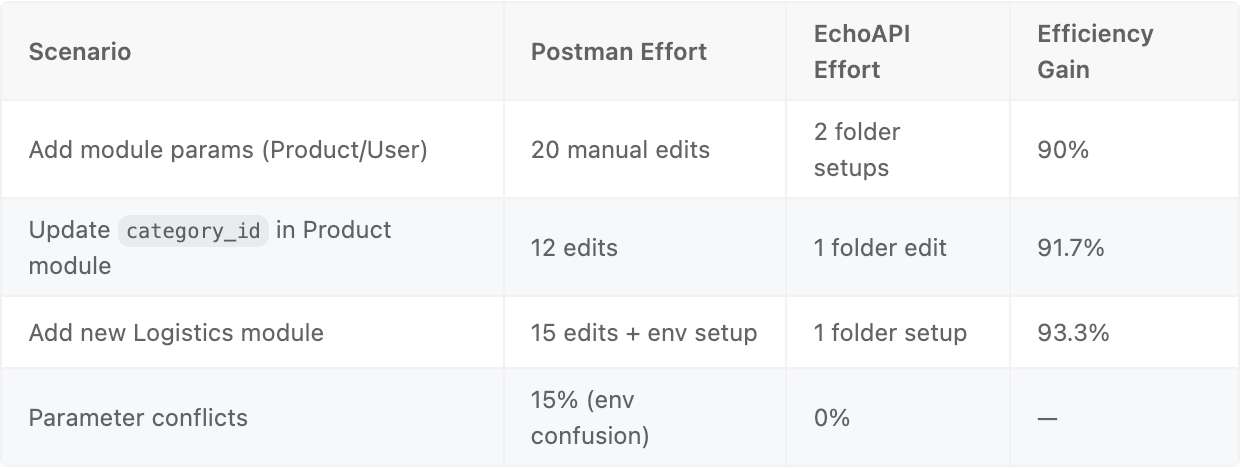
3. What This Tells Us About the Future of API Tools
Looking at Postman vs EchoAPI, the evolution is clear:
-
From single-feature → full-stack coverage
- Postman solves auth. EchoAPI solves everything.
-
From hard-coupled → fully decoupled
- Postman binds params to APIs; EchoAPI makes them reusable and hierarchical.
-
From manual tweaks → rule-based automation
- EchoAPI uses inheritance rules so humans stop repeating themselves.
For developers and testers, that means more than speed. It’s about finally being able to focus on logic, not logistics.
4. Practical Tips for Working with Global & Folder Parameters
-
Organize your parameters
- Global: Shared across all APIs (token, app_version, global asserts)
- Folder: Module-level (category_id, pay_type, scripts)
- API: Unique per endpoint (product_id, user_id, custom headers)
-
Use smart naming
- Follow
{scope}_{type}_{name}— e.g.global_header_token,goods_query_category_id
- Follow
-
Reuse scripts
- Save token fetchers, signature generators, DB queries as shared snippets and reference them globally or by folder.
-
Still using Postman?
- You can partially mimic EchoAPI’s setup with environment variables and scripts — but you won’t get inheritance or true hierarchy.
Final Thoughts
The real competition among API tools isn’t about shiny UIs — it’s about how deeply they solve developer pain.
Postman is still great for basic authentication, but modern multi-module projects demand more.
EchoAPI’s Global Parameters and Folder Parameters aren’t flashy — they’re surgical. They target exactly where Postman stops.
If you’ve ever thought:
“Postman handles my token, but not my app_version,”
or
“I’m tired of adding the same parameters to every module,”
then it’s time to try EchoAPI.
Because the first time you add a folder parameter that auto-applies to 10 APIs — and inherits global settings automatically — you’ll realize something:
A good tool doesn’t just make you faster. It changes how you work.
