How I Fixed a HUGE Problem With My First Web App
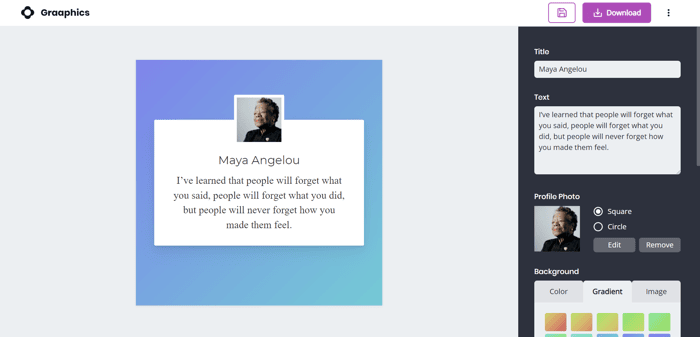
This is a bit of an overview of my journey making my first web app; graaphics.co.
If you're thinking about getting started with a SAAS, this should be insightful for you to avoid the mistakes that I made.
If you're a pro, I'd love to get your feedback!
Choosing an idea
I wanted to create something very focused that solved a very specific need.
Why? Because I wanted to build something where I'd learn as much as I could, without wasting time working on too many features.
I brainstormed a list of ideas and then I chose the idea that I thought would be:
- Easy enough to build,
- Still give me enough experience with the different parts of building a web app, and
- Not take me too long.
The idea for a social media post maker came from my need to create testimonial posts for my ecommerce brand (morada.eco). I had tried to find something on Canva and I didn't like the templates so I ended up creating a design from scratch.
So, when I needed an idea for this web app project, I thought it was perfect;
A simple editor for creating testimonial posts for social media.
I played around with some different designs before deciding on a template that gave enough room for customization, while still being simple.

Playing around with different design ideas.
On testing, I found that this same template was also great for different types of posts, so I reworded the concept to "social media posts", not just "testimonial posts".

The final design layout that I moved forward with.
Preparation
I created some simple wireframes to get an idea of UX for the editor, and also the rest of the UI for the other pages. I made sure I had a good idea of how the app would work with the wireframe before working with colors, graphics, and fonts.

Wireframing the UX.
The next thing I had to do was choose which languages and frameworks I was going to use.
I had plenty of previous experience with WordPress and therefore was very comfortable with HTML, CSS, JS, PHP, and MySQL, however, I didn't have a lot of experience working outside of that stack.
So, I Googled a fair bit and asked Reddit if I should use a boilerplate or build something from scratch.
There were some good arguments for using a boilerplate, but in the end, I decided that Firebase would give me a lot of the functionality I needed without too much work, and React seemed easy enough to use.
So I started with a fresh create-react-app and built up from there.

Playing around with color and layouts.
Coding
I worked on the editor first and found it wasn't too hard to use Material UI's components for the slider I needed, as well as the popup dialogs, and notification bar.

Using Material UI's popup "Dialog" and notification "Snackbar" at the bottom.
I copied in my SASS framework that I use when I normally build websites which comes with handy tools for responsive design, variable management, and "normalization" to make the website look the same across all devices/browsers.
Once I had a fairly complete editor working, I switched my attention to Firebase's authentication. I wanted to test the implementation of Facebook and Google log-ins but, with my limited experience, I had a hard time understanding the Google documentation and eventually decided it wasn't worth spending more time on.
I created an email sign-in only instead and created the Account page so that users could update their details.
I also used the Stripe extension for Firebase to integrate Stripe payments into the app. I'm using Stripe's dashboard for billing management so that I don't have to program any of that into the app.

Stripe makes it easy to handle billing with their built-in portal.
I then implemented the saving feature and added a page for users to find their saved designs. This was relatively easy as, for almost everything that the users edit on their social media post, it's all saved to a dictionary. This means that saving is as easy as saving that dictionary to the Firebase database.
I added in download limits for people who don't pay for the subscription, added in the CORS security rules and Firebase database security rules, created some animations for the home page using SVGator.com, and the app was done.
...
Well, the app was done "technically".
But there was a big problem...

Some simple animations for the home page made with SVGator.com
Optimization (Introducing NextJS...)
I then checked it on Google PageSpeed Insights.
The app felt quick, and well, it was... But that was because it was a SPA and once it had been loaded, it was snappy between page transitions with caching enabled.
Nonetheless, the real initial load time was slow. >10s Time-to-Interactive (TTI) slow.
E.g. very bad.

This is was the result from Google PageSpeed Insights when I ran it the first time. 😲
I loved working with React because it was so easy to start making things and deploying them to Firebase but, even when I removed all the unnecessary JavaScript libraries that I could, I was still only getting a Google PageSpeed score of around 45.
Also, when I ran it through checkbot.io to see how my SEO score was, it didn't crawl all of the pages because React was doing client-side rendering and not loading the links for the bot to crawl through as soon as the page loaded.
So, I decided I needed server-side rendering. Which led me to NextJS.
Which led me to find out that I could actually do something even better than server-side rendering.
🥁 Drum roll... NextJS Static HTML Export.
I found that I could quickly export all of my React pages as ready-to-open HTML pages that only included what was actually needed on each page.
This was great for loading times and perfect for SEO because the whole page was ready to be crawled as soon as it was loaded from the server.
As soon as I moved to NextJS static pages, my mobile speed score instantly got a boost to about 60-70.
So then I needed to figure out how to get it to 90+.
Well, very conveniently, when you export your React pages as static NextJS HTML pages, you can see exactly how much each page weighs with the included JavaScript libraries.
Up until this point, I'd been pretty relaxed about what I was importing into each page so I was loading far too much JavaScript into each page.

I was loading a lot of code where it wasn't needed.
The biggest problem I had was my use of React Contexts.
Because there were some things that I needed on several pages, I used a Context at the top level in order to conveniently pass them down to lower level pages.
This was very clean (I wanted to keep things DRY, right?), but it also meant that my initial load time for anyone visiting any page would instantly load a lot of JavaScript that they probably wouldn't end up needing.
A great example of this was the Firebase database. I used this in many places in the app but, by loading it at startup, it increased the download size by over 30kb for ALL pages.
Instead, I changed every place where I was loading the database so that it loaded the library dynamically only when it was needed.
I also introduced dynamic loading in as many other places as I could. E.g. I only loaded the content for the popup Dialogs when they were opened.
I eventually got up to over 85 on the Google Page Speed score for mobile and eventually found that the biggest problem I was having was Firebase's Authentication library. Unfortunately, I couldn't load this dynamically so I dug into the problem and found that I could disable it from loading scripts related to third-party authentication methods. Bingo!

Down from 292kb, 67.8kb was a much lighter NextJS "chunk" for users to load.
With that change, I was now loading the page within 2s and scoring a consistent mobile score over 90+.

Much better!
Conclusion
Overall, I've been really impressed with React, NextJS, Firebase and Stripe, and I'll definitely continue to use this stack. With this being my first jump into making a web app like this, I'd love to know what you'd have done differently or, if you have any questions, I'd be happy to provide further info.
Thanks for reading,
Stu
graaphics.co
