How I shrunk bulk PDF exports from 250MB+ to 12MB (without losing logo resolution)

Hey Indie Hackers,
I wanted to share a browser-side performance optimization that saved my app's user experience (and kept our server costs at $0).
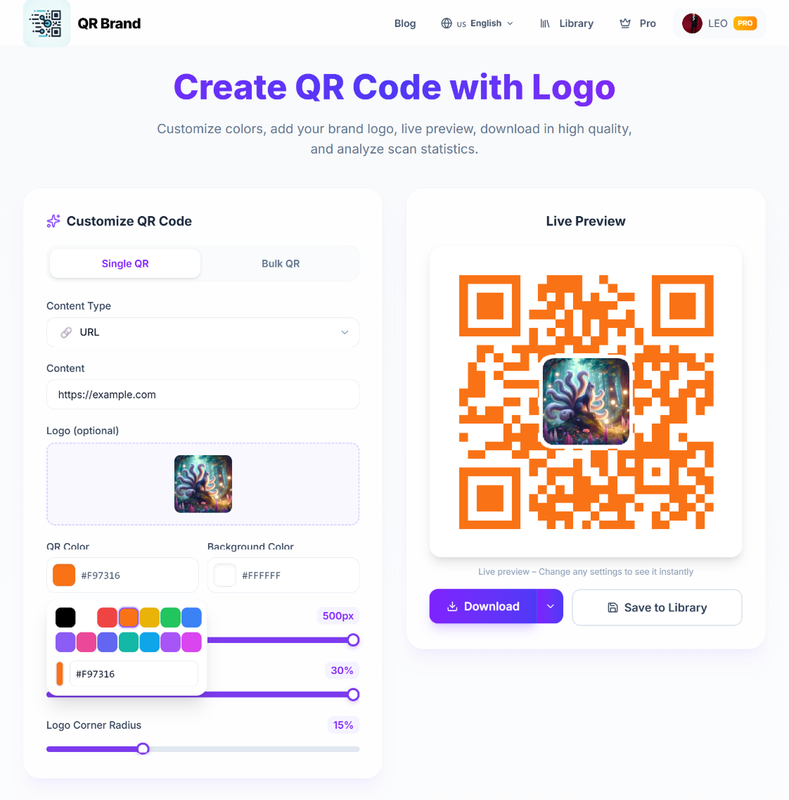
We’ve been building a feature that allows users to generate and export 300+ branded QR codes (with custom logos in the center) in a single grid PDF document for high-quality physical printing.
Here is the technical challenge I ran into, and exactly how we solved it.
The Problem: Memory Bloat & Blur
Initially, to keep the PDF generation fast, I generated the QR codes at 300x300px. But because the brand logo in the center only occupies about 15% of the QR area, it shrunk to a tiny 45x45px. When printed, the logos were blurry and pixelated. Unacceptable for high-res brand assets.
So, I bumped the QR resolution to 800x800px. The logos looked crisp, but the generated PDF size ballooned to over 250MB!
It took forever to compile in the browser, and it repeatedly crashed mobile Safari/Chrome due to memory limits during canvas renders.
The Solution:
- JPEG Conversion & Lossy Compression: Instead of rendering raw PNGs into the PDF canvas, we used
jsPDF's built-in compression. We converted the canvas outputs into optimized JPEGs with a compression ratio of0.75. This reduced the size of each QR code drastically while keeping the vector-like look of the black-and-white grids. - Immediate Garbage Collection: The biggest culprit was holding all 300 high-res image buffers in memory simultaneously before rendering. We refactored the loop to generate, paint onto the jsPDF canvas, and immediately garbage-collect the image data URI/buffer before moving to the next QR code.
- Resolution Sweet Spot: After multiple physical test prints, we confirmed that 800px was indeed the optimal point. It keeps the center logo at 120x120px (sharp enough to print small details) while jsPDF compression handles the weight.
The Result: The final PDF export dropped from 250MB+ to just 12MB. The download is almost instant, and it no longer crashes mobile browsers.
We are launching today (And a gift for the IH community!)
We officially launched the product — qrbrand.cc — on Product Hunt today.
Instead of just asking for upvotes, we actually want you to stress-test this bulk export feature and give us your raw, honest feedback.
To let you test everything fully (including high-res SVG/PDF exports and detailed analytics), we are giving everyone here 7 days of Pro for free (no credit card required).
How to claim it:
- Sign up for a free account at qrbrand.cc.
- Go to the Pricing page (https://www.qrbrand.cc/pricing).
- You will see a banner at the bottom: "Get 7 Days of Pro for Free!".
- Simply click to share the project on Twitter or Facebook, and your account will be instantly upgraded to Pro.
Once upgraded, go to the "Bulk QR" tab on the homepage, generate a batch of QR codes with your own logo, and export them as a PDF.
I’d love to know:
- How did your device handle the bulk PDF generation?
- Did the logos in the printed PDF look sharp enough?
- Any UI/UX frictions you noticed?
And if you find the tool useful, you can check out our launch and show us some support on Product Hunt here!
Let me know what you think in the comments! 🤘
