How I Turn Static Images Into Social-Ready Videos Without Opening Three Tools
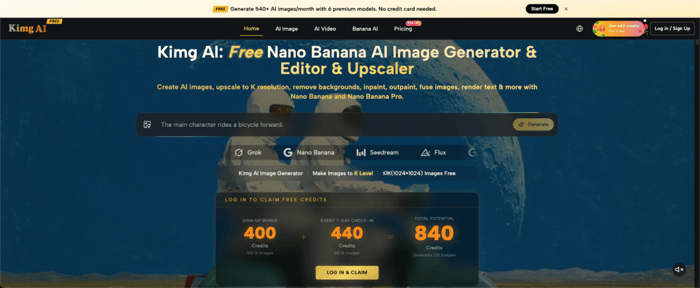
I used to bounce between an image generator, a background remover, and a video animator just to post one Reels clip. Somewhere along the way I found Nano Banana AI, the image model built into Kimg AI, and that three-app routine finally collapsed into one tab.
I. Get A Finished Clip From A Single Photo
The first thing that changed for me wasn't the image quality — it was how few clicks it took to get from a raw phone photo to something I'd actually post that same afternoon.
Upload once, edit everything
I drop one photo into Kimg AI and can style-transfer it, remove the background, or fix uneven lighting without ever re-uploading between steps. Everything happens inside the same project canvas, so I never lose track of which version is the latest.
Animate without leaving the tab
Once the still image looks right, the same project lets me push it straight into video generation instead of exporting a file and re-importing it somewhere else. That single continuity is what actually saves the time, not any one feature on its own.
Skip the file-juggling
No downloading a PNG, re-uploading it to a separate video tool, then exporting again for captions. Everything stays inside one project window, which means fewer duplicate files cluttering my desktop and fewer chances to grab the wrong version by mistake.
II. My Actual Workflow, Step By Step
This is the exact sequence I follow when a client needs a quick social clip built from a single product photo and no shoot budget.
Start with a prompt or a reference photo
I either write a text prompt describing the scene I want or upload a source image the client already has, then choose which model handles the transformation from there.
Pick the model for the job
For photorealistic edits I reach for Nano Banana; for faster rough drafts I switch to Seedream, and for precise object swaps I use Flux — all selectable from the same model menu without switching sites.
Animate the final still
Once I'm happy with the image, I move it into the video step, where motion and sound get layered onto the exact frame I just built, keeping the subject and composition consistent from image to clip.
III. Understanding The Nano Banana Family
People often ask me what actually separates Nano Banana, and Nano Banana Pro — here's the short version I give clients who just want a straight answer.
Nano Banana: the reliable base model
It handles style transfer and character consistency well for everyday work, and it supports up to four reference images, which is usually enough to keep a subject looking the same across a short set of shots.
Nano Banana Pro: the detail specialist
I reach for this one when a client needs sharper textures, cleaner text rendering inside the image itself, or tighter prompt accuracy for a hero shot that's going straight into an ad.
Nano Banana 2: the flexible middle ground
It sits between the two in practical terms, offering batch generation and more resolution control when I need several variations fast before picking a final direction with the client.
IV. Resolution And Credits I Actually Use
Nobody wants to talk pricing tiers all day, but knowing upfront what's free versus what needs an upgrade saves a lot of back-and-forth guesswork mid-project.
1K generations are free
Every account can generate at 1K resolution without paying anything, and honestly that covers most quick social posts and draft concepts I send for early feedback.
2K and 4K need membership
Higher-resolution output is gated behind a paid plan, which makes sense once you're producing print-quality assets or ad creative that needs to hold up zoomed in.
Sign-up and streak bonuses stretch your credits
New accounts get a 400-credit sign-up bonus, and signing in for seven straight days adds another 440 credits on top of that — together that's enough to test premium models across a couple hundred generations before spending a single dollar.
V. Switching Models Without Switching Sites
The part I didn't expect to value this much is not having to remember five different logins for five different image models scattered across five different companies.
One dashboard, several engines
Nano Banana, Seedream, Flux, GPT Image 2, and Grok Imagine all sit in the same interface, so comparing outputs side by side takes seconds instead of opening five browser tabs.
Easier to A/B test copy and visuals together
Since I write the marketing copy for the same campaigns I'm generating images for, producing three visual variations in one sitting speeds up the whole client review cycle considerably.
Less context-switching, fewer mistakes
Every time I used to move files between separate apps, something got mislabeled, overwritten, or exported at the wrong resolution — that risk mostly disappeared once everything lived inside one continuous project.
VI. Where This Actually Helps My Work
Beyond raw convenience, this workflow changed the type of content I'm now able to say yes to on short deadlines without panicking.
Client mockups without a photoshoot
I can generate product visuals in several different settings for a pitch deck the same afternoon a brief comes in, instead of scheduling a shoot and waiting days.
Consistent characters for recurring campaigns
Reference-image support means a brand mascot or spokesperson model can appear the same way across a whole month of content instead of drifting slightly each time.
Faster turnaround on short-form video
Turning a still into a short animated clip inside the same session cuts a task that used to eat an entire afternoon down to well under an hour, start to finish.
VII. What I'd Tell Someone Starting Today
If you're still treating image generation, editing, and video animation as three separate jobs, you're paying for that friction in time you don't get back — time that could go toward actually refining the message instead of managing files. Try building one asset from prompt to finished clip in a single sitting before your next deadline. You'll notice pretty quickly how much of your old workflow was just moving files around, not actually creating anything new, and that realization alone is worth the switch.
