How Indie Founders Can Reduce Support Load Across Devices and Languages
Support debt often arrives before a founder has the budget—or the desire—to build a support team. At first, answering users personally feels efficient. A few emails here, a couple of community questions there, and everything is still manageable.
Then the product starts reaching people on different operating systems and in different language markets. Suddenly, the same handful of questions keeps coming back: Where is the desktop version? Why does the mobile interface look different? Is this the right page? How do I change the language? Can I use the same account on my phone and laptop?
None of those questions is especially difficult. The problem is repetition. If a founder spends five or ten minutes answering the same issue every few days, the real bottleneck is often not support capacity. It is missing or unclear documentation.
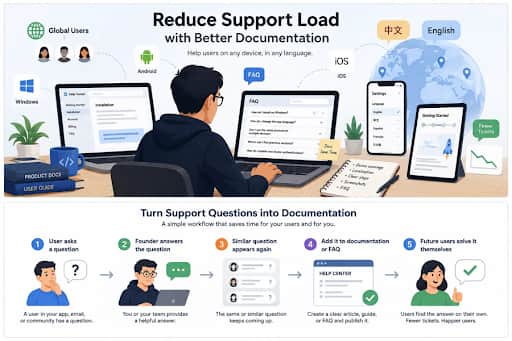
Better documentation turns recurring support questions into self-service answers.
Document the User’s Actual Environment
Cross-platform products create a predictable support problem: users assume instructions for one device apply everywhere. They rarely do. A Windows app may use a traditional installer, Android may rely on an app store, and iOS may present privacy permissions differently again. Desktop menus can also diverge from mobile interfaces.
A generic instruction such as “download the app and sign in” is easy to write, but it pushes uncertainty back onto the user. A better help center acknowledges the environment directly and gives users a path for Windows, macOS, Android, iOS, or the browser when those paths differ.
Telegram is a useful example because it is available across several device types. Someone comparing those options might consult a Telegram cross-platform setup guide to understand the differences between client choices and basic setup paths. The broader product lesson is more important than the example: document the environment your user actually sees, not the one you happen to use every day.
A practical documentation structure might separate:
Windows and macOS installation
Android and iOS setup
Browser or web access
Account and session management
Platform-specific permissions or limitations
Treat Localization as a Support Problem, Not Just a Translation Task
Localization is often treated as a UI project: translate the buttons, menus, and onboarding screens, then move on. That is only half the job. Users also need to understand help articles, privacy terms, error messages, security settings, notifications, billing instructions, and troubleshooting steps.
A localized interface paired with English-only documentation can still produce a frustrating support experience. It is especially noticeable when a product has international users who can navigate the main interface but struggle with technical terms once something goes wrong.
Global communication products make the gap easy to see. Chinese-speaking users, for example, may need a Telegram Chinese language guide to understand localized terminology, interface options, and common settings. Indie founders should apply the same principle to their own support systems: if a language market matters enough to localize the product, it usually matters enough to localize the highest-friction help content too.
A useful test is simple: can a user move from installation to onboarding to troubleshooting without switching languages halfway through the journey?
Turn Repeated Questions Into Product Documentation
Support conversations are one of the cheapest forms of product research. When the same question appears repeatedly, it is usually telling you that the product, onboarding, or documentation is unclear.
A practical rule of thumb is: if a question appears three times, stop treating it as a one-off. Decide whether the answer belongs in onboarding, an FAQ, a help article, or the product itself.
If users keep asking where downloaded files are stored, document it. If they repeatedly ask whether mobile and desktop sessions synchronize, explain it before they need to ask. If a privacy setting keeps confusing people, rewrite the explanation or add a screenshot.
Support question → clear answer → documentation update → fewer repeated tickets
Use Screenshots as Evidence, Not as the Instructions
Screenshots can reduce ambiguity, but they also create maintenance work. A small UI update can make dozens of help pages look stale, especially when a product supports several operating systems or languages.
The safest pattern is to make the text understandable on its own, then use the screenshot to confirm what the user should see. “Open Settings, choose Privacy, then select the visibility option you want” survives minor interface changes better than “click the blue button shown below.”
This also makes localization easier because the documentation does not depend on every screenshot matching every language and device combination.
Keep Canonical Knowledge Outside Community Chat
Slack, Discord, Telegram, and other community tools are useful for unusual questions, feedback, and relationship-building. They are poor places to store answers that every new user may eventually need.
Chat is chronological. Good documentation is canonical. If an answer matters beyond the person who asked it, move it out of the conversation and into a page that can be searched, linked, updated, and reused.
A simple workflow is:
Answer the question in the community.
Turn the useful answer into a help article or FAQ.
Link future users to that canonical page instead of rewriting the answer.
That small habit reduces moderator fatigue and keeps important knowledge from disappearing into old threads.
Prioritize Documentation by Support Cost
Not every question deserves the same amount of documentation work. Track both how often an issue appears and how much time it costs to resolve. That helps a small team focus on the pages most likely to reduce support load.
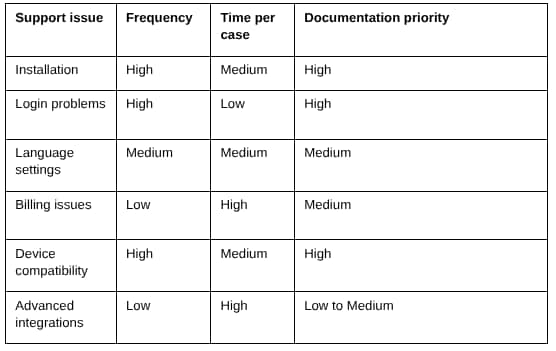
This is intentionally simple. The goal is not to build a support analytics system; it is to stop spending hours polishing rare edge cases while high-frequency setup questions remain undocumented.
Write for Beginners, Not for the Team That Built the Product
Founders and developers know their products too well. Familiarity removes steps from their mental model, which is exactly why internal documentation often feels incomplete to a new user.
“Authenticate your account and enable synchronization” may be perfectly clear to the team. A first-time user may need five explicit steps: open the app, enter account details, confirm the verification message, open Settings, and check that synchronization is enabled.
The difference is not intelligence; it is context. Good documentation assumes the user understands the outcome they want but does not yet know the product’s vocabulary or hidden assumptions.
Create One Canonical Answer for Each Common Problem
Another common support failure is answering the same question in five places: a blog post, an FAQ, an onboarding email, a community reply, and a product page. Over time, those versions drift apart.
Choose one canonical help page for each recurring issue. Let emails, product prompts, and community replies point back to it. When the process changes, update one page rather than chasing several copies of the same instructions.
Review Support Logs Before Adding More Support Tools
Documentation should evolve with the product. A short monthly review of support conversations is usually enough to reveal new gaps: which questions are increasing, which help pages still confuse people, which device creates the most setup friction, and whether international users are encountering problems the core team never sees.
Before paying for another helpdesk tool or adding another support channel, fix the recurring questions you already understand. Software can organize support work, but it cannot compensate for missing answers.
A Practical Documentation Checklist for Indie Founders
Cover the main operating systems your users actually rely on.
Separate installation and onboarding instructions when device paths differ.
Define terminology that is obvious to the team but unfamiliar to beginners.
Localize high-friction help content for important language markets.
Turn recurring support questions into permanent, searchable answers.
Use screenshots to support instructions, not replace them.
Keep canonical product knowledge outside private community chat.
Link to one current help page instead of maintaining duplicate answers.
Review support logs regularly for new documentation gaps.
Good documentation does more than reduce ticket volume. It makes a small product feel more deliberate, shortens onboarding, and gives founders back time that would otherwise be spent repeating answers.
For an indie team, that recovered time is often more valuable than adding another support tool. The goal is not to eliminate every question. It is to make sure the predictable ones no longer require the founder to answer them personally.

