How LT Browser can improve Mobile Web Dev Experience?
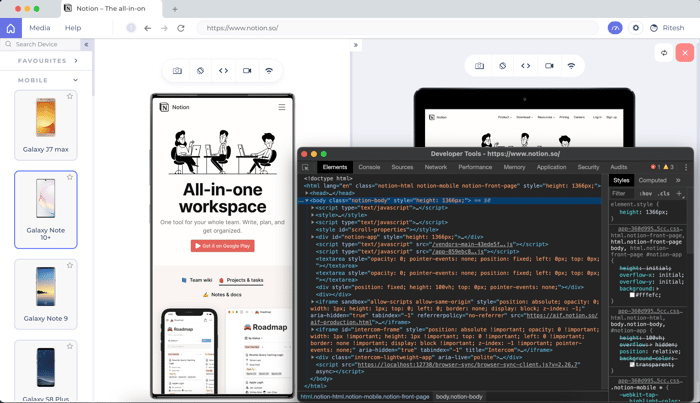
LT Browser is an intuitive mobile web development tool with 45+ pre-built device viewports. A developer-friendly browser enables you to,
- Quickly debug and validate the design using the built-in dev tool.
- Test Locally Hosted Website by just inserting the URL
- Experience user touch screen behavior by enabling touch mode.
- Analyze how the website behaves on different network conditions at a click.
Using LT Browser you can streamline the UI UX development, test content placement and alignments, assess visually heavy websites on different screen resolutions, and generate performance reports of your websites.
Download now to experience seamless mobile web development - https://www.lambdatest.com/lt-browser

My pet peeve with mobile web development is differences between the rendering engines.
I love that LT browser helps testing with different resolutions and network speeds but I can already do that with Chrome DevTools.
Now, having to test my web app with an actual iPhone to find out Safari is behaving differently than every other browser on this one CSS rule is really painful. Can LT browser help me with that ?
For cross-browser testing on different device resolutions, that's exactly what our platform LambdaTest is for. You can test on an iPhone or an android phone resolution across 2000+ browsers. You can try that, sign-up on the platform, and spin up the test with ease. It's Free! https://www.lambdatest.com/
Agreed we have chrome dev tools, but LT Browser helps web designers and developers perform responsive testing faster and offers an easier way to do it. Offering side by side viewports for easy comparison, one-click integrations to share with the team, or hot reloading. The ultimate goal of LT Browser is to speed up the development and testing process and enhance the experience.
Have you heard of responsively.app?
Yes! However, doesn't give you the feature to run a performance test report or integrations to share bugs/errors with the team. Furthermore, with LT Browser you can also access the LambdaTest platform - a cross-browser testing infrastructure.
Ah, I see. Thanks for sharing this cool resource!
This comment was deleted 6 years ago