How to build a hero section that actually gets you a chance
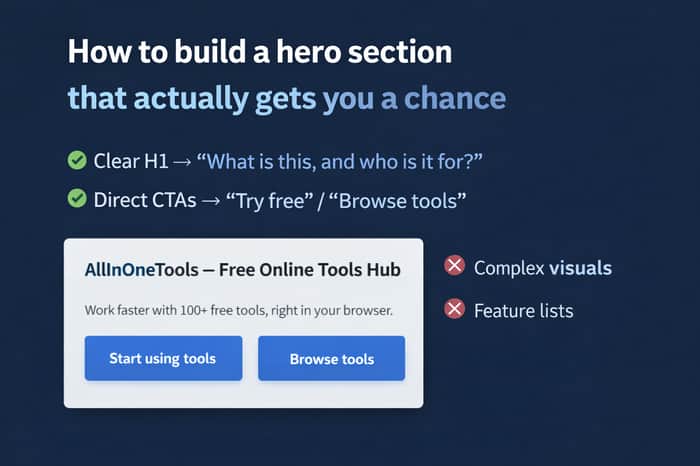
After I shared why the hero section decides whether your website even gets a chance, a few people asked the obvious follow-up:
“Okay… so what should a good hero section actually include?”
I’ve been thinking about this while building AllInOneTools, and the answer I’ve landed on is simple:
The details change by product, but the job of the hero never does.
The real job of a hero section
A hero section is not:
- a feature dump
- a branding exercise
- a place to explain everything
It is:
- a fast decision point
- a trust filter
- a shortcut to action
If users hesitate here, they leave.
If they understand and feel safe, they continue.
The minimum hero structure that actually works
Across tools, SaaS, ecommerce, and courses, a strong hero usually needs just:
- One clear H1
- A short supporting description
- 2–3 core benefits
- 1–2 obvious CTA buttons
- Optional visual (used carefully)
Anything beyond this often slows people down.
1. The H1 (the most important line)
Your H1 should answer this instantly:
“What is this, and who is it for?”
Clarity beats cleverness every time.
Examples:
- AllInOneTools — Free online tools for everyday tasks
- Seeto — AI website & market analysis for faster decisions
If users have to interpret it, you’ve already lost time.
2. The hero description (keep it short)
This supports the H1 and explains why it exists.
Rules I follow:
- 2–3 short lines
- Outcome-focused, not feature-heavy
- Easy to skim
If someone has to slow down to read it, it’s too long.
3. Core benefits (not a feature list)
Instead of listing everything, highlight decision accelerators:
- No signup required
- Works instantly in the browser
- Free and privacy-friendly
These remove doubt. They don’t sell — they reassure.
4. CTAs: direct > clever
CTAs should move users closer to action, not explanation.
- Tools: “Browse tools”, “Start using”
- SaaS: “Try free”, “See how it works”
- Ecommerce: “Shop now”
- Courses: “Start learning”
If your CTA says “Learn more,” you’re usually delaying the moment that matters.
5. Images: useful or harmful
Images can help — or completely hurt.
Good:
- Simple UI preview
- Lightweight visuals
- Fast-loading assets
Bad:
- Heavy sliders
- Autoplay videos
- Large, unoptimized images
For tools especially: speed > beauty.
A fast hero builds trust faster than a pretty one.
What this does (for everyone)
For users
- Immediate clarity
- Less thinking
- Faster task completion
For builders
- Lower bounce rates
- Clear positioning
- Fewer explanations needed later
For search engines
- Clear structure
- Strong topical signals
- Better engagement
SEO doesn’t need a fancy hero.
It needs a clear one.
The final rule I follow now
Before shipping a hero section, I ask:
- Can someone understand this in 3–5 seconds?
- Can they start immediately?
- Does this feel like a tool — not a pitch?
If the hero answers those, it’s doing its job.
Everything else is optional.
Curious how others approach this:
When you design a hero section, do you optimize it for
branding, explanation, or instant action?
Would love to hear how others think about it.

Local Python scripts have a structural advantage in the current market: they're immune to the SaaS subscription backlash. No recurring costs, no vendor risk, no data concerns.
The positioning challenge is that 'script' sounds less polished than 'platform.' Worth double-down on the positioning: 'the tool you own, not the subscription you rent.'
Good point. The subscription fatigue is real — that’s exactly why I focus on tools people can just open, use, and leave.
Strong post. One thing that’s helped me is treating the hero like a pre-onboarding flow: it has to answer (1) who it’s for, (2) what outcome they’ll get, and (3) what the first action is.
A couple concrete tweaks I’ve seen move the needle:
Litmus test I use: if a user can’t predict what the next screen looks like after clicking the CTA, it’s usually too abstract.
Curious: do you A/B these changes, or do you mostly ship → watch scroll/exit data → iterate?
This framing really resonates — especially the “pre-onboarding flow” idea. That’s exactly how it feels in practice.
I love the time-to-value promise point. I’ve noticed users relax instantly when they know how fast they’ll get something done, not just what the tool does.
So far I’ve mostly been in the ship → watch sessions / scrolls → iterate loop rather than formal A/B tests. For small tools, even tiny wording or CTA changes show up quickly in behavior.
The litmus test you shared is gold too — “can the user predict the next screen?”
That’s a great gut-check I’m going to steal 😄
My current bias is toward instant action first.
Branding and explanation still matter — but only after the user feels they can start without friction.
If the hero doesn’t give that “I can just use this” feeling in a few seconds, everything else becomes irrelevant.