How to Build Team Collaboration Software For Enterprise
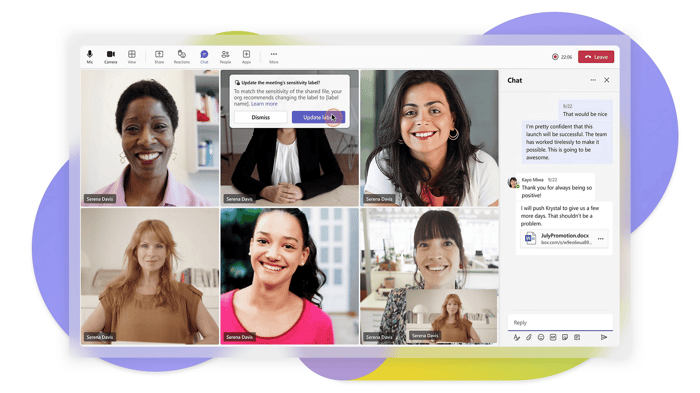
When using team collaboration software, every enterprise hits the same wall: too many tools, scattered conversations and zero control over their data.
So, it makes sense that more businesses are building in-house team collaboration software to fit their workflows instead of fusing five different apps that never were meant to work together.
This guide explains why enterprises make that shift and how to build collaboration software from scratch.
Why Teams Choose Custom Team Collaboration Software?
Off-the-shelf online collaboration tools are fine until your enterprise outgrows its boundaries, where customization, security and ownership become non-negotiable.
So, platforms like MirrorFly Teams, Apphitect and Troop Messenger have shown what can happen when businesses build their own, custom team collaboration software instead of sticking with SaaS defaults.
Here, teams get a self-hosted team collaboration tool with full source code access and 1000+ messaging, voice and video features to customize based on your security and compliance needs.
Now enterprises don’t need another chat app. They want secure team collaboration software that works the way their teams do and not what a vendor expects them to do.
How to Build Team Collaboration Software?
Building team collaboration software is not about writing code first. It’s all about understanding your team’s communication gaps before you pick a tech stack.
It starts with identifying the problems, jotting down the required features, then selecting a build approach and finally scaling the platform as your organization grows.
Step 1: Identify Your Core Problem
Be honest about what is broken before you build anything. Is your team communication scattered across five apps? Poor visibility on project status? Security concerns? And more?
Every strong enterprise IM Software project starts with a technical problem and not a feature wishlist. You need to map your bottlenecks like message delivery latency, poor uptime SLAs or lack of audit logging, as these will affect your architecture decisions later on.
Step 2: Define the Features You Need
Once you identify the problems, map out the features and technical requirements that can solve them. The core features of team collaboration software are broken down into various backend services:
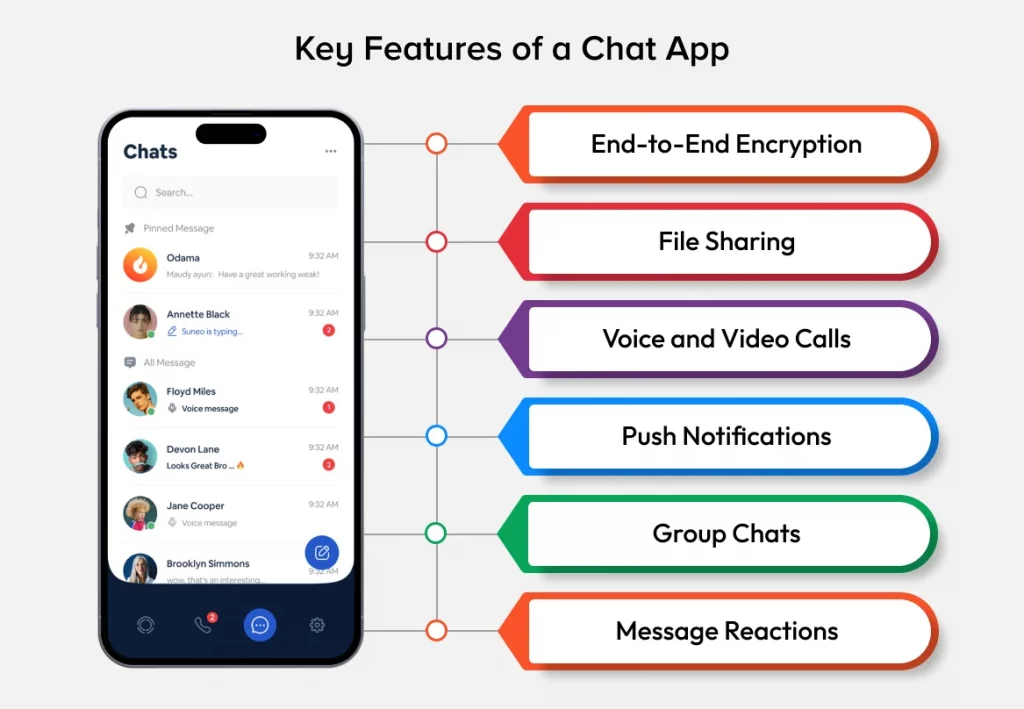
- One-to-one and group messaging require a persistent connection layer (WebSocket) and a message queue or guaranteed delivery.
- Voice & video calling requires WebRTC with STUN/TURN servers for NAT traversal and an SFU for group calls.
- File sharing with version control requires a S3-compatible object storage separate from your main message database.
- Admin dashboard requires role-based access control (RBAC) at the API gateway level instead of just the UI.
- Full-text search across messages and files requires a dedicated search index like Elasticsearch instead of directly querying your primary database.
- Integrations with CRM, HRMS or project trackers via REST or webhook-based APIs.
You need to resist the urge to build every microservice at once. So, start with the core messaging and calling infrastructure and slowly add other features as your collaboration tool development matures.
Step 3: Choose Your Building Approach
Here is where most enterprises make their first big architecture decision: either build the whole real-time stack from scratch or use an existing chat API/SDK as the base layer.
Building from scratch means building your own signaling server, SFU or MCU media infrastructure, hosting TURN relays and managing WebSocket connection pools. All of this takes a lot of time before you can write a single collaboration feature and not an ideal choice.
By using a chat API/SDK, you can abstract this entire layer away. Instead of handling signaling, ICE candidate exchange, media routing and connection state management, the provider provides clean APIs for chat, presence and calls.
Here is how you integrate a chat API by yourself: https://www.mirrorfly.com/blog/how-to-build-an-instant-messaging-app/
Step 4: Plan Your Tech Stack for Real-Time Collaboration
Now that you know which approach to take, the online team collaboration software architecture needs to support real-time messaging, voice and video with no lag or connection drops.

- Technically speaking, a good tech stack for collaboration software would be something like this:
- Frontend - Using WebSocket clients and browser-native WebRTC APIs for media capture on React or Angular.
- Messaging Transport - For bidirectional, low-latency message delivery use WebSocket and for enterprise presence and message federation use XMPP.
- Voice/Video - WebRTC for media transport, STUN for natural discovery and TURN as a relay fallback if direct peer connections fail.
- Media Server - Use SFU (Selective Forwarding Unit) for group calls and forwarding individual streams without server-side mixing for low compute overhead.
- Backend - Use Node.js or Go for the signaling server and API layer that have non-blocking I/O models to support concurrent connections.
- Message Queue - If you need to scale beyond a single server instance, use Redis Pub/Sub or Kafka for message distribution and delivery guarantees.
- Database - For relational users, roles and permissions, use PostgreSQL and for unstructured message history and metadata, use MongoDB.
- Security - TLS 1.3 for transport encryption, AES-256 or the Signal Protocol for end-to-end message encryption and OAuth 2.0/JWT for session authentication.
Getting this stack avoids painful rewrites later when your cloud-based collaboration software development needs to scale horizontally across regions or data centers.
Step 5: Build and Launch Your Platform
With the stack done, development starts on the core services. Ideally, the messaging microservice, the signaling server/media routing logic and the admin API layer are containerized and deployed separately per load and not as a single monolithic application.
Test it across all browsers and devices, as WebRTC implementation quirks in Safari and older mobile browsers can cause connection failures that won't show up in a single-browser test environment.
Try out a pilot run with a smaller team first to uncover latency issues, message delivery failures or permission misconfigurations before going full company-wide rollout.
Step 6: Scale, Integrate, and Iterate
Launching is only the beginning. Your infrastructure needs load balancing across signaling servers, horizontal scaling for your message queue, and monitoring for TURN relay bandwidth consumption.
These are the most unpredictable costs as concurrent call volume increases. At this stage, teams also containerize services in Docker and orchestrate scaling with Kubernetes.
Adding layers of caching to reduce database load on frequently accessed threads and AI-powered replies or meeting transcription.
Enterprises that view their project collaboration software as a system with continuous monitoring and improvement provide long-term reliability more than those that just launch.
Final Verdict
Building team collaboration software for your enterprise isn’t just about technical expertise; it's a decision about the protocols, infrastructure, and data ownership model your organisation will rely on for years.
Whether you build from scratch or use a chat API/SDK, the goal is the same. Create collaboration software that fits your team’s data flow and security needs.
So, start with the technical problem, define features at the protocol level, choose the right build approach and treat the platform's infrastructure as something that grows with your enterprise.
