How to Cut Onboarding Time by 40% with Devlok
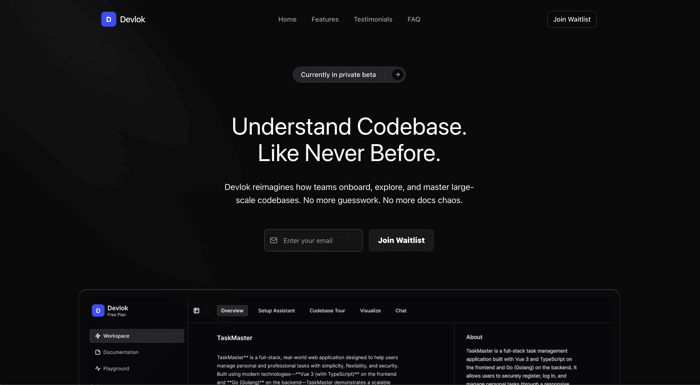
I’ll never forget my first week at a sprawling, legacy codebase. I was buried under outdated READMEs, juggling half a dozen setup scripts, and firing off frantic Slack messages just to get my development environment working. By the time I managed to run a hello-world endpoint, I’d already spent more hours wrestling with dependencies and configurations than actually writing features.
If that rings a bell, you’re in good company. At scale, this drag becomes a silent killer of velocity. And the good news? It doesn’t have to be this way.
Devlok is built to change that.
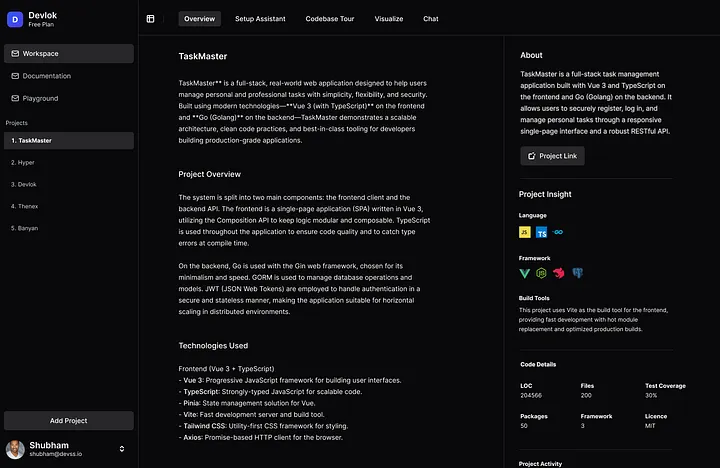
Why Onboarding Often Feels Like Wading in Molasses
Picture this: you’ve just hired three mid-level engineers for your flagship service. On Day 1, each of them…
- Opens the README only to find it last updated 18 months ago.
- Scours Confluence and Slack for setup tips, discovering five conflicting versions.
- Spends hours debugging missing packages, mismatched Node/Python versions, or Docker quirks.
- Receives “just ping me if you have questions” from the lead engineer.
By the end of Week 1, they’ve spent 30–50% of their time just figuring out how to run the code, and almost none of it on understanding why the code works the way it does.
Extrapolate to a team of ten or twenty, multiply by quarterly hiring cycles, and you’re hemorrhaging hundreds of developer-hours and serious budget, every year.
What if your codebase could show new hires how it works, instead of making them guess?
Meet Devlok: The Visual, Intelligent Onboarding Engine
Devlok was born to solve exactly this conundrum. We asked ourselves:
- What if your repo could teach itself?
- What if, instead of hunting for context, new engineers could follow an interactive roadmap?
- What if setting up didn’t feel like defusing a bomb?
Devlok isn’t just another documentation tool. It’s a structured, visual, and team-aware platform built to make large codebases understandable from day one.
1. Codebase Tours — Not Just Docs, But Guided Learning Paths
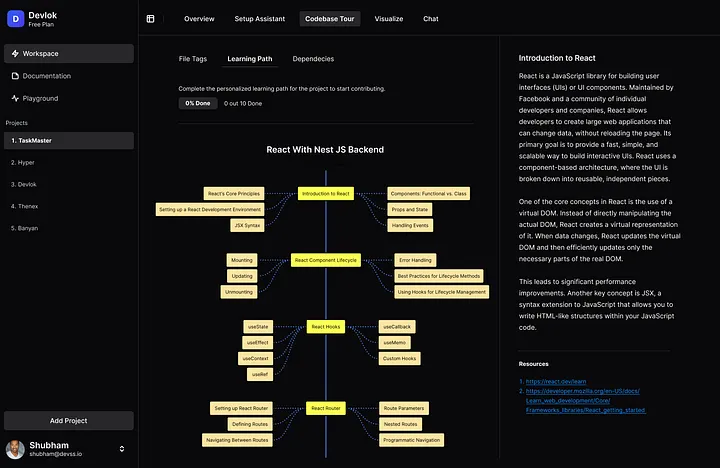
Think of Devlok’s Codebase Tour as a guided museum exhibit—except it’s your code, and every exhibit is clickable.
- Auto-tagged entry points, database models, APIs, and hotspots so you know exactly where to start.
- Visual dependency graph showing which modules call which services, and who owns them.
- Contextual tooltips that surface code snippets, one-click jump-to-definition, and short explanations linked directly to real code.
- Curated learning paths for each feature or service, with a clear “next step” at every turn.
🔍 No more hunting through Slack threads to understand where to start. The system explains itself.
2. One-Click Setup Assistant: Because “It Works on My Machine” Should Stay a Joke
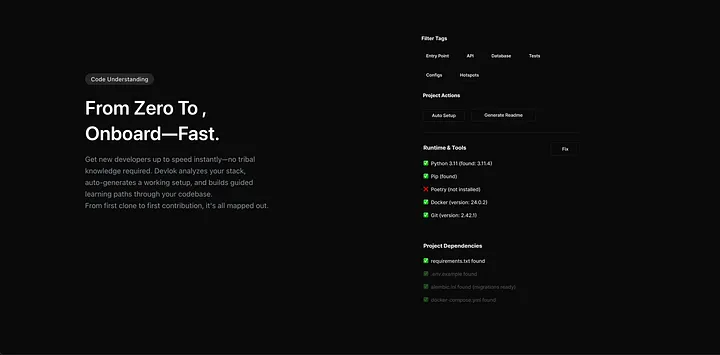
Forget stale setup instructions. Devlok’s Setup Assistant takes the guesswork out of environment configuration.
- Intelligent scans of your repo’s Dockerfiles,
package.json,pyproject.toml, and more. - Generated scripts for Docker Compose, npm, Poetry, or whichever tools your stack uses.
- Pre-flight checks that tell you “Hey, you need Python 3.9.5” before anything breaks.
- Instant spin-up: clone → click → code.
🚀 New hires can go from clone to code-ready in under 10 minutes.
3. System-Scale Visualizations: See the Forest and the Trees

Understanding a codebase isn’t just about reading—it’s about seeing relationships. New devs often ask: “How does this all connect?”
With Devlok, they don’t need to ask anymore.
- Architecture diagrams auto-generated from import structures, updated live as code changes.
- API maps plotting every endpoint, HTTP verb, and middleware layer in a browsable graph.
- ERD-style database schemas that map out tables, relations, and foreign keys—no manual DB tools required.
- Heatmaps of commit activity and churn, so you know where recent work and conflicts are concentrated.
🧠 Combine that with live code references and Devlok becomes your Google Maps for your codebase.
4. Docs That Write Themselves (And Actually Stay Useful)
Stale documentation is as dangerous as no documentation. Devlok keeps yours fresh.
- Auto-generated docs grouped by feature, module, or service.
- Inline annotations where subject-matter experts can leave tips, links, and versioned notes.
- Export options for Markdown, Confluence, Notion—whatever your team uses.
- Sync checks that flag outdated sections when code changes.
🧾 Your docs now live in lockstep with your code, meaning fewer “Docs say X, code says Y” moments.
The Real Impact: Numbers You Can’t Ignore
Teams that’ve piloted Devlok report:
- 🚀 40–60% reduction in time-to-first-commit for new hires
- ✅ Over 90% success rate in one-click setups without manual intervention
- ⏱️ Hundreds of developer-hours saved per quarter—time now spent building features, not hunting for context
Who Benefits Most?
- Engineering Managers: ditch endless 1:1 walkthroughs and focus on strategy.
- Senior Devs: no longer get “pinged” for every small question—they can mentor at a higher level.
- DevOps Teams: gain consistent, reproducible environments—every machine, every time.
- CTOs: see onboarding as an ROI line item, not a sunk cost.
- Vibe Coders: let AI copilots (Claude, ChatGPT, Loveable, etc.) scaffold complex features, and then use Devlok’s visual tours and learning paths to instantly understand and validate that AI-generated code.
Your Next Hire Doesn’t Have to Be an Explorer
Imagine your next developer joining on Day 1, clicking through a tailored learning path, spinning up their environment instantly, and shipping their first PR by Day 2.
That’s not fantasy—that’s Devlok in action.
👉 Join the Devlok early access waitlist and cut your onboarding time by 40% or more.
Stop wandering in the codebase wilderness. Let Devlok guide you every step of the way.
