How to Generate AI Music for Any Mood & Genre (Step-by-Step)
In the world of AI music creators, Tadai stands out for its intuitive user experience, customizable genres, mood-based control, and royalty-free licensing. This guide explains how to leverage Tadai to produce mood-appropriate music across genres—from upbeat pop to melancholic ambient—perfect for creators, online businesses, or content marketers.
The Key Components

To achieve seamless AI song generation, familiarize yourself with Tad. ai's interface and core variables:
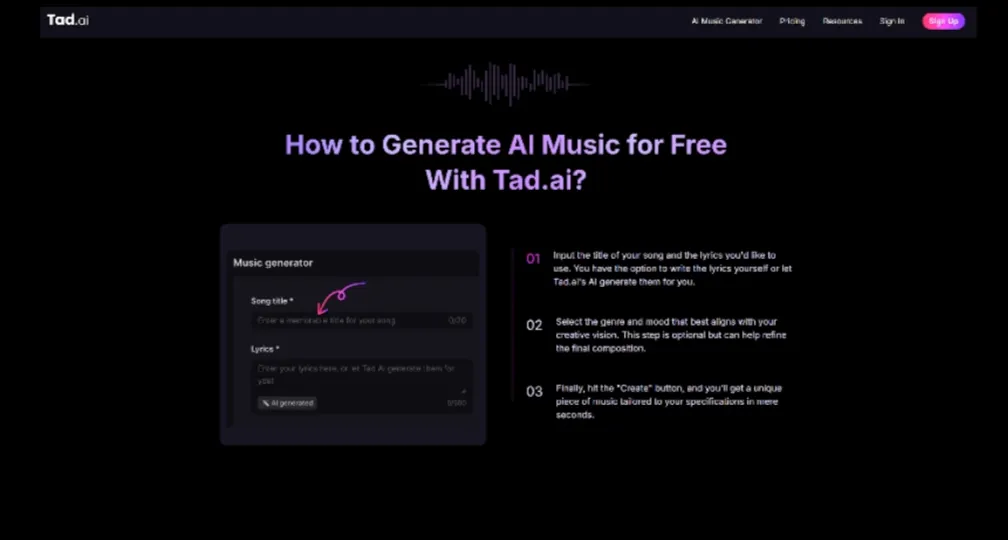
Prompt Input – You provide a song title and optional lyrics.
Genre Selection – Choose from options like Pop, Rock, Jazz, Electronic, Folk, Country, Metal, etc.
Mood Specification – Point-and-click to set moods such as Happy, Sad, Epic, Angry, Relaxing, Romantic, Upbeat, etc.
Output Settings – Number of versions, quality, optional lyric generation.
Generate Feature – Click “Create” and receive MP3 tracks ready for download.
This mix of AI music generator elements enables you to create content that resonates emotionally and stylistically with your audience.
Step-by-Step Walkthrough
Step 1: Choose a Theme and Mood
Start with a clear concept or campaign goal:
Video intro → upbeat, electronic
Ad background → relaxed, cinematic
Podcast transitions → folk, gentle
Select moods like “Upbeat,” “Epic,” “Relaxing,” or “Sad.” Tad. ai supports an extensive emotion palette.
Step 2: Pick Your Genre
Align genre with content:
Energetic/Advertorial → Electronic, Dance, Pop
Serious/Reflective → Folk, Jazz, Acoustic
Dark/Cinematic → Rock, Metal, Epic Orchestral
Choose genres that match mood and audience preferences. Tadai offers broad coverage—pop, rock, folk, metal, jazz, electronic and more.
Step 3: Add Title and Lyrics (Optional)
Including a song title or brief lyric note helps guide the AI song generator:
Title: “Summer Sale Anthem,” “Cozy Evening,” “Angry Breakup”
Lyrics: even a line can steer tone or emotional depth. Tadai can auto-generate lyrics when prompted.
Step 4: Generate and Compare
Click Create. Tadai will process inputs and return 2–3 music variations. Generation typically takes under 30 seconds.
Review each output:
Check genre accuracy
Validate if mood (“epic,” “relaxing”) resonates
Listen to arrangement, mixing, lyrics (if any)
If needed, iterate by adjusting genre, mood, title, or lyrics. Tadai’s quick iteration enables experimentation.
Tips for Mood-Inspired Genre Combinations
Here are proven pairings and prompt techniques to generate mood-appropriate music on Tad.ai:
Upbeat & Energetic
Genre: Electronic Dance, Pop
Mood: Happy, Upbeat, Energetic
Prompt: “Summer sale dance-pop upbeat electronic hook”
Expect bright synths, driving bass, energetic rhythms.
Relaxing & Chill
Genre: Folk, Acoustic, Ambient
Mood: Relaxing, Calm, Warm
Prompt: “Meditation folk acoustic, calming”
Expect gentle guitar, soft harmonies, relaxed pace.
Emotional or Sad
Genre: Jazz, Piano Ballad, Slow Rock
Mood: Sad, Emotional, Melancholic
Prompt: “Solo piano sentimental ballad”
Expect sparse instrumentation and poignant tones.
Epic or Cinematic
Genre: Orchestral, Rock, Electronic
Mood: Epic, Dramatic, Inspirational
Prompt: “Cinematic orchestral rock epic build”
Expect swelling arrangements and impactful tones.
Angry or Intense
Genre: Rock, Metal, Industrial
Mood: Angry, Aggressive, Intense
Prompt: “Aggressive metal riff, angry tone”
Expect heavy guitar, powerful drums, and raw energy.
Advanced Customization Strategies
Multiple Versions per Prompt
Generate at least two variations per concept—choose the best, or combine ideas manually.
Tweaking Inputs
Adjust the smallest detail—genre to sub-genre, mood nuance, lyrics wording—for better output. Quick tweaks yield different soundscapes.
Refine Lyrics with AI
For full songs, let Tadai auto-generate lyrics, then fine-tune to match branding voice. Lyrics feature is one-click and easily editable.
Workflow Iterations
Integrate Tadai tracks in test content and gather feedback. Refine songs based on viewer response or brand alignment.
Performance Optimization
Track time to publish and engagement metrics to calculate ROI. Tadai delivers tracks in under a minute—time savings compared to custom audio.
Final Thoughts
Tadai enables creators, marketers, and businesses to generate AI song tracks tailored to any emotion or genre with precision. By understanding genre-mood synergies and iterating smartly, you can build a rich catalog of mood-aligned audio assets—without breaking budgets or infringing copyrights. Use this guide to harness the full potential of mood-based AI music generation with Tadai for your online goals.

