How to make a fixed header on Carrd?
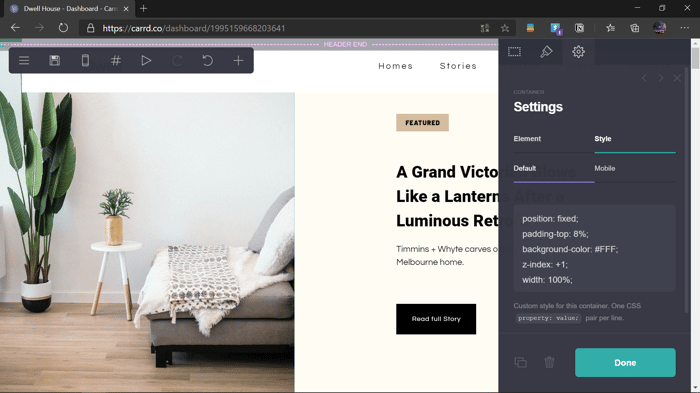
So I saw Martin doing something like this, got very inspired and even tough im a little bit early in my css course I decide to give it a shot. It seems to kinda work but the widht isnt covering the full page and the container isnt taking a space in the page (it is floating). I suspect that it has something to do with HTML but cant figure out what.
this is the page
and here is the code
position: fixed;
padding-top: 8%;
background-color: #FFF;
z-index: +1;
width: 100%;
Any ideas? 🤔

Very cool to see how you built on top of the https://arestaurant.carrd.co template! :D
The navbar looks good, but there's still a bit of a hack in the beginning when you scroll down. I had this problem for a long time also, but asked my developer friend to fix the code a bit, you can see the result here in a Carrd template that I made:
https://getclockwise.carrd.co/
It work very well in my phone, but only in landscape! Did you figured out or it’s the same css as the example?
Looks like you got it working. What did the trick?
Judging by the code there is this custom css that overrides the card css with the !important property for the header
dwelhouse css
#header.sticky {
position: fixed !important;
top: 0;
width: 100% !important;
background: #806DE8;
z-index: 9999;
margin-left: 0 !important;
left: 0 !important;
}
clockwise
#header.sticky {
position: fixed !important;
top: 0rem;
width: 100% !important;
background: #fff;
z-index: 9999;
margin-left: 0 !important;
left: 0 !important;
}
@rustyy if you still have issues let me know I'll give it a shot
Thanks!!
Hi! I've been trying to do this too and it's also not filling the width, despite using 100% !important;
any ideas?
is your code somewhere where I can look at it?
Hi, I've also tried this code and it doesn't fill the width. Any ideas? I used this code
position: fixed !important;
top: 0;
width: 100% !important;
background: #806DE8;
z-index: 9999;
margin-left: 0 !important;
left: 0 !important;
position: fixed !important;
top: 0rem;
width: 100% !important;
background: #fff;
z-index: 9999;
margin-left: 0 !important;
left: 0 !important;
thanks!
I'm sorry, but I can't say from that snippet I would need to see the entire site.
https://uvdraft2.carrd.co/ . thanks.
the position of the code seems to be at the wrong place.
Try to put the code further up, so that it is within the main div wrapper.
Thanks! It works great now.
Nice to hear that 👏🏽
the only thing I'd add is that when it loads you see the header in the middle and not full width, and then a few seconds, and then it displays nicely full width. I don't know if anything can stop that jump happening?
It has to do with the animation.
The animation for some reason blocks the header from stretching.
try to
take out the animation from the whole page see if it works
try to add "is-ready" to the class of the header
This comment was deleted 5 years ago