How to make an advanced feature more discoverable?
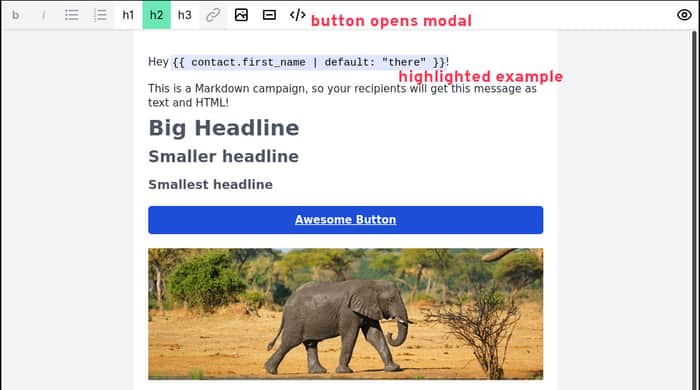
Hey folks,
I’m building Keila, on OpenSource alternative to email newsletter tools like Mailchimp.
Keila supports the Liquid template language (which you might be familiar with from Shopify) in its campaigns. But this is of course not immediately obvious for people using the editor.
So I’m trying to make this feature more discoverable. Here’s what I’m doing:
- When you create a new campaign, the default text already includes a highlighted example of a Liquid tag
- I’ve added a new modal dialog to the WYSIWYG editor that gives some hints about how Liquid works.
What do you all think? Do you like the design of the new modal dialog? What else would you suggest to make the templating feature more discoverable?
Thanks!

There are many ways to improve on this.
How we tackle this scenario.
We use a 3 panel setup.
The tags are clickable, and insert the code at the cursor position. The input is a textarea, to indicate you can add more than one line.
Does it combine markdown and liquid? Show examples of these features.
Do not hide it behind a modal, the tags should be visible, while the user is editing the code.
This IH comment box also has markdown support. It is nice to have the hint at the bottom right, but it also fails. You can't keep the hints open while you are editing the text. It only mentions markdown, but does not link to the cheat sheet. It says "Use Markdown for images and links", but doesn't tell you how.
## How to think about these scenarios in general
You want to teach something and encourage your users to experiment with this powerful tool. Learning this and applying it is an interactive and iterative process. So your users should be able to do both at the same time.
## Interface clutter, too many options will scare new users
No it won't. Power tools, need power interfaces. It won't scare users away. Advanced options are just ignored. Take a look at your microwave oven, it probably has a couple buttons you never press, but it won't stop you from using it.
## Help your customers recover from common mistakes.
We have a front-end based parser of our simple tag editor. It checks if the most common tags are used. If they are not, a popup appears before sending, to make sure the user knows what they are doing.
## Help your users verify they are doing it right, risk-free.
We have a preview function, that sends a test email to the user. This was one of the most requested features by customers, even though sending emails is not our core business.
Thanks for sharing your experience and I fully agree that advanced features should be easily accessible and not unnecessarily hidden away.
I can imagine the solution on your screenshot working very well – and I love that you call the tags "magic fields"!
Keila’s editor does indeed support Markdown. You can either use a pure text-based Markdown editor or the hybrid editor shown in the screenshot above. If you’re curious, here’s a little video:
https://twitter.com/pentacent_hq/status/1491072489690378241
Cool! Would be great if you'll post a follow-up article about the progress you've made on this feature.
I can still remember calling it Magic Fields. Mailchimp already used Merge Tags, which sounds way too complicated and technical. With Magic Fields I wanted to give the user the idea, "Hey don't worry about it, it just works"
Another pattern you can use is tracking/detecting which users have used a given feature, and providing more guidance for users who haven’t used it yet.
Thanks for the suggestion! Do you know of any examples where this pattern is used particularly well?
You typically see this in onboarding processes, sometimes with an option to dismiss the suggestion(s), e.g.