How to organize new contacts after a conference or event
A few months ago, I attended an event called Endeavor Experience. Endeavor Experience is, essentially, a networking event that brings together entrepreneurs, industry leaders, and innovators to share insights and foster meaningful professional connections. I met dozens of interesting people, exchanged business cards, and had a notebook full of ideas. But as the event ended and I started going home, I realized one thing: If I didn’t organize my new contacts, all those interesting people and key connections would quickly slip from my mind.
Events like these are powerful networking opportunities, but they can quickly become overwhelming if you don’t have a system to manage the connections you make. That’s why I take these few simple steps after an event to organize my new contacts and maintain those relationships. Here’s how I do it:
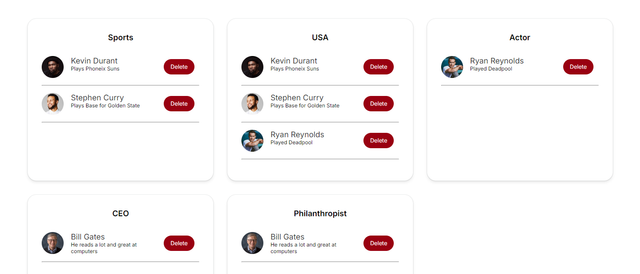
An example of what an organized network would look like (made with InContact)
Step 1: Prioritize Your Contacts
Not every person you meet will have the same relevance for your career or business. After an event, I go through my contacts and identify who could be a potential partner, client, mentor, or just someone I want to stay in touch with. This saves time and ensures I focus on the contacts that matter most to my goals.
Step 2: Categorize them
Next, I categorize my contacts. Categories can include “client leads,” “investors,” “Full stack developer” or “fellow entrepreneurs.” This way, when I need to follow up later, I can quickly find the right people without having to search through a sea of names.
Step 3: Take Notes
Memory fades, and after a few weeks, it’s easy to forget why you connected with someone in the first place. That’s why I always take notes. I jot down important details about our conversation — whether we discussed a potential project, a mutual connection, or just had a great talk about industry trends. These notes help me craft more personalized follow-up messages, reminding them who I am and what we discussed.
Step 4: Follow-Up
Timely follow-ups are key to building strong relationships. Within a week of the event, I send personalized messages to the most relevant contacts. I mention something specific we discussed and suggest a time to continue the conversation. The sooner you follow up, the more likely the relationship will stick.
Step 5: Use a Tool to Help You Do All of These
If you’re reading this thinking that you’d need an Excel spreadsheet with dozens of contacts that already make you exhausted, don’t worry! That’s not the case at all.
You could use a CRM or tools like Apollo, but they tend to be expensive, and their free tiers are quite limited. Also, don’t recommend using bloated software with a million different features (let alone paying for it!), it just makes everything more overwhelming than it is. Organizing your network should be simple, and straightforward and should not have a learning curve.
This is where tools like InContact come in handy. InContact is a free Chrome Extension that allows you to organize your LinkedIn contacts with tags and notes, just like I described. After events like Endeavor Experience, I import my LinkedIn connections into the tool, categorize them, and add notes about our conversations. This way, I’m not relying on memory alone, and my professional network is always organized and easily accessible.
Conclusion
Networking at conferences and events can be overwhelming, but organizing your contacts is the key to making those interactions valuable. By prioritizing, categorizing, taking notes, and following up, you can ensure that you’re nurturing relationships that could be crucial to your career. So next time you walk out of a conference, take a few minutes to put your new connections in order — it could be the start of something big.
This system has worked well for me, and I hope it can do the same for you!
Don’t forget to give InContact a try. It’s completely free and it will be a game-changer for your career.

Great idea for a tool! I always ensure I add them there and then to LinkedIn on the spot, then I just go through all my accepted request notifications the next day :)
Thank you so much!
I particularly like how you added follow up! Looks like a fantastic tool.
Thanks so much! Don't forget to share it with people who might find it useful