How to Streamline Your Event Marketing
Events are a crucial part of the marketing mix for any company. From public relations to sales - events build your business identity and expand your brand awareness to targeted audiences. However, along with creating a well-designed presentation and rehearsing a killer keynote speech, event planners must also spend a ton of time promoting their event in advance.
There's a lot that goes into building creative ideas, a great atmosphere, and making participants feel like they're part of something special.
A major challenge with event marketing is that each event is a one-time experience. There's a great deal of repetition and your time can get unnecessarily used up in activities that don't help you scale up or create better results.
It's important to have a clear plan of action from the start of your events to after-event marketing activities. In this post, we'll look at how you can streamline your event marketing in an effective way. So that you don't waste your time on activities that can be automated and can focus on your content and building relationships with your target audience.
Use an event calendar plugin
The key to automation in event management is to use the right tools. There are a number of free and premium tools that you can mix and match to meet your needs.
But I find that the simplest option you can use is an event calendar plugin. I recommend Sugar Calendar since it covers all the functionality needed to set up and manage your event. And if you need special integrations and features, you can always opt into using addons and third-party features.

Create calendars and events
To get started, create a calendar or set up as many of them as you want to. Creating different calendars is a great way to organize multiple events. If you're an event planner, then you might manage fashion events, product launches, anniversaries, weddings, and more.
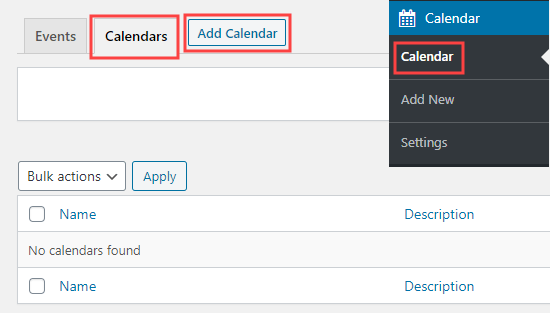
By having different calendars, you can separate different types of events and create clarity if that's what you want.
Once you have your calendar(s) up, you can add events to it and add details like the date, time, event agenda, and your event graphics.
Set up recurring events
Do you have events that repeat often? In such cases, you can fine-tune the settings of your events to automatically repeat and get published by using the recurring event feature of your calendar plugin.
You may also have events that occur at odd times like every seventh Thursday - with some exceptions. It's possible to create recurring events even under such circumstances with a top-notch plugin.
The simple step of setting up your event as recurring removes the need for you to change dates manually or publish your event all over again - it will happen automatically! And the time you save will make it possible for you to focus on troubleshooting any issues or focus on your customers.
Build your event's front-end look
Making your event calendar look good is important if you want to draw in more participants. And an important way to manage your event calendar's front end is to use forms. A good event calendar plugin should integrate with form tools to easily register people and sign them up.
All you have to set up your brand's logo and graphics once on specific categories of events or in different calendars and they'll be present on recurring events.

Add your payment option
Do you need to sell event tickets? You can avoid posting your event on event platforms that take a significant cut from your ticket sales by selling them right from your website.
An event calendar plugin like Sugar Calendar will allow you to sell entries and tickets to your events easily. Your audience can pay for them when they sign up and they'll automatically get event details in their inboxes.
Use a social media management tool
Aside from creating your actual events, you also need to promote them. And to streamline this, it's a good idea to use a social media management tool.
With such a tool, you can prewrite and schedule your event promotions well in advance. As a result, without manually having to do so, your audience will get regular reminders and updates about upcoming events.
Conclusion
We've looked at a few ways now that you can streamline your event marketing. The key is to use good tools and to make use of important features like the ability to create recurring events. Adding payment integrations and leveraging social media tools are also important.
You'll save considerable time with such setups and will be able to focus on really connecting with your customers instead.
