How to Transform a Single Product Photo into Dozens of Marketing Assets with AI
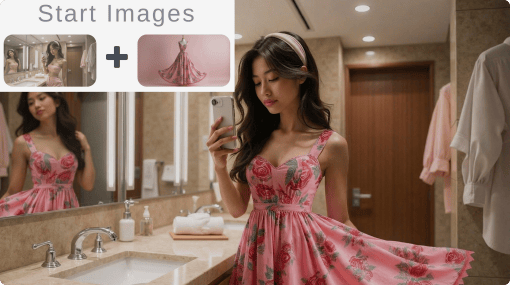
You have one product photo. Maybe it is a flat lay of a dress on a white background. Maybe it is a pair of sneakers shot in your living room. Maybe it is a piece of jewelry photographed on your kitchen table.
From that single image, you now need: social media posts for Instagram, Facebook, and Pinterest. Hero banners for your store. Lifestyle shots showing the product in context. Seasonal variations for holiday campaigns. Maybe even a short video clip for ads.
A year ago, that meant booking photoshoots, hiring models, renting locations, and spending weeks on production. Today, AI image editing tools — powered by the same technology behind Google Gemini and ChatGPT — can take that one photo and produce dozens of unique marketing assets in an afternoon. The product stays the same. Everything around it changes.
The Problem Every Store Owner Knows
Running an online store means you need an almost absurd amount of visual content. Each product needs multiple angles. Each marketing channel wants different dimensions and styles. Seasonal campaigns demand fresh imagery every few weeks.
The traditional options are expensive:
Professional photoshoots: $500-$2,000 per session, plus model fees, location costs, and styling
Freelance retouching: $25-$100 per image for background swaps, color corrections, or compositing
Stock photos for context: $200-$500 monthly subscriptions for generic images that every other store is also using
For a small store with 50 products, creating just three lifestyle variations per product means 150 edited images. At $50 each for professional editing, that is $7,500 — before you have created a single social media post or seasonal campaign.
$7,500+
Typical cost to create lifestyle variations for 50 products using traditional methods
Most small store owners simply cannot afford this. So they settle for plain white-background photos and wonder why their conversion rates lag behind larger competitors with polished, lifestyle-rich catalogs.
What AI Image Editing Actually Does Now
The latest generation of AI models does not just generate images from text prompts. It edits existing images intelligently. You upload your real product photo, describe what you want changed, and the AI preserves your actual product while transforming everything around it. No Photoshop, no design skills required.
Platforms like Deep Dream Generator (DDG) bring multiple AI editing models together in one browser-based workspace, so you can upload, edit, and even animate product photos without switching between tools. Two models on DDG are particularly well-suited for e-commerce work:
NanoBanan Pro: Edit Product Photos Through Conversation
NanoBanan Pro is built on Google DeepMind's Gemini image technology. On DDG, you use it to edit product photos through natural language. Upload a photo and tell it what you want: "Place this dress on a woman walking through a summer market in Barcelona" or "Put these sneakers on a runner in a foggy morning park."
What makes it useful for e-commerce:
Conversational editing: Describe changes in plain English. No layers or masks to manage.
Product preservation: The AI preserves actual product details — colors, textures, logos, stitching — while changing the context around it.
Text rendering: Handles text in images accurately, so promotional overlays or branding elements come out legible.
Up to 4K resolution: High-resolution enough for print materials, not just social media.
Example: One Dress, Five Campaigns
Start with a single flat-lay photo of a summer dress. Using NanoBanan Pro on DDG:
"Show this dress on a woman at a rooftop brunch, natural sunlight" — lifestyle shot for Instagram
"Display this dress on a model walking through autumn leaves in a city park" — fall transitional campaign
"Place this dress on a woman at a beach resort, golden hour" — vacation collection banner
"Show this dress styled with accessories at a minimalist indoor setting" — product page lifestyle image
"Present this dress on a different model with a casual street style look" — diversity in marketing imagery
Five distinct marketing assets from one original photo. Each with a different model, setting, and mood.
SeeDream: Batch Consistency at Scale
SeeDream is ByteDance's image generation and editing model, also accessible on DDG. Its strength is handling multiple reference images and producing consistent results across batches — meaning you can maintain visual coherence across your entire catalog.
Key capabilities for e-commerce:
Multi-image input: Feed it up to ten reference images at once — your product plus style references or mood boards — and it synthesizes them into cohesive output.
Product consistency: Your red handbag looks like your red handbag in every variation. Identifying details are preserved with high accuracy across scenes.
Batch generation: Up to six variations in a single request, all visually consistent. Critical for cohesive product galleries or campaign sets.
Natural language editing: Like NanoBanan Pro, you describe edits conversationally. "Remove the background and place this on a wooden shelf in a rustic kitchen" works as a prompt.
Pro tip: Use SeeDream when you need a consistent set of images across an entire product line. Upload your hero product photos as references and generate seasonal campaign imagery in one session — the visual style stays unified across every output.
From Still Image to Video
Static images convert well. Video converts better — product pages with video consistently see significantly higher engagement and conversion rates. The problem has always been cost: professional product video production starts at $1,000 per clip.
Once you have edited your product lifestyle images on DDG, you can animate them into video clips on the same platform. DDG provides access to several AI video models — including Google's Veo 3, Hailuo AI, Kling 2.1, and Seedance 1.0 Pro. The workflow:
1. Upload your AI-edited product lifestyle image
2. The video model animates the scene — fabric moves naturally, hair flows, lighting shifts subtly, the model walks or turns
3. Output: Full HD (1920x1080) video at 30 FPS, up to 10 seconds
Ten seconds is the sweet spot for product ads on Instagram Reels, TikTok, and Facebook. Short, eye-catching clips are what performs best in social media advertising.
Example: From Photo to Video Ad
Step 1: Upload your product photo to DDG, select NanoBanan Pro. Prompt: "Show this leather jacket on a man walking confidently down a rainy city street at night, neon reflections."
Step 2: Feed the generated lifestyle image to the video generator.
Step 3: The AI animates the scene — the man walks, rain falls, neon lights reflect off wet pavement, the jacket moves naturally with each step.
Result: A product video clip suitable for social ads. Total time: under 10 minutes.
Practical Workflows for Store Owners
Product Page Enhancement
Most product pages have 3-5 photos on white or plain backgrounds. AI editing can expand that to 8-12 images mixing studio shots with lifestyle context:
1. Keep your original product photos as the primary images (customers want to see the real product)
2. Use NanoBanan Pro to generate 3-4 lifestyle variations showing the product in use 3. Use SeeDream to create a consistent "lookbook" set if you sell multiple related items 4. Add one video clip showing the product in motion
The original photos build trust. The lifestyle images build desire. The video builds engagement.
Seasonal Campaign Refresh
Instead of shooting new content every season, regenerate contextual imagery from existing product photos:
Spring: "Place this product in a bright garden setting with cherry blossoms"
Summer: "Show this product at a sunlit beach house, casual coastal vibe"
Fall: "Display this product in a cozy cabin interior with warm autumn tones"
Holiday: "Present this product in an elegant gift-giving scene with soft golden lighting" Four seasonal campaigns from the same product photos, created in hours instead of weeks.
Weekly Social Media Pipeline
Monday: Generate 5-7 lifestyle product images for the week
Tuesday: Animate the two best images into short video clips
Rest of week: Post across Instagram, Facebook, Pinterest, and TikTok with a mix of stills and video
Total time investment: 2-3 hours at the start of the week.
What This Actually Costs
Method Cost per Product Time per Product
Professional photoshoot + editing $150-$500 Days to weeks
Freelance photo editing $50-$200 1-3 days AI editing (5 lifestyle variations + 1 video) Under $5 30-60 minutes
Most AI editing platforms offer free tiers to test the workflow, with paid subscriptions typically in the $9-$30/month range. The cost per image is orders of magnitude lower than traditional methods.
For OpenCart store owners: You do not need to change your existing product
photography workflow. Shoot your products as you normally would. Then use AI to multiply each photo into lifestyle imagery, seasonal variations, and video content. Your original photos remain the product page foundation — AI adds the marketing layer on top.
When AI Works and When It Does Not
Where AI Excels
Background and context changes: Placing products in new environments. Lighting, shadows, and reflections are handled convincingly.
Model placement: Putting clothing on different body types and poses, with natural fabric behavior.
Mood and atmosphere: Changing lighting conditions, color grading, and overall feel. Perfect for seasonal campaigns.
Video animation: Subtle, realistic motion — fabric flowing, hair moving, gentle camera movement.
Where Humans Still Win
Fine product details: Verify the AI preserved exact details like precise button placement or logo positioning. Occasionally fine details shift.
Complex multi-product scenes: Arranging multiple products in specific spatial
relationships can require several attempts.
Brand-critical hero shots: For flagship campaign imagery, consider using AI for concepts and a designer for final polish.
Getting Started
If you want to try this approach:
1. Pick three products from your catalog — ideally ones where you wish you had better lifestyle imagery.
2. Go to Deep Dream Generator and upload a product photo. Select NanoBanan Pro and start simple: "Place this product in a modern living room with natural light."
3. Iterate on the prompt. Add specifics about mood, setting, model appearance, lighting. Each generation teaches you what works.
4. Try video. Take your best generated image and feed it to the video generator. 5. Compare results against what you currently have in your store.
The experiment takes about an hour and costs nothing on the free tier. The results will speak for themselves.
The Bottom Line
The gap between how large and small e-commerce stores present their products has always been a budget gap. Big brands hire agencies, book studios, and produce polished lifestyle content at scale. Small stores make do with whatever photos they can afford.
AI image editing is narrowing that gap. A single product photo can become a set of lifestyle images, seasonal variations, model diversity shots, and video content. The technology is not perfect and will not replace professional photography entirely. But for the day-to-day visual content demands of running an online store, it is a practical option that did not exist a year ago.
In e-commerce, where customers cannot touch or try products, visuals matter more than almost anything else. The tools to create those visuals are now accessible to stores of any size.

