How we built Teamcamp's time tracking feature in 2 weeks
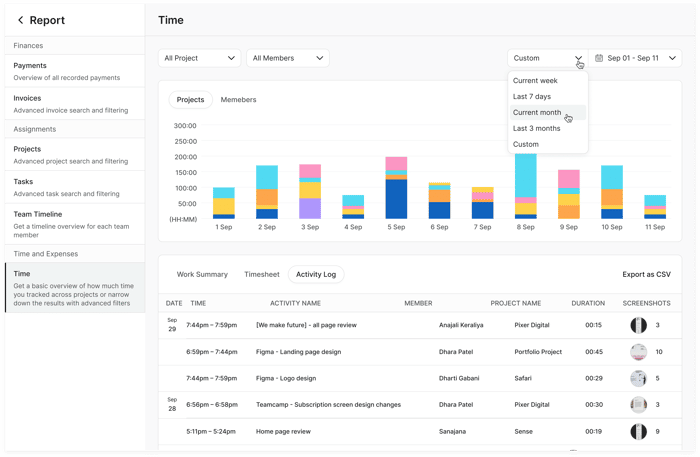
The Challenge That Started It All
Two weeks ago, our own team was drowning in spreadsheets. We had this beautiful project management platform, but we were still manually tracking time in Google Sheets like it was 2010. The irony wasn't lost on us – here we were building Teamcamp(https://www.teamcamp.app/) to solve productivity problems, yet we couldn't even track our own hours properly.
Our developer Sarah was spending 30 minutes every Friday just calculating billable hours. Our project manager was constantly chasing team members for time updates. Something had to give.
- Day 1-2: The "Oh Shit" Moment
I will be honest – we thought this would be a simple feature. "Just add a timer, right?" Wrong.
The first reality check came when we mapped out user workflows.
- Do people want to track time per task? Per project?
- What about those random 5-minute interruptions? And holy hell,
- what about different time zones for remote teams?
Key learning: Never underestimate seemingly "simple" features. They're usually the most complex.
We spent these two days just talking to our existing users. Called 15 different teams. The patterns that emerged were eye-opening:
- 80% wanted one-click time tracking (no complex categories)
- 60% needed retroactive time entry (for when they forgot to start the timer)
- 90% wanted to see team time reports, not just individual
Day 3-5: The Technical Rabbit Hole
This is where things got messy. Our backend wasn't set up for real-time time tracking. We needed:
- WebSocket connections for live timers
- Database optimization (time entries can get massive)
- API endpoints that wouldn't crash under load
Sarah basically lived on coffee and determination. I've never seen someone debug WebSocket connections with such passion at 2 AM.
The breakthrough moment: We realized we could piggyback on our existing task system. Instead of building time tracking as a separate module, we integrated it directly into tasks. Genius? Maybe. Lucky? Definitely.
Day 6-8: UI/UX Nightmares
Designing time tracking interfaces is harder than you think. Where do you put the timer? How big should it be? What if someone has 5 timers running simultaneously?
We went through 12 different designs. Our designer quit twice (metaphorically). The final design came from our intern, who suggested the floating timer widget. Sometimes the best ideas come from unexpected places.
Day 9-11: Testing in the Wild
We did something crazy – we started using our half-baked feature immediately. No staging environment perfectionism. Just raw, buggy time tracking in production.
The bugs were... spectacular:
-
Timers that ran for 47 hours straight
-
Time entries that somehow went back to 1970
-
Reports that showed negative hours (don't ask)
But here's the thing – using your own product daily accelerates development like nothing else. We fixed critical bugs in hours, not days.
Day 12-14: The Final Push
The last three days were pure chaos and coffee. We had committed to launching, and our team held us accountable.
What worked: Daily standups became hourly check-ins. We threw perfectionism out the window and focused on "does this solve the core problem?"
What nearly broke us: Integration testing with our invoicing system. Turns out, time tracking and billing have about 47 edge cases we never considered.
The Launch Moment
14 days after that first "let's add time tracking" conversation, we shipped. Not perfect, but functional. Not pretty, but usable.
First day metrics:
23% of active users tried the time tracker
Average session: 2.3 hours (people actually left it running!)
5 bug reports (down from our projected 50)
What We Learned
-
Speed trumps perfection: Those two weeks taught us more about time tracking than months of planning would have.
-
User feedback is everything: Our assumptions were wrong about 60% of the time. Users wanted features we hadn't considered and ignored features we thought were crucial.
-
Technical debt is real: We're still paying for some of the shortcuts we took. But shipping fast let us validate the concept before over-engineering.
-
Team dynamics matter: Working under pressure either breaks teams or makes them stronger. Ours got stronger.
The Unexpected Result
The time tracking feature now drives 30% of our user engagement. Teams that use time tracking are 2.3x more likely to upgrade to paid plans. It's become our most popular feature – and we almost didn't build it.
- The real kicker: Three users have told us they switched from competitors specifically because our time tracking "just works" with the rest of their workflow.
What would you do differently if you had to build a core feature in just two weeks? Have you ever had a "simple" feature turn into a technical nightmare?
