I built a Chrome extension that lets you preview any font on any live website — just launched it for free
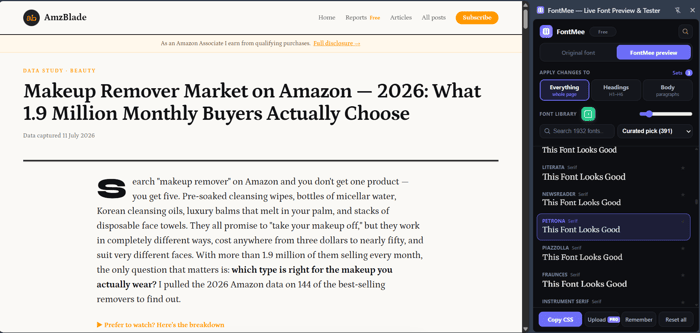
Hey!
I want to share something small I shipped recently: FontMee, a free Chrome extension.
The problem I kept running into: every time I wanted to try a different font on a site — mine or a client's — the workflow was always the same. Copy the font name, paste it into the CSS, reload the page, look at it, decide it's wrong, repeat. Five fonts in, I'd burned twenty minutes on something that should take twenty seconds.
Font preview sites don't really solve this either — they show you a sample sentence in a blank box, which tells you almost nothing about how a font will actually look with your real headlines and real content.
What I built instead: FontMee opens a side panel in Chrome. You click any font from a list of ~1,900 (Google Fonts + a few extras), and the actual page you're looking at changes instantly — live, no reload. You can target the whole page, just headings, or just body text, so you can try a heading/body pairing at once. When you land on something you like, one click copies the exact CSS you need to make it permanent on your own site.
That's it. No accounts, nothing tracked, nothing sent anywhere except a direct request to Google's public font service.
Why I'm posting this here specifically: it's part of a small lineup of free Chrome extensions I've been building and shipping under one umbrella (GetPlugzz) — this is #7. Each one started the same way: a small personal annoyance that turned out to be more universal than I expected. I'm slowly trying to get real usage numbers up and figure out what resonates, so any feedback — brutal or otherwise — is genuinely welcome.
Two things I'd love opinions on:
- Is "preview a font live on any site" actually a problem other builders/designers here run into, or is this too niche?
- For a free-forever tool like this, does a small optional paid tier (uploading your own font files, unlimited saved presets) feel like a reasonable way to eventually make it sustainable — or does that undercut the "just free and useful" appeal?
🧩 FontMee on the Chrome Web Store (free): https://chromewebstore.google.com/detail/fontmee-—-live-font-previ/adpdeaofnkhhilmlbmhhfnchcfefbpji
📺 1-minute demo: https://www.youtube.com/watch?v=UKdp9aNKM9c
Happy to answer anything about the build, the Chrome Web Store review process, or the licensing setup if it's useful to anyone else shipping an extension.
—ZZMC

Since “nothing tracked” is part of the product’s appeal, I wouldn’t add remote analytics just to answer the pricing question.
You could keep a usage counter locally in the extension and, after someone uses it on three different sites, show a one-time optional question about their workflow. That would sample repeat users — the people most likely to need paid features — without changing the privacy promise.
I’d also test demand before building custom uploads. A visible but not-yet-active “Upload your own font” option could simply ask interested users to join a small waitlist.
If repeat users click that, build it. If they do not, saved project-specific font sets may be the stronger paid workflow.
Have you considered local-only instrumentation plus a one-time opt-in survey instead of conventional analytics?
The live preview workflow is genuinely better than the current process - this is a real efficiency problem for anyone doing real font exploration work on live designs. The context matters here: designers and developers switching fonts on real content, real colors, real spacing.
On the paid tier question: the answer isn't about whether people value free tools (they do), it's about whether the paid features solve a friction point that free users hit. Custom fonts + saved presets aren't nice-to-haves if someone is testing fonts across multiple projects - that's where the pain arrives. Charge for that friction, not for the core feature. The people who benefit from presets will pay because they save time; the free tier users who don't need it won't feel like they're missing out.
This is exactly the model FontMee already uses, actually — free tier keeps all 1,900+ fonts, the layers, and CSS export, and the paid tier is specifically custom font uploads + unlimited saved presets. Your framing nails why: someone testing fonts across multiple client projects hits that friction fast, someone just poking around on their own blog never will. Good to hear the split makes sense from the outside, not just from where I'm sitting.
Seven extensions under the same umbrella makes this more interesting than FontMee alone.
Curious what you've seen across the first six that made you keep shipping separate small tools rather than concentrating on whichever one was getting the strongest usage.
Honestly, this started more as a way to learn how AI actually thinks while building with it, than a search for "the winning product" — seven small tools taught me that faster than one big one would have.
The real problem though isn't building — it's distribution. Installs are moving slower than I'd like across the board, so right now the actual bottleneck is getting any of these in front of people, not picking a winner to double down on.
That context helps. The conclusion that distribution is the bottleneck across all seven, rather than choosing between them, is actually the part that caught my attention.
I'd be interested in continuing the conversation by email if you're open to it. What's the best email to reach you on?