I built a competitor monitor for indie founders
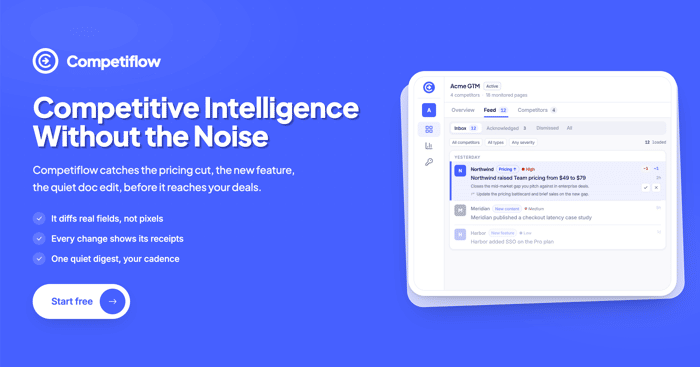
Hi Indie Hackers,
Competiflow is live: competiflow.com
I ship my own products. I also watch a handful of competitors while I do it. Pricing pages, changelogs, positioning tweaks. The kind of thing every founder here does in a bookmark folder, or with Visualping, or by opening the same five tabs every Monday.
That habit kept stealing time from actual building.
Visualping would ping me because a cookie banner moved. Same alert tone as a real price change. I'd open the diff, squint at pixels, and still ask myself: did their Starter tier actually move, or is this noise?
The answer I wanted was boring and specific. "Their Pro plan went from $29 to $39." With the before and after attached, so I could decide in ten seconds whether to adjust my own pricing page, update a landing headline, or ignore it and get back to code.
I couldn't find that at a price that made sense for a solo founder, so I built it.
How it works
Paste a competitor homepage. Competiflow finds their pricing, docs, blog, and changelog URLs and starts monitors. No CSS selectors to maintain.
On a schedule, we read each page, pull out the fields that matter (plan names, prices, feature bullets, post titles), and diff those. When something real changes, you get severity, a short read of what happened, a suggested next step, and the evidence: exact text before and after, source URL, capture time.
Digests by default. Email, Slack, webhook if you want them. I use it myself while juggling other projects, so the default is one summary, not twenty pings.
If you also build
REST API and MCP server (same surface I use from Cursor). OpenAPI on the site.
Pricing
One check = one page read. I priced it for indie usage, not enterprise seats.
Free trial: 100 checks, no credit card
Starter $19/mo (2,000 checks, daily cadence)
Growth $49/mo (5,000 checks, 6-hour cadence)
Pro $99/mo (10,000 checks, hourly cadence)
I'm curious how other solo founders handle this. Still on bookmarks? Visualping? Something else? And what would you watch first on a rival: pricing, changelog, or docs?

Pricing page first, always: a competitor's pricing change is their strategy announced in public, while changelogs mostly tell you what their engineers did last sprint. We watch a handful of competitors at SocialPost.ai and the only alerts anyone acts on are price moves and packaging changes, exactly the "Pro went $29 to $39" framing you built. One push back: keep the digest default, founders who check rivals daily are usually avoiding their own roadmap.
The pricing signal is interesting but incomplete - a price increase could mean product-market fit OR desperation to hit revenue targets. Same change, opposite contexts. The real question is whether you can correlate with their growth metrics (job postings, blog frequency, feature release cadence). If a competitor raises prices AND ships more features AND hires faster, that's a different message than a price hike with radio silence. Have you thought about layering in those contextual signals?
The "cookie banner moved, same alert tone as a real price change" line is exactly the failure mode that makes people stop trusting monitoring tools and go back to manual tab-checking. We do a version of this by hand right now, watching a handful of adjacent products for positioning and pricing shifts as part of our own research, and it's genuinely tedious enough that a screenshot-diff tool alone doesn't cut it, you still have to read every diff yourself to tell signal from noise. The severity + suggested-next-step framing you described is the actual product, the monitoring part is commodity. To answer your question directly: pricing first, always, then changelog, docs last, since docs changes are usually lagging indicators of something that already happened on the pricing/positioning side weeks earlier.
The pixel diff versus semantic diff distinction is the whole game here, and it's the same problem I fight with in code review tooling. A raw diff of a docs page is as noisy as a cookie banner alert, what you actually want is "this plan added a seat limit" the way you'd want "this function's return type changed" instead of "14 lines changed". Curious how you handle pages that A/B test pricing though, because if a competitor serves different prices to different visitors your monitor could report a change that never actually happened for a given customer. That edge case is the kind of thing that would make me trust the tool a lot more once I saw you'd thought about it.
Bookmark folder and a Monday habit, honestly. I compete against two products with a near-identical pricing ladder to mine, and the thing I actually check is exactly your example — whether their entry tier quietly gained the feature I differentiate on. A $0 change to their feature grid matters more to me than a $10 price change. To answer your question: pricing first, but homepage positioning copy is the earlier tell — the headline usually changes a few weeks before the pricing page does.
This fills a real gap — most competitor tracking tools are built for big companies with big budgets. How do you decide what counts as a "meaningful" change worth alerting on, versus noise?
The shift from "something changed" to "here's what actually changed" feels like the real product.
Reducing false positives is often more valuable than adding more monitoring.
The false-positive fight is almost the whole product in any diff-alerting system.
The failure mode that bit me in production was the opposite one: A monitor that goes quiet looks identical to a monitor with nothing to report. Alarming on the age of the newest observed change made silence distinguishable from breakage for me.
Makes sense.
The "silence vs nothing to report" distinction is a good example of how small interpretation gaps can create blind spots in monitoring systems.
Thanks for your feedback!
Semantic diff is the moat, not the monitoring. Everyone's tried pixel diffs; you're solving 'was that noise or strategy?' in one read—that's why it sticks.
One layer to watch: your audience is probably skewing Solo/Pre-seed (actively watching rivals), but your conversion curve might flatten at Seed+ (they've outsourced competitive intelligence by then). The comment above nailed it; pricing first for those founders; changelog/docs are lagging indicators. Real question: which stage cohort actually converts to paid, and what's their primary watch target? If it's 80% Solo watching pricing, and Seed founders bounce after free trial, that's a positioning signal.
List on SoftRankings (competitive intelligence tools, Solo/Indie segment) stage-segmented traffic data tells you instantly where your real wedge is, before you waste roadmap on multi-user features nobody at your core stage needs.
This is something a lot of solo founders underestimate until a competitor suddenly ships something similar. How do you handle competitors who barely update their public-facing pages — is there a way to catch backend/pricing changes too, or is it mostly visual/content-based monitoring?
the "signal not noise" framing is the whole product, and you already found it: nobody wants a diff, they want "their Pro plan went from $29 to $39." thats your wedge and your marketing line, lead with it everywhere, not "competitor monitoring" (which is what Visualping already owns in peoples heads). two thoughts: 1) the killer feature isnt detecting changes, its classifying them, price change vs cookie banner. if you nail that filtering, thats the entire reason to switch off Visualping, so make it the hero of the landing page, not a feature bullet. 2) distribution wise, indie founders already publicly complain about exactly this ("visualping pinged me for nothing again") on here, r/SaaS, and twitter. show up in those threads with the specific before/after example, thats more convincing than any ad because it demonstrates the signal-vs-noise difference live.
This is the exact pain I feel running a KDP publishing side project — I manually track 5-10 competitors across different book niches (pricing, review counts, keyword positioning) and it's easily 30 minutes a day that should be building time. The semantic diff approach is smart. One thing I'd love: competitor review velocity as a signal. If a rival's book suddenly jumps from 20 to 50 reviews in a week, that's as actionable as a price change — it means they're running ads or got algorithmic traction. Have you thought about monitoring non-page-change signals like that?
This comment was deleted 5 days ago