I built a complete cookbook with AI - here's the full workflow from prompt to finished book
Creating an individual recipe with AI is easy, but creating an actual cookbook is a different problem.
A finished cookbook needs a coherent structure, recipes that fit the same theme, consistent formatting, images, a professional cover and a finished file you can actually publish or share.
You can use Inkfluence AI to handle that entire workflow in one place.
In this tutorial, I'll walk through how to make a complete cookbook with AI, from the initial idea through to generating recipes, adding images, designing the cover and exporting the finished recipe book.
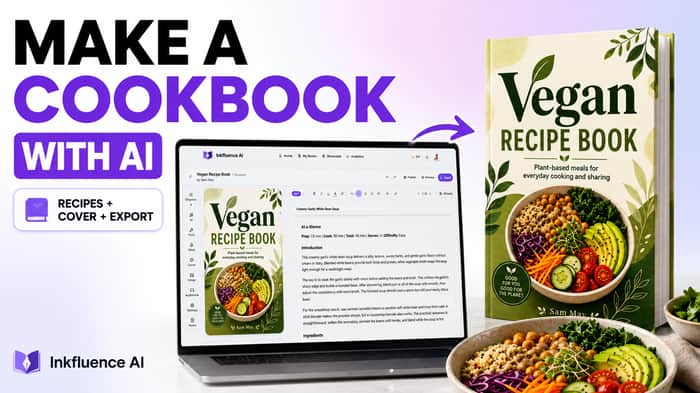
For this example, I created a complete vegan recipe book.
The full process is:
Cookbook idea → outline → recipes → editing → images → cover → formatting → finished book
- Start with your cookbook idea
First, decide what kind of cookbook you want to create.
That could be:
- Vegan recipes
- High-protein meals
- Quick weeknight dinners
- Desserts
- Air fryer recipes
- Budget meals
- Family recipes
- Regional cuisine
The more specific the concept, the easier it is to keep the finished cookbook coherent.
For my example, I created a vegan cookbook.
Inside Inkfluence AI, you can start by describing the book you want to create. The platform then uses that idea as the basis for the complete book rather than simply generating a single recipe.
That's an important distinction when using an AI cookbook generator.
Instead of:
Prompt → recipe
you're creating:
Idea → cookbook structure → recipes → finished recipe book
- Generate the cookbook outline
Before generating all of the recipes, create the structure of the cookbook.
For a recipe book, chapters can represent different meal types, recipe categories or sections.
For example:
- Breakfasts
- Soups & Starters
- Main Meals
- Quick Weeknight Recipes
- Desserts
Inkfluence AI generates an initial book outline from your idea, which you can review and edit before generating the complete book.
This is useful because you're not committing to dozens of recipes based on a single prompt without first seeing how the cookbook will be organised.
You can also add more chapters later.
If you finish the cookbook and realise you want another section for sauces, desserts or 30-minute meals, you can expand the existing project rather than starting again.
- Generate the recipes with AI
Once you're happy with the outline, the next step is generating the actual cookbook content.
Inkfluence AI generates the content as chapters within the book.
For my vegan cookbook, one of the recipes generated was Creamy Garlic White Bean Soup.
The recipe included information such as:
- Preparation time
- Cooking time
- Total time
- Servings
- Ingredients
- Introduction
- Cooking instructions
The important part is that the recipes aren't isolated AI responses.
They're created inside the cookbook itself, so you can move between chapters and continue working on the complete book.
- Review and edit your AI-generated recipes
You should always review AI-generated recipes before publishing them.
This is particularly important for cookbooks because recipes contain real measurements, ingredients, cooking temperatures and preparation instructions.
Inside the Inkfluence editor, you can manually change the content or use AI editing tools to help rewrite and improve sections.
For example, you might want to:
- Change an ingredient
- Adjust quantities
- Rewrite unclear instructions
- Expand a cooking step
- Shorten an introduction
- Change the writing style
- Add your own experience or advice
AI is extremely useful for creating the first draft, but the final cookbook should still have your judgement behind it.
- Add images to your cookbook
Cookbooks are naturally visual, so the next step is adding images to the recipes.
Images can be added directly to the book inside Inkfluence AI.
That means the recipe, image and formatting remain part of the same project instead of having to export the manuscript and rebuild everything in separate design software.
For a professional cookbook, make sure each food image accurately represents the recipe beside it.
If you're using AI-generated imagery, check that the ingredients and finished dish shown are reasonably consistent with the actual recipe.
- Create a cookbook cover with AI
Once the recipes are in place, you can create the cookbook cover.
Inkfluence AI includes an AI book cover generator and cover designer, so the cover can be created as part of the same workflow.
For this tutorial, I created:
Vegan Recipe Book
with the subtitle:
Plant-based meals for everyday cooking and sharing
You can generate an initial cover with AI and then customise it rather than being stuck with the first result.
A good cookbook cover should make the subject of the book immediately obvious and remain readable at thumbnail size if you're planning to sell the book online.
- Format the finished recipe book
Once you've added the recipes, images and cover, the next step is turning everything into a properly formatted book.
This is one of the major differences between asking a general-purpose AI tool to generate recipes and using an AI book generator.
Generating the text is only part of creating the finished product.
Your headings, recipes, images and sections ultimately need to become consistently formatted pages.
Inkfluence AI keeps these elements within the same book project, allowing you to preview the cookbook and make changes before exporting it.
- Export your cookbook
Once you're happy with the finished recipe book, you can export it.
Inkfluence AI supports:
PDF - useful for visually formatted cookbooks, direct downloads and sharing.
EPUB - useful if you want to distribute the cookbook as an ebook.
DOCX - useful if you want an editable document for further changes outside Inkfluence.
For many digital cookbooks, PDF is particularly useful because it preserves the visual layout of the pages.
At this point, you've gone from a basic idea to a finished cookbook:
Idea → outline → recipes → editing → images → cover → formatting → PDF/EPUB/DOCX
Can AI create an entire cookbook?
Yes.
AI can help generate the cookbook structure, draft recipes, assist with editing, create imagery and covers, format the content and prepare the finished book for export.
But that doesn't mean you should blindly publish everything AI generates.
Recipes involve real measurements, ingredients, cooking times, allergens and food-safety considerations. The finished recipes should always be reviewed and verified.
The most useful way to think about an AI cookbook generator is as a tool for accelerating the cookbook creation process, while you remain responsible for the quality and accuracy of the finished book.
AI cookbook generator vs using ChatGPT
You can absolutely use a general AI assistant to help write recipes.
The difference is what happens afterwards.
If you ask ChatGPT for 30 recipes, you still need to organise those recipes into a book, edit them, create the imagery, design a cover, format the pages and turn everything into a finished file.
Inkfluence AI is specifically designed around the complete book creation workflow.
It combines the generation and the book-production stages so you can go from the original cookbook idea to an exportable recipe book within the same project.
Watch the complete cookbook tutorial
I've recorded the complete process using the real Inkfluence AI editor, from prompting the original vegan cookbook through to creating the cover and exporting the finished book.
The written guide and full walkthrough are here:
How to Make a Cookbook With AI:
https://www.inkfluenceai.com/learn/make-a-cookbook-with-ai
The tutorial covers the complete workflow, including:
00:00 How to make a cookbook with AI
00:15 Prompting your cookbook
00:35 Creating your cookbook outline
01:00 Writing your cookbook chapters
01:15 Editing your cookbook
02:30 Adding a cover to your cookbook
02:45 Generating a cookbook cover with AI
04:30 Adding more chapters to your cookbook
05:16 Exporting and sharing your cookbook
Final result
The end result is a complete recipe book rather than a collection of AI-generated recipes.
For this example, that meant starting with a simple vegan cookbook idea and ending with a structured, illustrated and formatted Vegan Recipe Book with its own cover and an exportable finished file.
That's really the key difference.
AI can write a recipe in seconds.
An AI cookbook generator like Inkfluence AI can help turn the initial idea into the complete book around those recipes.

The interesting distinction here is that you’re solving the production workflow around AI-generated content, not just the generation itself.