I Built a Font Tool That Eliminates Layout Shift (CLS) Using AI — Here's How I Solved a $10,000 Web Vitals Problem.
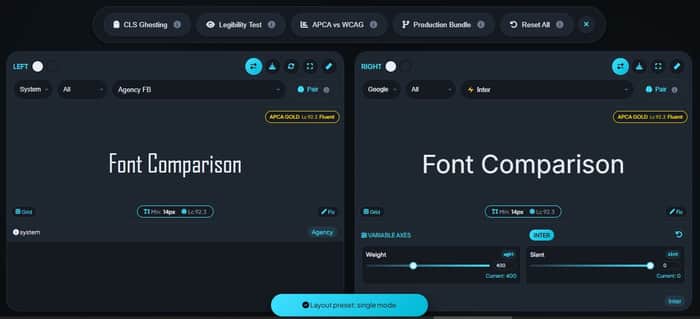
I've been obsessed with Core Web Vitals ever since Google made them a ranking factor. And the one metric that kept haunting me? Cumulative Layout Shift (CLS).
You know the feeling. You load a page, text jumps around, you mis-click a button, and you get annoyed. That's CLS in action. And for sites using custom fonts, it's a silent killer of user experience and SEO rankings.
The problem? When a custom font loads, it swaps with the system fallback. If those fonts have different metrics-different x-heights, different widths-the whole page jumps. Users hate it. Google penalizes it.
I spent months researching how to fix this, and what I found shocked me: there was no easy tool to generate optimized font fallbacks with metric overrides. Designers were manually guessing size-adjust values. Developers were ignoring the problem entirely.
So I built one.
The "Aha!" Moment with size-adjust
The solution to CLS has been sitting in CSS for a while: the size-adjust, ascent-override, descent-override, and line-gap-override descriptors in @font-face rules. These let you "normalize" a fallback font to match your custom font's metrics.
But here's the catch: you need to know the exact override values for each font pairing. Arial needs different adjustments than Helvetica. Times New Roman is completely different from Georgia.
I realized I could build a database of these metrics and let AI match fonts to their ideal fallbacks. The result? Zero CLS. Literally no layout shift when fonts swap.
How the AI Morphology Pairing Works
I didn't want to just match fonts randomly. I wanted to understand their characteristics-their x-height, their contrast, their geometric vs. humanist style. So I built a simple AI matching system:
function getFontCharacteristics(fontName) {
// Analyze font name for style cues
if (name.includes('sans')) return { style: 'geometric', xHeight: 'large' };
if (name.includes('serif')) return { style: 'traditional', xHeight: 'medium' };
// ... plus actual data from my font database
}
When a user picks a font on the left, the system analyzes its morphology and suggests a perfect pairing on the right. It's like having a typography expert looking over your shoulder.
The APCA Contrast Revolution
WCAG 2.1 contrast ratios are outdated. They don't account for font weight, font size, or perceptual brightness. Enter APCA (Accessible Perceptual Contrast Algorithm) , the proposed standard for WCAG 3.
I integrated APCA scoring directly into the comparison view. Now users can see:
Bronze (Lc 45+) : Acceptable for large display text
Silver (Lc 60+) : Good for body text at 16px
Gold (Lc 75+) : Excellent readability, fluent UX
And if the contrast fails? One click on the "Fix" button and the tool automatically adjusts colors to meet APCA Silver standards.
The Production Bundle: One-Click to Deployment
The feature I'm most proud of? The Production Bundle. With one click, the tool generates:
Google Fonts import statements
Zero-CLS @font-face fallbacks with exact metric overrides
CSS custom properties for your font stack
Usage examples for headings and body text
A designer can go from "I like these two fonts" to "deployed in production" in under 30 seconds.
Building for the Community
I built this tool because I needed it myself. But along the way, I added features requested by the community:
CLS Ghosting: Visualizes exactly how much the fallback font shifts
Legibility Test: Simulates viewing at distance or with low vision
Optical Size Controls: For variable fonts like Roboto Flex
Sandbox Studio: Test your fonts in real HTML/CSS before deploying
The Indie Hacker Takeaway
This project taught me something valuable: the best tools solve a specific, painful problem that everyone assumes is "just how things work." Designers accepted layout shift as inevitable. Developers added font fallbacks without thinking about metrics. Nobody stopped to ask: "Can we fix this?"
I did. And now it's a free tool that helps thousands of designers and developers ship better, more accessible websites.
If you have a nagging problem that everyone else ignores, maybe it's time to build the solution. You might be surprised how many people need exactly what you're building.
Try the Pro Font Lab yourself →https://fontpreview.online/comparison

his is super real 🔥 solving invisible problems like this is exactly what good tools do.
Also, for builders here — there’s a live idea competition where you can submit your idea for $19, winner gets a Tokyo trip. Just opened, so early stage = better chances.