I built a macOS app to make mobile E2E testing less awful
Testing mobile apps sucks.
You either click through the same flows manually before every release, or you commit to a heavyweight automation stack that demands code, infrastructure, and a budget you don't have. For indie developers and small teams, neither option fits. You want confidence in your release without turning testing into a second job.
I ran into this repeatedly while shipping apps. So I started building Qampanion.
What it is
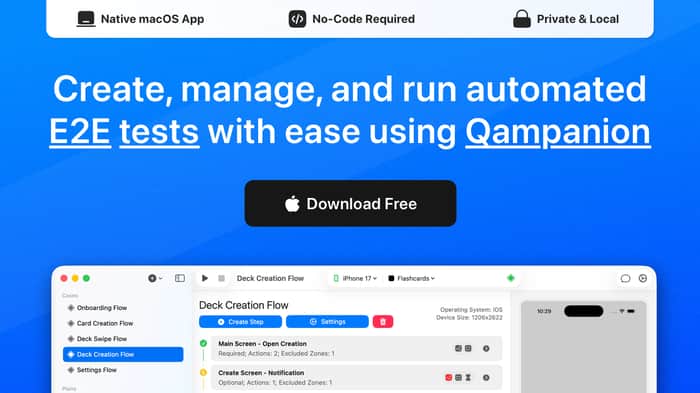
Qampanion is a macOS app for creating and running end-to-end tests for iOS and Android. You build test cases visually — tap, swipe, type, wait — instead of writing scripts. It runs on your machine against Xcode simulators and Android emulators, compares screenshots to catch regressions, and handles device setup, app installs, and test execution in one place.
You can also mix in API requests, bash scripts, and reusable linked steps when a pure UI flow isn't enough.
How Qampanion differs
Most mobile testing tools fall into two camps.
AI-first runners generate a new test plan every time you hit run. That means you pay for tokens on every execution, and small changes can produce different results. Qampanion generates tests once, with or without AI, then runs them statically. Same steps, same screenshots, same outcome every time.
The older enterprise route gives you power, but only if your team writes and maintains test code. Qampanion skips that. You build tests in a visual editor, so a non-technical teammate can create and update cases without opening an IDE.
Everything runs locally on your Mac. Your app, your screenshots, and your test data never leave the machine. The project file is plain and versionable, so you can launch it in CI/CD the same way you launch it locally.
The MCP integration is the bridge between the two worlds. Connect any AI agent, describe the flow you want, and the agent will tap through the app and build the test case for you. After that, the test runs on its own. You can also take an existing iOS test case and adapt it for Android without rebuilding it from scratch.
Three ways to work
I didn't want another tool that forces a single workflow:
- Visual editor. Build tests with clicks. No code.
- CLI. Run tests from the terminal or wire them into CI/CD.
- MCP / AI. Connect an AI assistant and generate or adjust tests from descriptions.
The idea is simple: start visual, automate the repetition, and let AI speed up the parts that still feel tedious.
Who it's for
- Indie developers shipping solo and tired of manual regression checks.
- Small teams that need reliable testing without enterprise tooling prices.
- QA engineers who want to spend less time on setup and more time finding real bugs.
Current state
Qampanion is in public preview, free to use, and I'm looking for early adopters. It's built natively in Swift, keeps your data on your machine, and requires macOS 15+.
I'm actively developing it around real testing pain points — visual editing, fast local execution, and AI-assisted test creation. If mobile testing frustrates you too, I'd love your feedback.
I'm looking for my first early users to help shape the product, so if this solves a problem for you, I'd love to hear how it fits into your workflow.

useful
Thank you! Do you test mobile apps in your own work?
I’ve avoided full E2E for mobile mostly because maintaining tests becomes a headache after a few UI changes. This visual approach makes sense for small teams.
How do you handle updating tests when the UI changes across multiple flows? Is there some way to edit steps globally or reuse components?
This is the main pain of mobile testing. If your Login screen changes, you do not want to fix 50 tests manually.
We solve this with Linked Steps:
It should be easy to update often-changing flow ;)
Definitely something I'd use.
Thanks, that means a lot. It is a free public preview right now, so you can try it on a real app today.
What kind of app would you test with it first?
The "generate once, then run deterministically" choice is the part that jumped out. I work a lot with AI coding agents, and the failure mode of AI-first test tools is exactly what you're dodging — if the plan regenerates every run, your suite is non-deterministic, so a "fail" might just be the model taking a different path, not a real regression. That kills trust in CI fast. Using the agent only for the initial authoring (your MCP step) and pinning the flow afterward feels like the right split.
On what breaks tests most: in my experience it's rarely the happy path — it's selectors/anchors drifting after a UI refactor, and telling that apart from an intentional change. How does the snapshot diff handle deliberate UI tweaks (a copy change, a spacing nudge) without drowning you in false positives? That triage step is usually where no-code test tools lose me.
Either way — nice niche, and local-first + native Swift is the right call. Following the preview.
You hit the exact point. Running AI on every test in CI is expensive and flaky. One different token breaks the build.
About deliberate UI changes and false positives:
Qampanion works strictly with screenshot comparisons and coordinates.
If you change the UI on purpose, the test will fail. To handle this without pain, you can:
If you have too many tests to update manually, you can use any AI via MCP. The agent will run the app, find the new coordinates, and record new baseline screenshots. You pay for AI tokens once to fix the suite. After that, you run fast, deterministic tests for free.
The local-first approach is a big part of the appeal here. Static, repeatable tests seem much more useful for regression checking than regenerating a test plan on every run. The MCP integration is especially interesting too: letting an agent create the initial flow, then keeping the actual test deterministic, feels like a practical balance between AI flexibility and reliable CI.
Yes, you got the idea. AI helps you build the first flow, and after that the test stays the same on every run. So you get AI to start fast, but your CI stays stable and cheap.
Local-first was a clear choice for me too. The app and data stay on your machine, and tests run fast because nothing goes to the cloud.
Do you use MCP tools much in your own work? I am trying to learn if that first step feels easy or new for most people.
great
Thank you! It is free to try right now. What would you want to test with it first?
nice work
Thanks a lot! Is mobile testing something you deal with in your own work?
I like that you're reducing the cost of writing tests, but I'd pay even more attention to reducing the cost of maintaining them.
A lot of teams don't avoid test automation because creating tests is hard. They avoid it because every product change threatens to break the suite. If maintenance becomes dramatically easier, that's a much stronger reason to switch than "no code."
You are right, and this is a great point. Writing tests is only half of the problem. Tests that break on every product change are the real reason teams stop.
A few things help here. The visual editor lets you fix a broken step in a few clicks, with no code to refactor. Snapshot comparison shows you what changed on the screen, so you can see fast if it is a real bug or just a small UI update. And each flow is a separate test, so one change does not break the whole suite.
But you are right that this is the hard part, and I want to make it even better. In your experience, what breaks tests most often? UI changes, new steps in a flow, or changed data?
That's a good question.
The reason I'm hesitant to answer it in a few lines is that I don't think the answer is universal—it depends on the assumptions you're making about what the product should optimize for as it evolves.
I'd rather explain the reasoning in the context of Qampanion itself than give you a generic answer.
If you're open to it, what's the best email to reach you on?
Sure, that makes sense. A good answer depends on the goal, so the context helps.
You can reach me at general@qampanion.com. I would be glad to hear your thinking.
Thanks! I’ve just sent it over.
Looking forward to hearing your thoughts whenever you have a chance.
I’m developing indie iOS applications, and I test them manually. For example, when I add new functionality to my app, I test it manually before release (and usually check the whole app with all flows), then I publish it in TestFlight for a small test group to catch typical bugs. After that, I publish the new release.
If an application is not too big, it doesn’t take much time. But I have a few really big apps, and in this case, it is really hard to check the whole app.
I have tried testing through Claude Code with skills, but it spent all the daily limits :D
Thanks for laying out your whole flow — that "check every flow before each release" step is exactly the pain I built this around, and it's the part that stops scaling once an app gets big.
On the Claude Code point: that's actually why I went with a test-editor approach instead of a pure agent. With an agent, every run re-invokes the LLM, so regression testing burns tokens (and daily limits) every single time. In Qampanion you author a test once — visually, or via the MCP integration if you want AI to draft it — and after that the runs are deterministic replays on the simulator. So the AI cost is one-time authoring, not recurring execution, and you can re-run the whole suite on every release for free.
Snapshot comparison also helps with the "big app" case — instead of eyeballing every screen, it flags visual regressions for you. It's a free public preview right now (macOS 15+, iOS sims), so it could slot in right before your TestFlight step.
Question for you: for your big apps, roughly how many distinct flows would a "full" regression pass cover? Trying to figure out where manual stops being viable — and whether people would rather hand-author those tests or let AI draft them first.
My biggest app has about 30 screens. They link into different flows based on user parameters, so the paths change dynamically. I cannot test all real user paths by hand :D
I would start with the main flows and add more over time.
Yeah, 30 screens with paths that change by user parameters is very hard to test by hand. You don't need every path. Start with the main flows and add more later.
In Qampanion each flow is one test. You build it once and run it again for free on every release. Snapshot comparison checks every screen for you.
For the dynamic paths, you can add an API request step. It sends an HTTP request to set the user into the state you want, and then you check that path. So the paths become clear, repeatable tests.
How do you set these user states now when you test by hand? Staging backend, feature flags, or different builds?
This solves a pain I’ve seen with small teams. Testing is important, but the setup often becomes harder than the actual app.
Thank you, and you are right. Many small teams drop testing because the setup is too hard. That is the main thing I try to fix. You start fast, with no complex config and no code.
What made setup the hardest for you before? The tools, the CI, or getting the app into the right state?
Building native on macOS comes with a tax nobody mentions upfront, notarization, entitlements, and if your tool needs Accessibility or Screen Recording permissions to drive another app that is its own onboarding fight before a user even opens it. Curious how you handled the permission prompts, that part ate more of my build time than the actual testing logic on a similar native tool. Respect for going native instead of wrapping something in Electron.
Thanks! For me it was smoother than expected. Notarization was easy, the Apple flow went fine.
And I got lucky on the permission part. The tool drives the iOS simulator, not a random macOS app. So it does not need Accessibility or Screen Recording permissions at all. There is no permission prompt fight before the user starts. That is one big reason I target the simulator.
Were you driving other native macOS apps on your tool? That is the case where those permissions really bite. How did you make that onboarding less painful for users?
Deterministic tests with AI only at authoring time is the right architecture call, and it's also your best sales line: teams are getting burned right now by AI-first runners that bill tokens per run and drift. One caution from two decades of selling tooling: a long free preview sets the price at zero in your early users' heads, so ask what they'd pay now. The visual editor plus versionable project file is what lets you sell to the QA lead and the engineer at the same time.
This is really useful, thank you. The pricing point hits hard.
You are right, a long free preview can set the price at zero in people's heads. I do not want that. So I will start asking early users what they would pay now.
And yes, the token-per-run pain is real. Many teams got burned by AI-first runners, so deterministic runs are a strong story to tell. I will lean on that more.
One question, since you have done this for years: how do you ask early users about price without scaring them off? Do you name a number first, or let them say one?
Keeping runs local is a nice choice. A lot of teams don’t want screenshots and app data going through third-party services.
Thank you, and you got it. Screenshots and app data can be sensitive, so many teams do not want them going to a third-party cloud. With this tool everything stays on your machine.
Is local-only a hard rule for your team, or more of a nice-to-have? I want to know how much it drives the choice.
Anything that makes testing mobile easier is worth a snipe.
Thanks! Mobile testing needs more easy tools, so I am glad you think so. Do you build mobile apps yourself?
You completely nailed the release-day dilemma here. Every time I'm about to ship an update, I dread the manual tapping, but I also absolutely refuse to spend an entire week setting up an enterprise automation framework that requires its own maintenance job. The visual "tap, swipe, type" workflow sounds like the perfect middle ground for getting quick sanity checks without the scripting overhead. Stoked to see this built natively in Swift, checking out the preview today!
Thank you, you said it perfectly. That is the exact gap I aim for. Manual tapping is slow and boring, but a big enterprise framework is too heavy and needs its own maintenance job. Most small teams do not want either one.
So the goal is a quick middle ground: build a simple tap, swipe, type flow, and get a fast sanity check before you ship. No scripting, no big setup.
Thanks for checking out the preview today. If you try it on a real app, I would love to hear what feels rough. What would you test first, your main release flow?
Definitely the checkout and premium upgrade flow first. As a solo builder, if a minor UI layout shift accidentally breaks the purchase button or the paywall trigger, it's a total disaster that hits the wallet immediately. Having a quick visual check to make sure the core payment flow actually loads and works before hitting submit on App Store Connect would save me so much anxiety. I'm setting up a test run for my payment workflow later tonight, so I'll let you know how it goes!
Testing is always that pain every dev knows but rarely turns into a product — good to see someone tackling it. How did you validate demand before building, or did you just go straight to building since you were feeling the pain firsthand?
Honest answer: I did not really validate it first. Right now is the validation part, so posts and questions like this help me a lot.
The idea came from what I saw at work. I worked at a very big company, and I saw how much time the QA team spent on manual testing and automation. It was a real bottleneck. I also worked at startups, where testing is even harder, because there are fewer people and less time.
So the pain was clear to me, and now I am checking if other people feel it too. Did you see the same testing pain, at a big company or at a startup?
C'est un très beau projet, et merci de votre part
Merci beaucoup! C'est encourageant. N'hésitez pas à l'essayer et à me dire ce que vous en pensez ;)
The deterministic angle is the right wedge. Teams get burned twice by AI-first runners, once on tokens per run and once on flaky results they cannot reproduce, so 'same steps, same outcome' is a real buying trigger. My advice: put a price on it now, even in preview, because free early adopters will tell you it's great while never telling you if it's worth money.
Thanks for the solid advice. You are totally right about the trap of free users.
The app is free right now during the public preview because I want to fix bugs and get initial feedback.
Yo that's a really nice project right here but I would have to say that if I don't stop for a little while just to check my post on my feed, I would have skipped yours.
I just wanna say that title doesn't really grab attention at the first, there's a lot of potential that I see from this, just imagine you can sharpen the title by cutting the word and maybe you hook them, grab more attention? For example, instead of saying "I built a macOS app to make mobile E2E testing less awful" now you say "Running E2E Test. Even When You're Sleeping" see the difference? I'm here to offer you that I can help you sharpen it for free in time if you're interested.
Thanks.
Thank you, this is kind of you. And you are right, the title matters a lot. People skip a post in one second, so the first words really need to grab them.
I like how you think about the hook. Your example is catchy. I am open to better titles, so feel free to drop a few ideas here in the thread. What do you think makes a title stop the scroll?
Psychology Density. For most people, you don't have to tell them what your app does to them, what they actually care is what will they get if they install your app, the ultimate benefit they get. Just imagine if you bombard them with guaranteed end-benefits first and explain it very clear for those nerds? That's the way you catch your prospect first
And second is the attention. In reality you're only have like 0.5ms or much lower than that to hook 'em, if your title was too long, and it didn't trigger their deepest desire for their problem then how are you gonna get them back? Only if they randomly stop like me but the chance they look at your post it depends on your luck.
But hey, I aware that this is the place for developers, I know that they're not like the normal consumer are so lazy that you need to hook em but if the you hook the normal consumer well then do you think it will be the same for developers? of course yes, for most. We're all tied to that laziness of scrolling, if the developers are struggling to find something useful for them but they're really really burned out to read that long title, you miss another prospect.
That's only few of it. Thanks
Thanks, these are good points. You are right, people care about the benefit first, not the how. And a long title loses them fast. Short and clear wins.
I like the way you think about this. Can you show me one title for this post that you would use? A real example helps me see your idea in action.
Let's give it few examples:
"Wipe out your E2E pain in minutes. No code required"
"Run your E2E tests painlessly. Done faster"
See? I'm just simply trigger the desire of most developers, don't you guys want to get your product done faster with better quality?
or
maybe if you want it shorter then this is my idea:
"Get your E2E tests done fast, simple."
It sounds like a very useful project
Thank you! It is a free public preview now, so you can try it on a real app today. Do you work on mobile apps yourself?
Yes, that's exactly the idea. You create a test once and run it the same way every time. Because the test stays consistent, regression checks are more reliable and repeatable.
You're also right about small teams. With the visual editor, non-technical team members can create and maintain tests without writing code or using an IDE. That means QA engineers, product managers, and other stakeholders can contribute—not just developers.
Are you part of a small team? I'm curious who would be responsible for creating and maintaining the tests in your case—a developer, or someone in another role?
Generating tests once and running them the same way every time instead of regenerating a plan on each run feels like the more trustworthy approach for actual regression testing.
Letting a non-technical teammate build and update test cases without opening an IDE is the part that probably matters most for small teams.
Yes, that is the main idea. You build a test once and run it the same way every time. This makes regression checks stable, because the test does not change on its own.
And you are right about small teams. The visual editor lets a non-technical person build and update tests with no IDE and no code. So QA and product people can help too, not only developers.
Are you on a small team? I want to know who would build the tests in your case, a developer or someone else.
yeah, small team here. realistically it'd be a mix, dev sets up the first ones and the rest of us just tweak them after. which is exactly why the "no IDE" part matters, otherwise every tiny change goes back into the dev's queue and testing quietly becomes one person's job.
Yes, that is the exact case I build for. A dev sets up the first tests, and then the rest of the team can tweak them in the visual editor, with no IDE and no code. So small changes do not go back into the dev queue, and testing does not become one person's job.
When your team tweaks a test, what do you change most often? The steps, the test data, or the checks at the end?
Nice!
Thanks! Do you build mobile apps yourself?
Nice app, but there are a few tools like this nowadays
The real challenge isn't making ui tests easier to create - it's making them easy to maintain
That's usualy where tools like these struggle
Fair point.
We can't honestly promise that maintaining tests will always be easy. What we can do is provide tools that reduce the maintenance burden: built-in test data setup, device preparation, reusable test cases, and flexible ignore/assertion zones to make tests less sensitive to UI changes. Our goal isn't to eliminate maintenance - it's to make it much less painful
We have AI too - for people who don't even want to write the test😄
The real work starts after generation, though
Looks interesting. One thing I'm wondering: if I generate tests with AI, do I have to pay for AI tokens every time I run the test, or is AI only used during test creation?
Great question. AI is only used when you choose to generate or modify a test. Once the test is created, it's just a static test case, so every execution is completely free and doesn't consume any AI tokens. You can run it as many times as you want locally.
Thanks, that makes sense. Appreciate the clarification!
This resonates — most of the pain I've seen isn't the test-running step, it's everything around a failure: screenshotting it, marking up what's wrong, and getting that in front of whoever fixes it without losing 10 minutes to context-switching. Curious whether Qampanion's screenshot-diffing output ever needs to leave your tool — e.g. get attached to a ticket for a dev who isn't the one running the tests? That handoff step is its own small rabbit hole once you dig into it.
This comment was deleted 2 months ago