I built a Tesla digital wrap editor in two weeks, and someone paid for it
I recently spent two weeks building a Tesla digital wrap editor called Tesla Wrap Studio.
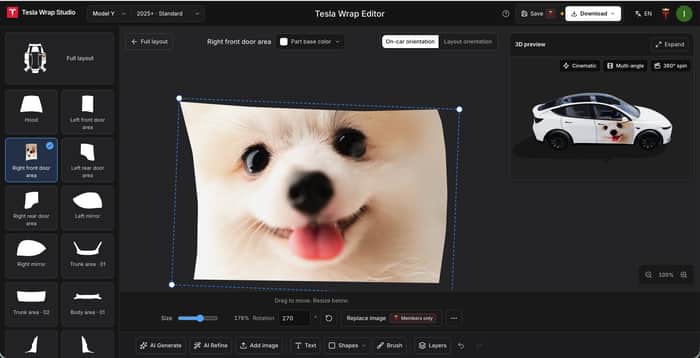
It lets you place your own photos on different parts of the car, adjust their position, size, and rotation, and see the result in 3D as you edit.
By “digital wraps,” I mean changing how the vehicle model looks on your Tesla's screen and in the app. Your actual car stays the same.
For example, you can put a photo of your dog on the door:

Why I built it
The idea came from a friend who's also an indie developer.
He showed me a Tesla digital wrap product and suggested I give it a try. I already own a Tesla, and there were some interesting technical challenges to work on.
I looked into it and found that Tesla already provides image templates for different models on GitHub. You can download a template, add photos, text, or drawings in Photoshop, and export it to use on the vehicle model on your car's screen.
That gives you a lot of freedom. But if you're unfamiliar with image editing, finding the right template, figuring out which area goes where, and editing the image can take some effort.
I also looked at a few competing products. They seemed to emphasize ready-made wrap galleries and AI generation: download a design you like, or describe what you want and let AI generate it.
I was more interested in another situation: you already have a photo you love and want to use it in your design.
Maybe it's a photo of your dog or cat. You already know what you want to put on the car. What would help is an easy way to position, resize, and rotate it, with a preview so you can see how it looks.
That's the process I wanted to simplify: choose a body panel, add your image, make a few adjustments, and see the result.
There's just something about seeing your own dog on there.
What I built in those two weeks
The product currently has three main parts:
- A wrap gallery: Free downloads of ready-made wraps, plus checks to see whether images meet Tesla's file requirements.
- An online editor: Design with your own images and text, or use AI to generate a design, fill in the remaining panels, or make the overall style more consistent.
- A live 3D preview: See changes as you edit, rotate the model, and check whether the image is positioned where you want it.
Here's how that dog photo looks on the door:

The part I most want to get right is designing with your own images, so someone who's never made a digital wrap can bring their idea to life.
Someone paid before I started actively promoting it
I did some SEO work while building the product.
Before I started actively promoting it, I woke up one morning to a payment notification. A user in Japan had found the site through Google and made a purchase on an Android phone.
I'd spent the previous few days working on the product, often late into the night. Seeing someone willing to pay for it made me pretty happy.

Of course, one purchase doesn't mean I've got everything right. But it was a real encouragement at that point.
I've recently started sharing the product in developer communities to hear what people think when they try it for the first time. When you use something every day, it's easy to miss the places where a new user might get stuck.
I'd love your feedback
Here's the product: Tesla Wrap Studio
I'd appreciate your thoughts on a few things:
- When you first land on the homepage, can you tell what the product does? Does it make you want to try it?
- Do you see any problems with the website or product design? For example, is the structure clear and easy to follow? Does the pricing seem reasonable?
- While trying it out, which step feels most confusing or makes you want to stop?
- If you own a Tesla, would you want to create your own digital wrap? If not, is it something you simply don't need, or do the current features and results not appeal to you?
You don't need to own a Tesla to give feedback. I'd also love to hear whether the homepage and editor are easy to understand.
No need to answer every question. Even one honest first impression would help. If something is confusing or frustrating to use, tell me. I'll read every response.

ice one. The “use your own photo” use case is clearer than most of the gallery-heavy alternatives.
Getting that first organic sale before any real promotion is a good feeling, especially after the late nights.
Hope the feedback comes in useful and helps you tighten the flow for new users. Looking after yourself while shipping this fast is worth doing too.
Thanks, Stefan! That’s exactly what I want to make easier: taking a photo you care about and turning it into a digital wrap. Getting that sale after all those late nights felt pretty good.
If you get a chance to try the editor, I’d love to hear where anything feels confusing. And thanks for the reminder to get some rest! 🙂
The organic purchase is a useful signal. Do you know whether that buyer was paying specifically for the custom-image editor, or for the broader wrap product?
Good question. I don’t know yet. I can see that they found the site through Google and made a purchase, but that doesn’t tell me which feature motivated them to pay.
Editing with your own photos is the use case I’m most interested in, but I haven’t confirmed whether that’s what this buyer wanted. I’d like to ask what they were trying to create and what made them decide to buy.
How would you go about figuring that out in a situation like this?
The buyer’s actual use case is the key signal now. If you’re open to it, what’s the best email to reach you on?
Sure, you can reach me at support@teslawrap.studio. I’d love to hear how you’d approach understanding what motivated this buyer to pay.
Thanks! I’ve just sent it over.
Looking forward to hearing your thoughts whenever you have a chance.
Great execution on the 3D preview — that's the killer feature. SEO paying off before launch is the dream. One thing: pricing page could show a comparison (your tool vs Photoshop + template time). Curious what the conversion rate is from editor session to purchase?
Thanks! Glad the 3D preview stood out. The Photoshop comparison is a useful suggestion, especially around the steps and time involved in making a wrap.
I don’t have a reliable editor-to-purchase conversion rate to share yet. It’s still early, and I’m gathering feedback on the experience. I’m particularly interested in where people get stuck or decide not to continue.