I built a todo list app with React Hooks 😎
Hey!
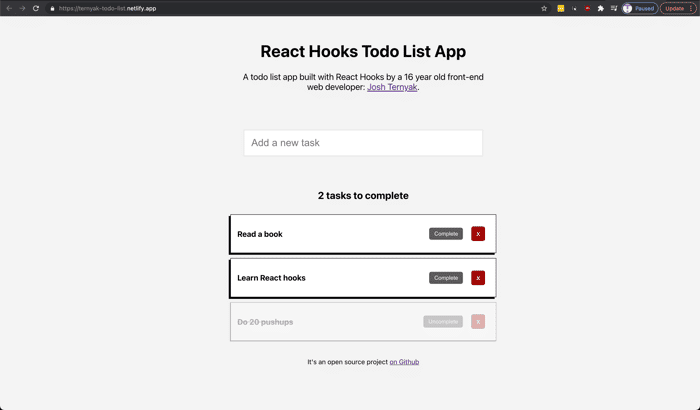
To teach myself react hooks, I built a todo list app using React Hooks, and some CSS.
You can try it here.
It's the first web application I've built with React hooks, so I'd definitely appreciate any feedback on the open source Github repo.

useCaptainHook🎉Is that a custom hook that is good for a todo list application?
Haha no it's just pun reference to the guy from peter pan.
But maybe it should be a package 😛
Haha I even searched that package on Google to try to find the package lol.
In JS world it's a fair assumption that anything exists lol
Excellent job! It’s great that you’re happy to post your code in public.
You’ve had some good feedback already and I don’t have anything to add, but I wanted to reply to say that you’re doing great! Keep it up!!
Hey Dave,
Thanks! I appreciate it:)
Nice work Josh.
One thing I wish I had learned earlier is the concept of normalized state.
Instead of storing your tasks in an array, store them in an object.
That way, reads/edits are fast and easy.
e.g.
Then getting a value is as easy as
tasks[taskId].titleSetting/editing values is easy too, you don't have to do any array manipulations.
Since objects don't have order, you can have another array to keep track of order
e.g.
Then producing the list is easy:
tasksArray.map(taskId =>
<div>
{tasks[taskId].title}
</div>
);
This is very useful once your state becomes larger and/or more complex.
See: https://redux.js.org/recipes/structuring-reducers/normalizing-state-shape
That's extremely helpful. Thank you!
Hi Josh, nice project! :)
Hey! Thanks :)
Very good job, and really brave to share the source code. Adding the date and time for each task might be a big advantage, but I'm not sure if you would like to develop your product in that direction.
Thank you! That's a good idea for a way to improve the product. I will give that a shot!
Congrats! Will give it try for preparing our launch with paperless.io
Great! Thank you, let me know how the launch goes.
Nicely done, thanks for sharing!
Thanks, appreciate it!
Nice job! It takes some courage to post a source code, especially when you are learning something new.
Keep going :)
Thanks :)
When I add a new item the number of tests to complete increments, but the item doesn't show in the list.
UI is nice, I'd suggest making the 'complete' and 'X' buttons a bit nicer to match the rest of your design, check out Feather Icons for React - might be useful.
It's because the container of the Tasks a max height, you just have to scroll down on top of the tasks and you will be able to see the other ones. I might improve this in the near future.
This comment was deleted 4 years ago
That's helpful! Thank you.