# I built an AI Email Assistant to learn production-grade AI automation
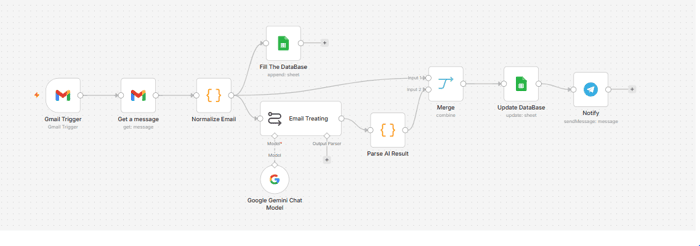
Over the past few weeks, I've been focusing on becoming an AI Automation Engineer. Instead of building another CRUD application, I wanted to create something closer to what businesses actually use.
So I built an AI Email Assistant using n8n, Gemini, Gmail, Google Sheets, and Telegram.
The objective wasn't to launch a SaaS. It was to learn how to design reliable AI workflows that could eventually be used in production.
The problem
Many professionals spend a significant amount of time reading emails, identifying which ones require attention, writing repetitive replies, and organizing follow-up actions.
I wanted to automate the repetitive parts while keeping the human in control.
What the workflow does
The workflow:
-
Monitors a Gmail inbox
-
Cleans and normalizes incoming emails
-
Uses a single Gemini call to:
- classify the email
- generate a summary
- draft a reply
-
Validates the AI output as strict JSON
-
Stores the results in Google Sheets
-
Sends a Telegram notification
-
Requires human approval before any reply can be sent
No email is ever sent automatically.
Design decisions
While building it, I tried to make decisions that improve reliability instead of simply making the workflow "work."
Some choices include:
- A single LLM call instead of multiple requests
- JSON schema validation after every AI response
- Human-in-the-loop validation
- Retry strategies for external APIs
- Logging workflow state throughout execution
- Separating normalization, AI processing, and persistence
These patterns make the workflow easier to maintain and extend.
What I learned
This project taught me that building AI automations is much more than calling an LLM.
The most challenging parts were:
- handling failures
- validating AI responses
- designing maintainable workflows
- defining clear responsibilities for each node
- thinking about production rather than demos
What I would improve next
There are several improvements I would like to add:
- PostgreSQL instead of Google Sheets
- Queue-based processing
- Multi-account support
- Attachment handling
- Calendar integration
- Fallback LLM providers
- Better monitoring and metrics
Open source
The entire project is available on GitHub:
GitHub: https://github.com/HakimDev-tech/ai-email-assistant-n8n
I'm currently building a portfolio of AI automation projects, so I'd appreciate any feedback on the workflow architecture, engineering decisions, or documentation.
Constructive criticism is always welcome.
