I got tired of setting up my dev environment every day, so I built a tool — and got 2 paying customers
I got tired of setting up my dev environment every day, so I built a tool — and got 2 paying customers
I work on 5–6 projects at the same time.
On any given day, I'm jumping between 2–3 of them. Each project means 3–4 terminal windows, an IDE, a browser for testing, and sometimes Postman and a database client to check things.
I tried to stay organized. Set up multiple desktops on Mac, arranged everything neatly. But then I'd plug in my external monitor at a coffee shop, unplug it later, and everything would scatter. Terminals on the wrong desktop. Windows stacked on top of each other. Complete mess.
And honestly? I have this habit of closing everything when I'm done for the day. Clean desktop, fresh start. Except the next morning I'm spending 15 minutes opening the same terminals, navigating to the same directories, loading the same browser tabs. Every. Single. Day.
One day I realized I'd been doing this setup ritual for years. That's hundreds of hours just... getting ready to work.
So I started building something for myself.
What 1DevTool actually is
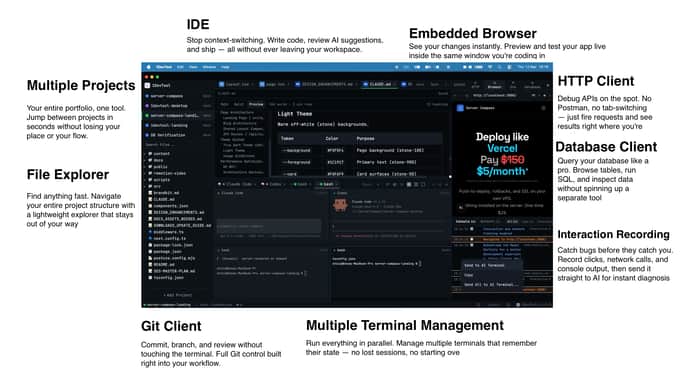
It's a desktop app where each project gets its own workspace. Inside that workspace: terminals, code editor, browser, HTTP client, database client, git — all in one window.
Switch projects with Cmd+P. Everything restores exactly how you left it.
Close the app, shut down your computer, come back tomorrow — your terminals are still there with full scrollback. No setup. Just keep working.
The small things that ended up mattering
When I started, I thought the main value was just "put everything in one window." But as I used it myself, I kept adding small optimizations that saved real time.
Browser that actually helps you debug
There's a browser panel built in. But it's not just for previewing your app — it captures console logs, errors, and network requests. When something breaks, you can send all of that context to your AI terminal (Claude, Codex, Gemini, whatever you use) in one click.
No more copying error messages, screenshotting the network tab, pasting into the AI, realizing you forgot something, going back...
You can view the demo of how quick to fix bug with Browser Interaction + Screenshot here https://www.youtube.com/watch?v=hwku_PhXfoU
Git without switching windows
I used to Cmd+Tab to a separate git client or terminal just to check diffs and commit. Now it's a tab in the same window. View changes, stage files, write a commit message, done. Sounds small but it removes a lot of friction.
Terminal sessions that survive everything
This one took a while to get right. The terminals use tmux under the hood, so when you quit the app or restart your machine, your sessions are still there. Scrollback preserved. If you were in the middle of something, you pick up exactly where you left off.
Prompt editor for AI agents
If you're using AI coding tools, you know the terminal input is tiny and annoying. I added an overlay (Cmd+I) where you can actually write. @ mention files from your project, drag in screenshots, format with markdown, preview before sending. Small thing, but I use it constantly.
The stack
- Electron (yeah, I know, but it works and it's cross-platform)
- React + TypeScript
- xterm.js for terminals
- Monaco for the code editor
- Zustand for state
- tmux for session persistence
Works on Mac, Windows, and Linux.
Where I'm at now
Been using it myself for months. It's at the point where I genuinely can't go back to my old workflow. The "open app and immediately start working" feeling is hard to give up once you have it.
Just released version 1.4 with a canvas layout where you can drag terminals anywhere, and a prompt history that archives every prompt you've sent to AI agents across all projects.
Posted about it for the first time yesterday and got 2 paying customers. Small number, but it meant a lot — someone handing over money for something you built scratches a different itch than likes or upvotes.
Try it
If any of this sounds like problems you have: https://1devtool.com
Would love to hear how other people manage multiple projects. Am I the only one who was doing the "close everything, set up again tomorrow" thing? Or is there a better system I never figured out?
