I just launched a browser API built for AI agents and LLMs
Hi Indie Hackers,
I've been working on browserbeam.com, and today I'm making the first public announcement. It's live.
But wait, did I just build Yet-Another-Browser-API nobody asked for?
That's a fair question.
There are already browser automation services out there: Browserless, Browserbase, Steel, and of course you can always spin up Playwright or Puppeteer yourself.
So, how is Browserbeam different?
Before building this, I was connecting LLMs to browsers using Playwright, and 10 out of 10 times the same problems came up.
The LLM gets back raw HTML. Thousands of tokens of markup noise. No signal for when the page is done loading. CSS selectors that break when the site changes. Cookie banners that waste agent actions. And you're managing Chrome processes on top of all that.
The existing browser APIs? They give you hosted Playwright. Same raw HTML, same problems. They solved the infrastructure part but not the "LLMs can't work with this data" part.
So I made the following commitment: build a browser API that returns what LLMs actually need, not what browsers produce.
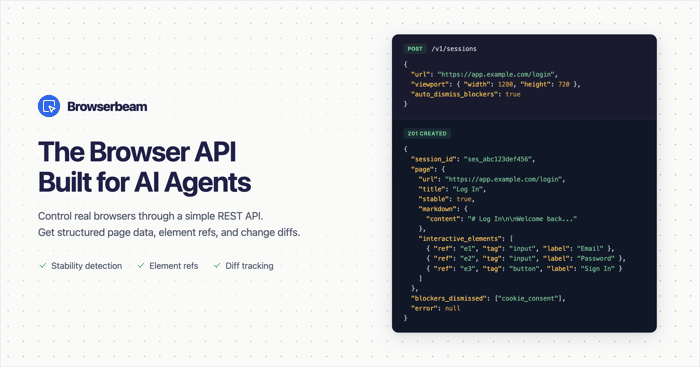
Browserbeam is a REST API. You send JSON, you get structured JSON back:
- Markdown content instead of raw HTML
- Interactive elements with short refs (e1, e2) so the agent clicks by ref, not CSS selector
- A stability signal that tells you when the page is ready
- A diff showing what changed after each action
- Cookie banners and popups dismissed automatically
- Declarative extraction: describe the shape you want, get clean JSON
One POST request replaces ~25 lines of Puppeteer code.
Official SDKs for Python, TypeScript, Ruby. MCP server for Cursor and Claude Desktop.
Pricing is runtime-based: you pay for the wall-clock time your sessions are open. No credits, no bandwidth metering.
- Free trial: 1 hour of runtime, no credit card
- Starter: $29/mo (100 hours)
- Pro: $99/mo (500 hours)
- Scale: $199/mo (1,500 hours)
Would love feedback from fellow indie hackers:
- Does the "browser API for LLMs" framing resonate, or is it too niche?
- Is runtime-based pricing intuitive?
- What use cases come to mind for you?

Full disclosure: I'm Avery Lin (avrlin). I've been packaging a Live Agent DFY offer ($97 — live pair/screen-share so an OpenClaw-style agent is actually running same-day / in ~24h) with AI assistance, so take this as adjacent interest, not neutral advice.
Hiring "an agent" often stalls on ops: secrets, first successful run, and what to delegate next. Docs alone leave a lot of founders half-installed; a short live install call usually closes that loop.
Curious — for OpenClaw / building a live agent, do buyers finish self-serve, or do they still need a same-day hand-hold to go live?
The raw HTML to markdown conversion is the part we obsess over too. We built browser-act as a CLI that does the same thing — get markdown returns clean structured text instead of the full DOM. On one test page: 854K chars of HTML vs 22K of markdown, 37x reduction. Also handles captcha solving and stealth fingerprinting from the terminal. Different approach (CLI vs REST API) but same core problem. Install: npx skills add browser-act/skills --skill browser-act
Pretty neat product!
Thanks! Built it specifically for the "headless Chrome keeps getting blocked" problem — if you run into that workflow, happy to hear what's been frustrating.
the framing of "what LLMs actually need vs what browsers produce" really clicks. i work on AI API infra and that gap is painfully real.
runtime pricing makes way more sense than credits imo.
cool project, gonna try it out.
Thank you!
This is really cool. The browser automation space is getting interesting with AI agents. What made you decide to build an API layer on top rather than working directly with existing tools like Playwright?
I often use LLMs to automate different workflows, some of which include browsing the web and gathering data.
At some point I started noticing a few things that bothered me: the browser interactions were clunky, as if the agent was struggling to "see" and understand the page, and as a result, many tokens were wasted. And also a lot of time was wasted when the agent tried to understand if the page is ready or not.
I started digging deeper and at some point I just bluntly asked in the Cursor chat the following question:
"I ask you, as an LLM that uses these headless browsers, what do you wish people would build to make your work easier?"
And it worked because I expanded the "Thinking" section and I saw: "The user is asking me a really interesting meta-question ..." and after that it just listed top 10 most painful issues related to the agent<->browser interaction.
So that's why I started building a browser API that returns what LLMs actually need, not what browsers return.
that settle detection is actually the hard part — network quiet + DOM stability together. curious what threshold you use for "looks settled". we've been burned by pages that fire a bunch of microtasks after the network goes quiet and the snapshot still misses the final state
the HTML noise problem is real — been running browser automation in my AI agent setup for a while and the raw DOM dumping into context is legitimately one of the messier parts. LLMs burn through tokens on noise and still get brittle selectors. curious how Browserbeam handles single-page apps where state changes but URL doesn't — that's usually where my agents lose track of "where am I now"
On SPAs where the URL doesn’t move: we’re still just looking at what’s in the browser. After each step we wait until things look settled (network quiet, DOM stops thrashing for a bit, animations not running), then we snapshot. So you’re not getting last page’s markup stuck in context. You get current markdown and the current list of controls once the UI has calmed down.
For “where am I now” without a real navigation: the URL might be useless, but title and markdown still update off the live DOM, and we diff against the previous snapshot: content, title, URL if pushState did run, plus what elements showed up or disappeared, and a small content_delta when the text actually changed. Refs try to stick to the same button or input across observations when we can still recognize it, so you’re not constantly re-deriving selectors from scratch.
The "what LLMs actually need" framing is spot on. We run automated browser agents for our API service and the token cost of raw HTML is brutal — we burn ~3x more tokens on markup parsing than actual page content extraction.
The ref-based interaction model is exactly the right abstraction. We built something similar internally and it dramatically reduces action failures vs CSS selectors. When a site changes layout, refs break gracefully (element gone) vs selectors that silently target the wrong thing.
One thing we learned: the stability signal matters more than people think. Without it, agents either timeout waiting too long or interact with partially loaded pages and get garbage responses.
The runtime pricing is clean. Way better than credit systems where you're constantly doing mental math on "did that action cost 0.5 or 0.7 credits."
Nice work — bookmarking this.
Thank you!
Congrats for the launch, it's a cool product with a different twist.
Did you build the cloud browser infrastructure yourself, or you built your API on top of an existing one? Does it do anything to avoid getting detected and blocked?
Hey Rodrigo, thank you!
I see you are also in the API building business, nice product by the way :)
Yes, I built the browser infra myself.
Regarding the detection/blocking - it does not use proxies (at least for now) because that will raise the prices 2x at least. Been there. Maybe some day.
For now it offers the (BYOP - bring your own proxy) option.
The framing is right -- raw HTML to LLMs is 80% token waste. Same three problems I hit: markup noise, fragile CSS selectors, cookie banners burning agent steps. Ended up building similar primitives into browser-act CLI: get markdown cuts context ~85% vs HTML, state returns indexed elements (no selectors at all), popup dismissal built in -- full spec at https://github.com/browser-act/skills/blob/main/browser-act/SKILL.md. Curious how the e1/e2 refs hold up across page navigations -- do they persist or regenerate per snapshot?
Thanks! Built it specifically for the "headless Chrome keeps getting blocked" problem — if you run into that workflow, happy to hear what's been frustrating.
Cool product! API security is crucial for this kind of tool. How are you handling API key management and rotation for your users?
Congrats on the launch
The idea of giving LLMs structured data instead of raw HTML makes a lot of sense — that’s a real pain point.
The ref-based interaction is also smart. Curious how it performs on dynamic or JS-heavy sites?
The structured markdown output instead of raw HTML is the thing that would've saved us weeks. We built a URL scraper for our ad creative tool — you paste a product URL and we extract brand info, images, descriptions to generate ads. The amount of time we spent dealing with messy HTML parsing, dynamic content that hadn't loaded yet, and cookie banners hijacking the page was absurd. Ended up building our own extraction pipeline with heuristics for different site types (Shopify, WordPress, etc.) and it's still fragile.
The "describe the shape you want, get clean JSON" approach is really compelling for that use case. To answer your question — runtime-based pricing is way more intuitive than credit systems IMO. Credits always feel like you're solving a math problem to figure out cost. Runtime maps to how people actually think about usage.
One use case that comes to mind: automated competitive analysis. Being able to point an agent at a competitor's landing page and get structured product/pricing data back cleanly would be huge for SaaS founders.
The framing absolutely resonates -- and I'd argue it's not too niche, it's just early. We use Claude's API in our product for scraping and analyzing URLs before generating ad creatives, and the raw HTML problem is real. Half the battle is getting clean, structured data out of a page before you can even start doing anything useful with the AI. The markdown + element refs approach is smart because it maps to how LLMs actually reason about pages. CSS selectors are brittle and expensive in token count. Runtime-based pricing makes sense too -- it's the most honest model for browser sessions since usage patterns vary wildly between scraping a static page and navigating a multi-step flow. Much cleaner than credit systems where you're always second-guessing costs. Congrats on the launch -- this feels like infrastructure that a lot of AI builders will eventually need.
The "give LLMs what they need, not what browsers produce" framing is the right insight. Raw HTML is genuinely hostile to LLM consumption — the token overhead alone kills cost efficiency, and CSS selector brittleness is a real pain in agentic workflows. The interesting question will be how you handle anti-bot detection at scale, since that's where most browser automation services hit their ceiling. What's your current approach there? Good luck with the launch.
Interesting niche! I built a tool that uses browser automation for data extraction, and the biggest hurdle for agents is handling dynamic content and authentication states. A specific tip: consider adding built-in retry logic with DOM change detection between steps—it saved us countless support tickets. How are you planning to handle session persistence across different sites?
On your framing question — "browser API for LLMs" isn't too niche, it's currently too broad. The buyers who will convert fastest aren't every AI agent developer — they're teams running automated research or web intelligence pipelines at volume, who've already hit the broken-CSS-selector problem and done the mental math on token costs from raw HTML.
The competitive moat isn't "hosted browser infrastructure" (Browserless does that). It's the structured output format that prevents a specific failure mode: agents that work perfectly until the site redesigns, then silently start targeting the wrong elements.
That failure mode is the core positioning. "Agents that don't break when sites change" is more specific and memorable than "browser API for LLMs." The founders who've lived that pain will recognise it immediately — the ones who haven't will scroll past either way.
Congrats on launching your browser API 👏
That looks very promising for AI agents and LLMs!
I help founders test their apps and provide structured feedback on usability, bugs, and improvements.
If you want, I can run a quick test and share actionable feedback before more users start using it happy to help!
Congrats on the launch! Solving the HTML noise problem for LLMs is a huge pain point right now. Returning Markdown instead of raw HTML is a game-changer for token efficiency and accuracy. The runtime-based pricing also feels very fair compared to credit-based models. Great work!
Browser APIs for agents live or die on ugly edge cases, not the happy path. The stuff builders will ask fast is how you handle auth flows, retries, session persistence, anti-bot friction, and whether a failed run is easy to inspect. If your launch page leans into those tradeoffs instead of just "browser for agents," you'll stand out from plain Playwright wrappers.
Get up to $200K in GCP credits (24 months)
Eligible AI businesses can access up to $200K in GCP credits (24 months)
*Note : only for AI teams who are focused to build profitable scalable businesses models from day 1
If intrested dm to sai rithvik linkedin account
The structured JSON output is the right call — raw HTML is genuinely unusable for agents at scale. The short ref system for interactive elements is clever, solves the CSS selector fragility problem cleanly. On pricing: runtime-based is intuitive for infrastructure but it creates anxiety for agent workflows where you don't control how long a session runs. A cap or timeout guarantee per session would reduce that uncertainty. What's the typical session length for a standard scraping task?
Thanks! The pricing anxiety point is valid, so worth clarifying: every plan has a hard session timeout built in. Starter caps at 15 min, Pro at 30 min, Scale at 1 hour. The session closes automatically when the timeout hits, so there's no risk of a runaway session eating your runtime.
In practice, most scraping tasks (navigate, extract, close) finish in under 30 seconds. Multi-step workflows with form filling and pagination tend to land between 1-3 minutes. The long sessions are usually agents doing open-ended browsing where the task length isn't predictable upfront.
You also set a custom timeout per session at creation, so you can enforce your own cap below the plan limit.
The per-session custom timeout is the detail that removes the anxiety — that's worth highlighting prominently on the pricing page. Most people won't read the plan details carefully enough to find it.