I Open-Sourced my Stripe Pricing Strategy for CoverLetterGPT
Hey All,
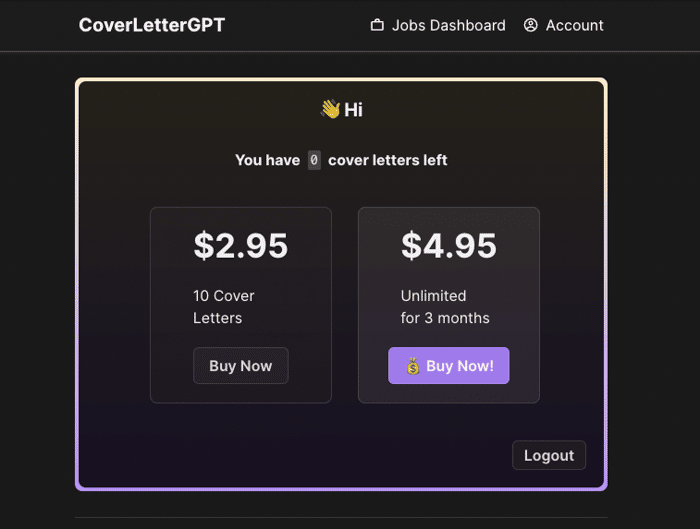
So CoverLetterGPT.xyz is going strong with just shy of 500 users, so I thought I'd give an update to the github repo which shows my pricing strategy and how I implemented Stripe checkout

For those curious, I implemented Stripe in two different ways, just to try out different approaches and get a feel for how stripe works:
- With a one-time payment, then I use cron jobs to check every day if the user's
datePaidis greater than 3 months, if so I turn off their unlimited status. This functions as my subscription model. - With stripe webhooks for users that buy 10 credits. I listen for the webhook and increment the user's
creditsfield in the DB.
Reach out to me on twitter if you have any Qs: https://twitter.com/hot_town

Hey there! First of all, congratulations on reaching close to 500 users! That's an amazing milestone. And it's fantastic that you've open-sourced your Stripe PricingStrategy - that's a great way to contribute to the community and help others learn from your implementation. It's really cool that you tried out two different approaches with Stripe, showcasing your adaptability and willingness to experiment.
What were the main challenges you faced while implementing Stripe checkout for CoverLetterGPT? And how did you decide on the pricing strategy?
Okay first of all congrats on launching a product, and getting paid users! As an Indie Hacker that's amazing, and is an incredible milestone.
I do Stripe Consulting as a side hustle, and am noticing a few red flags in your code.
1: You are missing the Stripe Webhook secret. This means anyone can call your API and update how many credits they have.
2: Instead of running a Cron Job, I'd leverage a Stripe Subscription. You could set it to auto cancel at the end of the 3 months, and this would give you a stripe webhook to update your DB. But as a business, why not have this auto renew? You can also send auto renewal emails diretly through Stripe.
3: Your dictating updating the DB based on a price. See Line 32 ServerSetup.ts. if (paymentIntent.amount === 295) You never want to dictate logic in your app based on the price. As time goes on you will update your price, and it's nice to not also have to update your webapp. You also might offer different services someday and want to charge the same price. Using your logic, this would update your DB even if you just manually charged someone in the Stripe Portal. Instead you should test if the payment was tied to a specific product.
I don't want to come off as rude. Again that's really cool you created a product that is providing value to customers! Hope the above feedback is helpful.
Hey Shayne,
Thanks so much for the thorough reply. You can tell this is my first time implementing stripe, right? ;)
I knew about the webhook secret but atm I'm not able to implement it because of a middleware issue. I tried a couple workarounds, but wasn't able to get the raw request body. Is there a possible workaround albeit even if its somewhat less secure? My assumption was that you'd have to pretty good at hacking to figure out the customer stripe id and the payload, and then even if you did pull it off succesfully, you'd only be saving yourself $2.95 😂
I was already working on refactoring the code to use subscriptions
What would be better than checking price? the price or product id?
Thanks again, and no, you didn't come off rude at all. This was very helpful and I appreciate the time and effort it took you to review my code 🙏
1: I don't think there is much of a workaround. You could check for a referrer, but at that point it'd be worth your time to just figure out the webhook secret. Also you are right, that worst case scenario is someone saves $2.95 lol
3: Yes I'd check for the product ID. But also once you implement subscriptions this might not even be relevant.
did you get this idea from explodingideas.co? they overviewed something similar a couple weeks ago.
regardless well done!
no. I released this on March 9th and already had the idea after chatGPT API released
Nice. The Cron job solutions reminds me the way I used to build it for Alfadata. Did you also implement the cancel subscription ?
yep. But I'm thinking of switching the logic to use the stripe subscription product instead
Yes, I think that is the best way forward. I might have some code in github that handles that, but I was using Flask so I don't think you can reuse it unfortunately...
Good luck with the Product!
Good work
Thanks!