I Rebuilt My Comic Canvas Several Times Before Settling on Fabric.js
When I started building Manhwa AI, I assumed the canvas editor would be one of the easier parts of the product.
The difficult part, I thought, would be generating characters, maintaining visual consistency, and turning a story into a sequence of comic panels.
I was wrong.
Generating an image and placing it on a page is relatively simple. Building an editor where users can move, crop, resize, reorder, replace, edit, and export dozens of comic elements is a completely different problem.
Over the past few months, I tried several canvas architectures. Some were quick to prototype but difficult to extend. Others gave me more control but became slow or complicated as the editor grew.
I eventually settled on Fabric.js. It is not perfect, but it is the first architecture that has remained stable as I continue adding features.
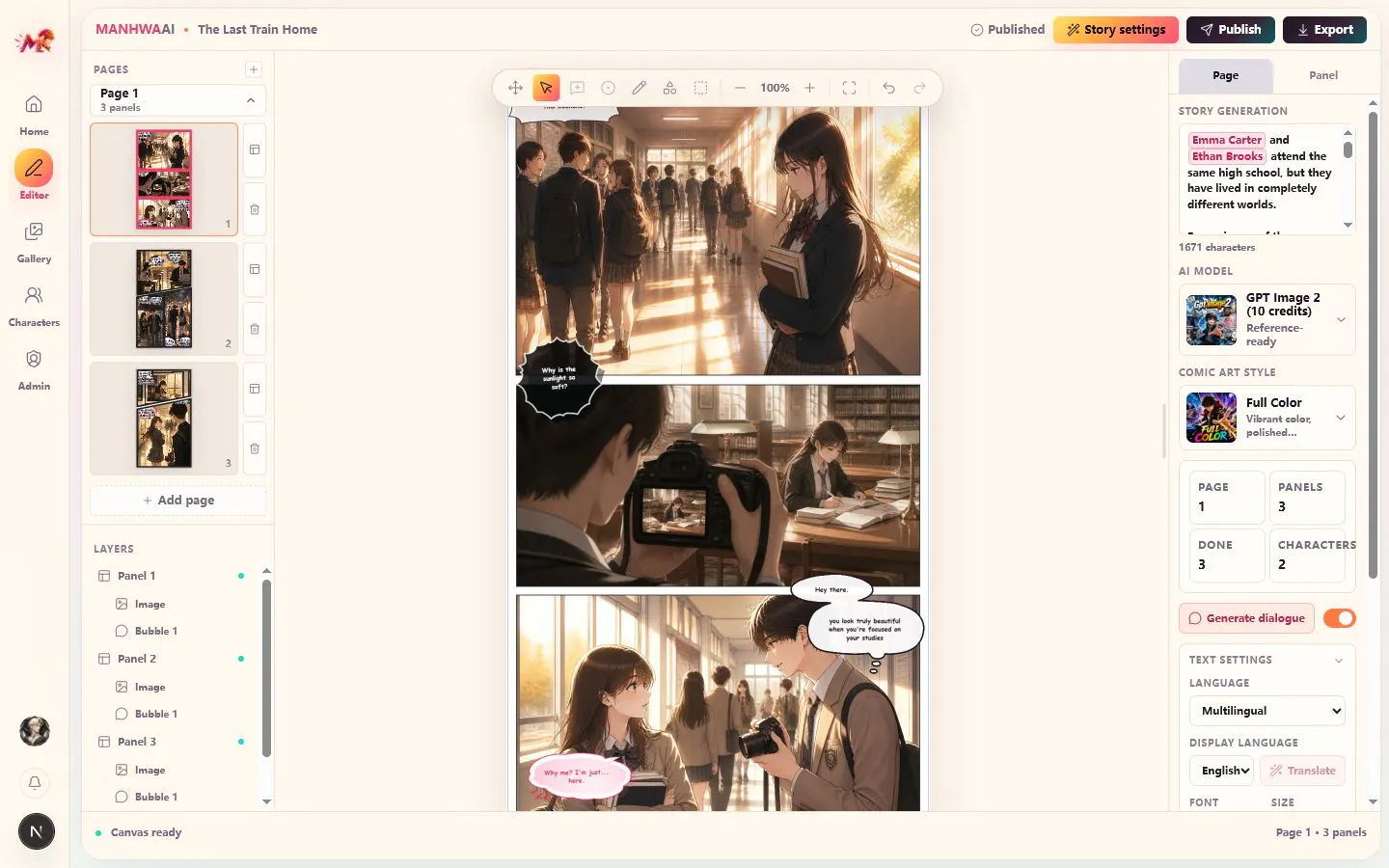
Here is the product: https://www.manhwaai.net/
What the editor actually needed to do
Manhwa AI is not just an image generator.
A typical comic page can contain:
Multiple panels
Generated images
Cropped character scenes
Speech bubbles
Dialogue text
Captions
Background elements
Decorative shapes
Layer ordering
Different page sizes and export formats
Users also need to replace an image without destroying its position, adjust the crop inside a panel, move dialogue bubbles, duplicate pages, undo changes, and export the final comic at a high resolution.
The editor also has to receive generated images while the user is working. A new panel may finish generating after the page has already been opened and edited.
This means the canvas is not just a visual surface. It is one of the main data structures of the product.
That was something I underestimated at the beginning.
My first approach: Native HTML5 Canvas
My first approach was to build the editor directly with HTML5 Canvas.
This gave me complete control. There was no framework forcing a particular object model or interaction pattern on the editor.
It also meant I had to build almost everything myself.
Even basic editor behavior required a surprising amount of code:
Detecting which object the user selected
Dragging and resizing objects
Drawing transformation controls
Rotating elements
Managing object order
Editing text
Grouping objects
Handling keyboard shortcuts
Implementing undo and redo
Saving and restoring the canvas state
Comic-specific features made it even more difficult.
I needed images to move inside fixed panel boundaries. Speech bubbles needed to be both draggable and editable. Panels had to clip images correctly. Exported pages had to match what users saw inside the editor.
None of these problems were impossible to solve with native Canvas. The issue was the amount of editor infrastructure I had to build before I could work on the actual product.
Every new feature added more event handling and more state logic. Selection, dragging, resizing, and text editing all affected one another. The code became harder to maintain much faster than I expected.
Native Canvas offered the most freedom, but it was not a practical foundation for an independent developer trying to build a full comic editor quickly.
Attempt 2: React-Konva
My next attempt used React with react-konva.
Konva provided a more mature node system than native Canvas. Images, text, groups, shapes, and events were easier to manage. I could build a functional editor much faster.
For an early version, it worked well.
The problems appeared when the editor started growing.
React state and Konva node state needed to stay synchronized. At first, this seemed straightforward. A user dragged an object, the position changed, and I saved the new position to React state.
But as the number of editable properties increased, the synchronization logic became more complicated.
Some values existed in React state. Some existed inside the Konva nodes. Some temporary values only existed during an interaction. Updating everything continuously during dragging or resizing could also affect performance.
Complex objects required more custom code than I expected.
Text editing was not as direct as displaying text. Image cropping needed its own interaction model. Grouping, serialization, custom transformation behavior, layer management, and history all required additional infrastructure.
Each individual feature was possible, but the editor architecture became increasingly heavy.
Adding a new object type was rarely just “create a new node.” It usually meant updating selection logic, transformation logic, serialization, state synchronization, history, and export behavior.
React-Konva was much better than starting from native Canvas, but it still felt like I was building too much of the editor framework myself.
It worked better for relatively fixed graphical interactions. Manhwa AI needed an editor whose capabilities would continue expanding.
Attempt 3: Tldraw
Tldraw looked promising because it already had many polished canvas interactions.
Selection, dragging, resizing, zooming, panning, and infinite canvas behavior were built in. Compared with my earlier approaches, it seemed like I could skip a lot of low-level editor work.
I spent a large amount of development time and AI coding tokens testing it.
The prototype looked promising at first. But once I tried to adapt it to comic editing, progress slowed down.
Tldraw is designed around an infinite whiteboard model. Manhwa AI is built around fixed comic pages, panels, cropped images, speech bubbles, precise layout, and predictable export.
Those are very different assumptions.
The clearest example was the speech bubble.
A speech bubble in Manhwa AI needs to behave like a combined editable object. Users should be able to drag it, resize it, change its text, and place it precisely over a panel.
After a lot of testing and debugging, I still did not have a stable implementation where the bubble could be moved and edited in the way the product required.
This does not necessarily mean Tldraw cannot support that behavior.
With enough customization, custom shapes, event handling, and changes to the editor model, it probably can.
The problem was the cost.
I was already spending more time adapting Tldraw than I would have spent implementing the feature in a canvas library designed around editable design objects.
Every comic-specific behavior required another layer of customization. Fixed page boundaries, panel clipping, image cropping, text editing, and high-quality export all moved further away from Tldraw’s default use case.
Tldraw gave me a mature whiteboard, but I did not need a whiteboard. I needed a comic layout editor.
That distinction ended up mattering more than the quality of the library itself.
Why Fabric.js worked better for Manhwa AI
I had considered Fabric.js earlier, but initially dismissed it because it felt less modern than some of the newer canvas libraries.
After the other attempts, I came back to it with a clearer understanding of what the editor actually required.
Native Canvas gave me complete control but almost no editor infrastructure.
Tldraw and Excalidraw provided complete editing environments, but their environments were designed around whiteboards.
React-Konva sat somewhere in the middle, but the amount of state synchronization and custom interaction code continued to grow.
Fabric’s object model matched the product surprisingly well.
Images, text, shapes, groups, clipping paths, and custom controls are all first-class concepts. Objects can be serialized into JSON and reconstructed later. Events are predictable, and the canvas can be exported at a higher resolution than the editing viewport.
More importantly, I did not have to fight the library’s core assumptions.
A comic page is stored as structured objects rather than a flattened image. A panel can have its own clipping path. Dialogue remains editable text. Generated scenes remain replaceable image objects. Layer order can be changed without rebuilding the page.
Fabric also made it easier to separate the editor into two layers:
The Fabric canvas handles temporary interactions such as dragging, resizing, rotating, and selecting.
The application state stores the persistent comic document, page metadata, generation status, and saved JSON.
I no longer update the entire React state tree during every pointer movement. The canvas handles the live interaction, and the result is synchronized back to the application state when the action finishes.
That change alone made the editor much more stable.
The current architecture
The stable version of Manhwa Canvas now follows a few rules.
Only the active page needs to be fully rendered and interactive. Other pages can be represented by lightweight previews until the user opens them.
Fabric owns the live object state while the user is editing. The application store receives updates after meaningful actions such as moving an object, changing text, replacing an image, or reordering a layer.
Editor actions pass through a command layer. For example, replacing a panel image is treated as one operation rather than a sequence of unrelated canvas mutations. This makes undo and redo easier to manage.
Comic pages are saved as structured JSON. Generated images and other large files are stored separately, with references inside the page document.
For export, the page is rendered using a higher multiplier rather than being limited to the editor’s on-screen dimensions.
I also had to make several performance changes:
Avoid syncing state during every mouse movement
Reduce unnecessary canvas rerenders
Load full-resolution images only when needed
Generate smaller thumbnails for page navigation
Disable expensive object checks when they are not required
Keep inactive pages outside the main interactive canvas
Batch object updates before rendering
Fabric did not solve these problems automatically, but it gave me a foundation where solving them did not require working against the library.
Fabric.js is not perfect
There are still parts of Fabric that require extra work.
Text editing across browsers can be inconsistent. Complex clipping paths need careful handling. Undo and redo are not provided as a complete document-history system. Major version changes can also affect serialization and custom controls.
Some parts of the documentation are easier to understand by reading examples or source code.
But these are manageable problems.
The difference is that the work now contributes directly to the product. I am extending an editor architecture that already matches the way comic pages are represented.
With the previous approaches, I often felt that I was adapting the product to the canvas library.
With Fabric, I can adapt the canvas to the product.
What I learned
The best library was not the one with the most impressive demo or the newest architecture.
It was the one whose data model was closest to my product.
Whiteboard libraries are excellent when the product is fundamentally a whiteboard. Lower-level rendering libraries are useful when a team has enough time to build and maintain a complete editor framework.
For Manhwa AI, I needed something in the middle: enough built-in editing behavior to avoid rebuilding everything, but enough control to support comic-specific interactions.
Fabric.js turned out to be that middle ground.
Rebuilding the canvas several times cost me a lot of development time, but it also forced me to understand the editor at a much deeper level.
The canvas is no longer just the place where generated images appear.
It is the core workspace where a collection of generated assets becomes an actual comic.
Suggested title alternatives:
Why Fabric.js Became the Foundation of My AI Comic Editor
I Tried Multiple Canvas Libraries for My Comic Editor. Fabric.js Was the One That Stayed
Choosing a Canvas Architecture for an AI Manhwa Editor
The Canvas Library That Finally Worked for My Comic Creation Tool
Here is the product: https://www.manhwaai.net/
Indie Hackers tags:
Development·Technical Decisions·Build in Public·AI·Bootstrapping

