I rebuilt the clients section of my CRM from scratch. Every decision, every reason.
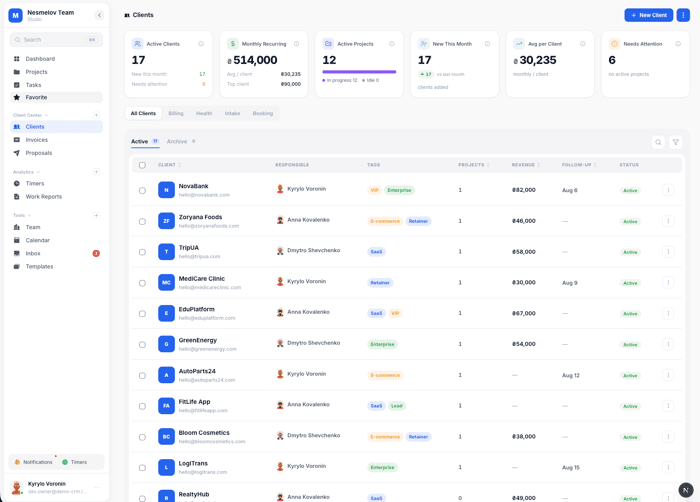
Six months ago, the clients section of Melororium was a list. Name, email, monthly payment. A link to open the client's projects. That was it.
I knew it was weak. But I kept delaying the rewrite because there was always something more urgent — the kanban board, the invoice PDF, the timer module. Clients is the section you look at every day but rarely build until something breaks.
What broke it: I was demoing Melororium to an agency owner in Tbilisi. Ten people. Eight active clients. She opened the clients page, clicked on a client, and asked: "Where do I see when I last talked to them? Where do I send them a brief? How do I know if this client is about to churn?"
Three valid questions. Three things the CRM didn't do.
That conversation became a three-week sprint that turned the clients section into one of the most complex parts of Melororium. This post is everything I built and exactly why I built it — decision by decision.
Why the original version was a mistake
The first version treated clients as a reference object. You attached projects to them. You stored their email. That was the relationship model.
But a client is not a project container. A client is a relationship with a financial value, a communication history, a trust level, and a risk of churning. None of that lived in the old model.
The agency owner in Tbilisi had eight clients. She knew, instinctively, which ones were hot and which were cooling off. But that knowledge lived only in her head. If she hired a project manager, that person would have zero context. If she went on vacation, follow-ups would drop.
That's the core problem: client relationship management requires memory, and software is supposed to be that memory.
So I started from scratch. I listed every question an agency owner asks about their clients:
- Which clients need attention right now?
- When did I last talk to each one?
- Who owes me money, and how overdue is it?
- Which clients are growing and which are going quiet?
- How do I send a brief to a new client?
- Where's that contract they sent me three months ago?
- Can I give clients a way to book a call without my calendar?
Seven questions. Seven features. Here's how I built each one.
1. The Health Score: making the invisible visible
The first thing I built was the health score. A single number, 0–100, that tells you how engaged a client is right now.
I've seen health scores in enterprise CRMs like Salesforce. They're usually complex — they pull in product usage data, support tickets, NPS scores. We're a CRM for agencies, not SaaS companies. I needed a simpler model that uses data an agency actually has.
Here's the algorithm I landed on:
Start at 50. Neutral.
Then adjust:
- Active tasks in progress: +25
- Has active projects: +10
- No active tasks: -15
Contact recency (days since last logged contact):
- Contacted within 14 days: +15
- Contacted within 30 days: +5
- Last contact 31–60 days ago: -10
- Last contact 60+ days ago: -25
- Never contacted: -10
Has a follow-up date set: +5
Clamp the result to 0–100.
So a client with active work, contacted last week, and a follow-up set next Tuesday scores around 95. A client with no active tasks, never contacted, and no follow-up set scores around 25.
Three output buckets:
- Healthy — score ≥ 50, has some recent activity
- At Risk — score < 50, things are slipping
- Dormant — no active tasks AND (never contacted OR last contact > 60 days)
The Dormant bucket is the one that matters most. Dormant clients churn. They don't announce it — they just stop responding. Catching them 30 days earlier is worth real money.
The score recalculates live, in the browser. The algorithm runs client-side from data that's already in the store. Zero API call needed.
I almost made it server-side, scheduled daily. Then I realized: if you log a call today, the score should change today — not tomorrow. Responsiveness matters more than server efficiency here.
What I'd do differently: I'd add invoice status to the algorithm. A client who hasn't paid the last two invoices is more at-risk than their task count suggests.
2. Billing section: seeing MRR without a spreadsheet
The billing tab solves this. It's built on two fields that already exist on every client: monthlyPayment and paymentDay. If both are set and recurring is true, the client appears in billing.
The section shows:
- Total MRR across all recurring clients
- How many are on auto-invoice vs. manual
- Upcoming charges sorted by date, with a countdown in days
- A "Due in 7 days" warning highlighted in amber
The auto-invoice toggle is the most time-saving feature. Turn it on per client, and on their payment day the system generates a draft invoice automatically. You review and send.
Bulk invoice generation: check five clients, click "Create 5 invoices." Each gets a draft. What used to take 40 minutes now takes four.
The hardest part of building this wasn't the UI — it was payment day edge cases. What if payment day is the 31st and the month has 28 days? I clamp to 28 as a maximum. Not perfect, but clear and predictable.
3. Health section: the two tables that matter
The health tab is the executive view. Three stat cards at the top: Healthy / At Risk / Dormant count. Then two tables — "At Risk" clients and "Dormant" clients.
Each row shows: client name, the reasons the score is low, who's responsible, last contact date, and the score itself.
The "Why" column is the part I'm proud of. Instead of showing just a number, it shows the exact reasons: "No active work · 47d since contact" or "No projects · Never contacted." The PM reading this row knows immediately what action to take.
I almost didn't build the "Why" column. It takes extra logic — maintaining a string array of reasons while computing the score. But a score without explanation creates anxiety, not action. "Client score: 23" is useless. "No active work · 67 days since contact" is actionable.
4. Follow-ups: the section that almost became a separate tab
I had follow-ups as its own tab initially. I cut it before launch.
The reason: follow-up logic is already embedded in the Health section. If a client has an overdue follow-up date, they appear At Risk. The Health section's "Why" column says "Follow-up overdue." That's enough.
The Log Contact button is one of those features that seems small and is actually critical. You get off a call, you click it, timestamp is saved, health score updates. Without it, "last contact" stays empty forever because nobody thinks to update it manually.
5. Intake (Briefings): turning client onboarding into a tracked process
Every agency has an onboarding process. You send a new client a questionnaire. Usually this happens over email. The responses come back scattered across threads. Two months later nobody can find the brief.
The Briefings system solves this with three parts: forms, sending, and tracking.
Creating a briefing form: You build a form with custom fields — text inputs, dropdowns, long-text areas. Each form gets a title and an intro message. Publish it and it gets a public URL. Draft forms are invisible.
Sending to clients: You open the Send modal, pick recipients from your client list or type new emails. The system emails each recipient a unique link.
Tracking responses: Every sent form shows status — Awaiting, Viewed, or Responded. Someone who opened the link three days ago but hasn't submitted is a different follow-up than someone who never opened it. You'd send different messages.
The best part: when someone fills out the brief and they're not yet a client, you can convert their intake submission to a client record with one click.
The wizard for building briefings has a discard guard — if you've typed a title or added questions and try to close without saving, you get a warning. I built this after it happened to me during a demo.
6. Booking: giving clients a way to book calls without your calendar link
External scheduling tools work. But bookings don't show up in your client record. You can't see "this client booked 4 calls last month" without going to a separate tool.
The booking system puts meeting scheduling inside Melororium.
You configure it once: meeting title, intro message, duration, which days you're available, start and end times, timezone. You get a public page at /book/[slug].
The timezone handling required real work. The system generates availability slots in your configured timezone but displays them to the visiting client in their browser's local timezone. The slot at 15:00 Kyiv time shows as 13:00 London time for a UK client. No "is this UTC or local?" confusion.
I support 16 timezone options. That covers every timezone where agencies realistically operate. Adding all 500+ IANA timezones would create a dropdown nobody could navigate.
The booking config validates that your time window fits at least one meeting slot. If you set start time at 17:00 and end time at 17:20 with a 30-minute meeting, the system blocks you from publishing.
7. Document folders: a real file system per client
The old documents tab was a flat list. Every file for every client just stacked up with no organization.
With the folder system, each client gets a directory. You create folders — "Contracts", "Designs", "Briefs" — and upload files into them. Breadcrumb navigation. Upload into the current folder. Move files between folders.
Bulk operations: select multiple files, move them all to a folder, or delete them.
File type color coding: PDF icons are red, Word docs are blue, Excel/CSV files are green, ZIP files are amber, images are purple. Reduces cognitive load when scanning 20 files.
The dropzone covers the whole documents area. Drag a file anywhere onto the tab, it uploads into the current folder.
Files up to 500MB. Client work involves large video files, raw assets, Figma exports. 20MB limits are unusable for agencies.
8. Work Reports: client-ready summaries from task data
Every client wants to know what you've done this month. Most agencies compile this by hand. Twenty minutes per client.
The Report tab generates this automatically. Pick a date range, click Generate. The system compiles all completed and in-progress tasks for that client within the period, with hours logged, project breakdowns, and completion status.
Each report is saved. You can open it again later, copy the content, paste into an email. The reports are stored per client — June report, July report, August report. If a client asks "what did we deliver in Q2?" you pull up three reports.
I don't auto-send the report. The report is the raw material. The PM adds context, attaches it to a personalized message.
9. Filtering and search: finding clients fast in a busy list
At eight clients, a search box was fine. At twenty-five it broke down. Search is the wrong tool for operational triage. You don't search for a client when you want to answer "which of my clients needs attention today?" You filter.
The current clients list has four filter types: by status (active/inactive), by health bucket (healthy/at-risk/dormant), by responsible team member, and by tag. Tags are the catch-all: "vip," "on-hold," "upsell-candidate," "payment-issues."
The combination of filters is what makes it work. Health = At Risk AND Responsible = Maya AND Tag = vip — that's the list of priority follow-ups for one PM this morning. Without those filters, Maya opens the full client list and decides by memory.
Badge filter: clicking directly on the health stat cards at the top filters the list to that bucket. A shortcut I added after watching myself navigate too many extra steps.
10. CSV import and bulk operations
The import accepts a CSV with client fields mapped to column headers. It validates up to 2,000 rows per import. The validation pass happens before any records are created — errors show as a row-by-row list. You fix the CSV and re-import.
One security detail I added quietly: CSV injection protection on the export. If a client name or note starts with =, +, -, or @, those characters trigger formula execution when the file opens in Excel. A client who knows this could inject a formula that phones home. The fix is a single-quote prefix on any string starting with those characters. Invisible to the user in Excel. Stops the attack.
Bulk operations on the clients list: delete, export, tag, and bulk invoice creation. The quarterly account review — identifying six inactive clients, tagging them all "dormant-2026-q3," exporting the list — takes ten minutes instead of forty.
11. The activity feed: a shared memory for the team
Six event types in the feed, grouped by day: task changes, contact logs, invoice events, document uploads, briefing responses, and booking events.
A PM who is about to call a client opens the feed, sees "Invoice sent 2 days ago, last call 8 days ago, no response to briefing sent 3 weeks ago," and walks into the call knowing what to address.
The feed builds itself. No team member needs to maintain it. When you log a contact, the feed entry appears. When a task moves to Done, the feed entry appears.
This is the institutional memory problem that no meeting can solve. When an account manager leaves, they take the relationship context with them. The feed doesn't replace everything. But it captures the events that lived in the system, and for operational continuity that's often enough.
A few things I got wrong on the first try
I built the health score for PMs, not account directors. The first version showed health scores only on individual client cards. The account director had no portfolio dashboard. I added the health section with aggregate counts after an early user said "I want to see the red ones first, not hunt for them."
I underestimated contact logging friction. The Log Contact button needs to be one click. The first version required opening the client card, finding the contact tab, clicking "add entry." By the time PMs remembered to do it, the call was two hours ago.
I built document folders before validating the need. Nobody asked for folders specifically — they asked to "organize files better." What some PMs wanted was search, not hierarchy. I still think folders are right, but I should have shipped a tagged flat list first.
The briefing discard guard saved a real demo. Almost didn't ship the unsaved-changes warning on the wizard. Then during a demo I closed the browser tab mid-form and lost four questions. Shipped the guard that afternoon.
What I learned about what agencies actually need
Most project management tools are built for the active project phase. They have nothing for the pre-engagement phase (sending a brief, scheduling a call), the drift phase (client going quiet), or the re-engagement phase (reviving a dormant account).
The clients section fills those gaps. Briefings cover pre-engagement. Health scores cover the drift phase. The booking system covers scheduling across all phases. Work reports cover post-project communication.
None of these replace a good PM. They give a good PM the information they need to do their job when they have twelve clients instead of five.
What's next
Three things coming:
- Invoice status in health score — overdue invoices tank the score
- Booking → Calendar sync — booked meetings appear in the Calendar module
- Briefing preview mode — test the form before it goes live
The thing I kept learning: every feature should answer a specific question someone is asking right now. Not "what might be useful" but "what question does this answer?"
The agency owner in Tbilisi had three questions. Three features exist because of those three questions.
Melororium is a team workspace for agencies and studios — flat-fee subscription, no per-seat billing. 14-day free demo at https://melororium.com. Starts at $29/month for 4 users.
If you're building something in this space, I'm usually in the comments.

The “who should I talk to next?” framing is interesting because that’s a different problem from automating the outreach itself.
From people using it so far, is the real value turning out to be better prospect selection, or replacing the LinkedIn/Apollo/AI/spreadsheet workflow around it?
"Existing clients only — not prospecting. The value is knowing which relationship needs attention right now: proposal sitting 6 days without response, invoice 30 days overdue, last project delivered but no follow-up. It's less about finding new people, more about not dropping the ball on people already paying you."
That distinction is interesting. The difference between finding new opportunities and preventing existing relationships from slipping through the cracks changes the problem quite a bit.
I’d like to continue the conversation outside the thread. What’s the best email to reach you on?