I spent 3 months building the Team section of my agency workspace. Here's every decision I made and why.
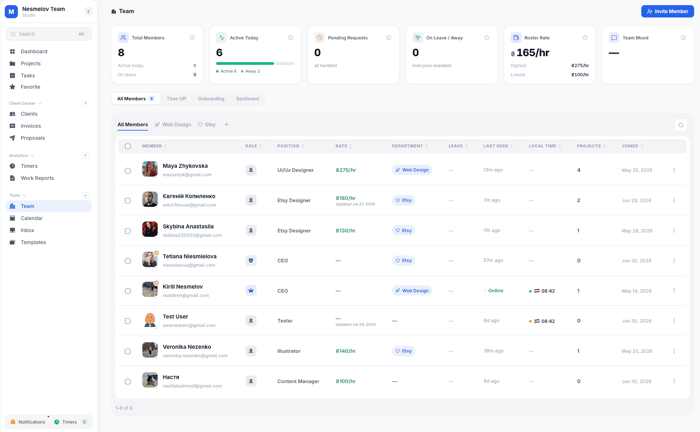
I'm building Melororium ( https://melororium.com ), a flat-fee workspace for agencies and studios. $59/month for the whole team, no per-seat billing. One of the hardest sections to get right was what I call Team — the people layer.
Most tools treat team management as an afterthought. You add people, assign roles, done. I wanted something different. Here's what I actually shipped and the thinking behind each decision.
The dashboard header tells you what's happening right now
Before you see any list, four stat cards load at the top:
Total members (with "active today" and "on leave" broken down)
Active today (members who signed in within the last 24 hours, shown as a segment bar)
Pending requests (join requests + sent invites waiting on someone to accept)
On leave right now (who's unavailable today based on approved time off)
I built these because I kept getting asked "is X available today?" The answer is now on the first screen you see. No digging.
Sub-teams with icons and leads
You can create named teams inside your workspace — Design, Dev, Marketing, Client Work, whatever fits your agency. Each team gets an icon (16 options: palette, rocket, code, camera, flame, and so on), a color, and a designated team lead.
The lead's card always appears first in the list. Members can be dragged between teams. Teams can be reordered by dragging. The tabs at the top filter the table to show only that team's members.
This sounds small. In practice it means a 12-person agency with a design team, a dev team, and a strategy team stops looking at one undifferentiated list of people.
The member table
Each row shows: name, position, their department team, local time right now (pulled from their timezone), role chip (Owner / Admin / Member), hourly rate, whether they're on leave, how many active projects they have, when they were last active, and when they joined.
Every column is sortable. Click once for ascending, again for descending, a third time to clear. You can filter by role. You can search by name or email. You can select multiple rows and bulk-export as CSV, bulk-email them, bulk-move them to a team, or bulk-remove them.
The inline rate editing matters for agencies. You click a rate cell, type a new number, tab out. No modal, no save button. It updates immediately.
The member profile drawer
Click any member and a drawer slides in with two tabs: Profile and Productivity.
Profile covers: photo (upload custom or remove), full name, position, email, role (changeable via dropdown), hourly rate, birthday, timezone with their current local time and work hours, and payment info.
The birthday field auto-adds to the workspace calendar when set. I built this because three agencies told me they'd lost a team member who felt invisible and underappreciated. A birthday in the calendar costs me two hours to build and costs the user nothing.
The payment info section (bank card, PayPal, IBAN, USDT) is read-only for the Owner. The member fills it themselves in their own profile. This is how most agencies handle this anyway — you ask the contractor how they want to be paid, they tell you — but having it in one place means you're not scrolling through old Slack messages to find an IBAN the night payroll runs.
The Productivity tab shows everything pulled from real timer sessions: tasks completed vs. total, completion rate, total time logged, total cost. Below that, tasks broken down by project with color-coded progress bars and time spent per project.
Leave management
The Time Off tab has two views: a 14-day calendar and a table.
The calendar shows who's out on which day. Color coding: Annual Leave is yellow, Sick Leave is purple, Personal is blue. You navigate two weeks at a time.
Members request time off themselves (type, dates, title, optional note). Admins see all requests and can approve or reject with one click. An admin can also create leave entries directly for any member.
Approved leave that covers today shows as an "Out" badge on the member's row in the main table. A pending request shows as "Pending." The On Leave widget in the header counts who's unavailable right now.
I built this after watching a 9-person agency use a shared Google Calendar for leave, a Slack channel for requests, and a Notion doc for historical records. None of them synced. Two people showed up as available during a week they were both out because nobody had updated the calendar.
Inviting people
The invite flow has more in it than most tools bother with.
You enter one or multiple emails at once (tab, comma, or semicolon separates them). You set their role (Admin or Member) and optionally assign them to a team and to specific projects before they even join. If you have the Onboarding module enabled, you attach a template and write a personal welcome note right in the invite flow.
There's also a copy-link option for sharing a join link directly.
Pending invites show in a list. You can resend or cancel each one.
Onboarding templates (add-on module)
Five built-in templates: General, Designer, Developer, Project Manager, Sales. Each has role-specific steps that cover the actual things that differ between a developer and a designer joining your team.
You can create custom templates. Assign during the invite, or assign later to an existing member. Track completion per member in the Onboarding tab.
The step-by-step checklist with per-step owners and deadlines lives here. The new person sees their own checklist in their own view. You see the whole team's onboarding status in the admin view.
Team sentiment tracking (add-on module)
Every Friday at 9am (your timezone, configurable), the system sends a mood survey to all members. The member scores their week on a 1-5 scale and optionally leaves an anonymous comment.
The dashboard shows a trend chart across all tracked weeks, the current week's response count, and all anonymous comments in chronological order. Built-in templates cover different angles (general wellbeing, collaboration quality, workload, clarity of priorities). Custom templates let you write your own questions.
You can rotate templates — set the sequence — so the same questions don't repeat every week. Drag to reorder the rotation.
The AI insights feature generates a plain-text report per week: what sentiment trended up, what trended down, what the anonymous comments point to as the main friction.
I built this because one of our beta agency users had a developer burn out quietly for six weeks before anyone noticed. The client delivery didn't slip yet, but the person was one bad week away from quitting. Weekly sentiment doesn't fix that on its own, but it creates a signal earlier than waiting for someone to bring it up in a 1:1.
The flat-fee element
All of this covers your whole team for one flat monthly price. Starter $29/mo for 4 users. Agency $59/mo for 10 users. Studio $119/mo for 25 users.
We're adding two contractors next month. The price doesn't change.
Happy to answer questions on any specific decision here. The sentiment tracking in particular involved a lot of tradeoffs around anonymity vs. actionability — open to hearing how others have handled that.

One thing I'd keep an eye on is whether the product is accumulating capabilities or accumulating reasons to buy.
Those usually overlap early on, but they eventually diverge. A product can become significantly more complete without becoming meaningfully easier to choose.
That's the sharpest thing anyone's said to me about this build in months.
My honest take: the reason to buy Melororium is one sentence — flat fee for your whole team, no seat tax. That's the hook. The features exist to make the choice defensible after someone already decided to look.
The risk you're describing is real. I have 20+ sections built. I could keep shipping. But "look at everything it does" is a terrible reason to switch tools.
The test I keep running: can someone explain why they bought it in one sentence without listing features? If yes, the capabilities are proof. If not, I've built a complete product that's still hard to choose.
Still working on making sure those stay aligned.
That’s useful context. I’d like to pick this up properly outside the thread.
What’s the best email to reach you on?