I spent more time setting up cold email than actually selling. Here is what fixed it.
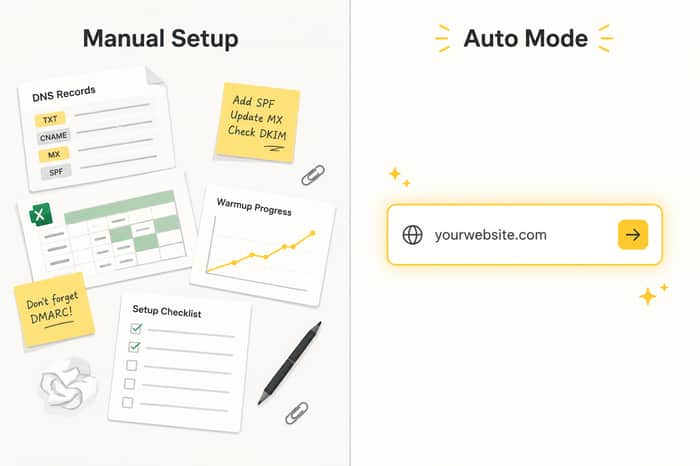
If you have ever tried to run cold email as a solo founder, you know this feeling. You are excited to get replies and book calls, but before you send a single email, you are buried in setup work that has nothing to do with your product.
The hidden cost of setting up cold email manually
- Mailbox health checks
SPF, DKIM, DMARC. You either learn these first, or configure them, wait, and check again.
- Warmup period
A new mailbox cannot blast 200 emails a day. It needs 2 to 4 weeks of warmup, slowly building trust with providers. Skip it and you land in spam, or get flagged.
- Finding the right leads
Define your ICP (role, industry, company size, location), search for matching contacts, verify emails, clean out the bad ones. Just 100 leads can eat a whole afternoon.
- Writing personalized emails
Generic templates get ignored. Writing a unique line per prospect based on their website, role, and context takes real research time, and that does not scale by hand.
- Setting up the campaign
Timezone, sending schedule, delays, daily limits, multi step sequences. Getting these wrong quietly tanks your deliverability.
- Watching the numbers
Bounce rate past 4%? Unsubscribe above 1.5%? Without real time monitoring, you may not notice until your domain reputation is already damaged.
By the time all of this is done, days or weeks have passed, and you still have not sent your first real campaign. It is not the writing or strategy that kills momentum. It is the setup.
What if setup took two minutes instead of two weeks
This is the problem we built Glow Mate, your AI Outbound Assistant, to solve inside Outbound Glow. It gives you two ways to get a campaign running, depending on where you are.
Auto Mode: built for onboarding, when you do not know where to start
You give it one input: your website URL. In about 2 minutes, it will:
-
Read your website to understand your product, pain points, value prop, and differentiators
-
Generate one best fit ICP (job title, industry, company size, location)
-
Write a 3 step email sequence: cold email, follow up, nurture
-
Set up your campaign config automatically, including send times, delays, and skipping weekends
You go from signing up to a live campaign without touching a single setting.
Custom Mode: when you know what you want
Custom Mode lets you take control while cutting out the repetitive manual work. You can:
-
Define your ICP manually or pick from AI suggestions, instead of rebuilding it from scratch
-
Toggle deep personalization on or off based on what the segment needs
-
Let AI recommend a smart sending limit based on your inbox age
-
Generate and launch in one flow: find leads, research, write, configure, go live, without repeating setup for every new campaign
This is for when you already have a direction, like targeting SaaS founders in the US, and want AI to handle the repeating setup work around it.
The real shift
The pain in cold email setup is not one hard step. It is how many small steps stack up before you can even test your message. Auto Mode removes that stack for new users. Custom Mode keeps you in control while removing the manual grind once you know your direction.
Either way, you spend time on what moves the needle, talking to leads and refining your offer, not configuring DNS records and sending schedules.
Try it yourself with a 14 day free trial at https://outboundglow.ai/. Drop in your website URL and let Glow Mate set up your first campaign for you.

The DKIM/DMARC + warmup grind is exactly the part that's killed my motivation before I ever sent an email. You really captured how the small steps stack up into weeks.
Yeah, the warmup grind hits different when you're eager to start sending. Most of that time isn't the work, it's not knowing if you're doing it right. Outbound Glow put together a full breakdown of the deliverability setup if you want something concrete to follow: https://outboundglow.ai/solutions/cold-email-deliverability/
One thing I'd be careful with:
The interesting question may not be whether cold-email setup is painful.
It may be whether setup friction is actually the thing preventing founders from getting results.
Those sound similar, but they can lead to very different product decisions.
I'd be careful assuming they're the same.
Fair distinction. Setup friction is the visible pain but you're right that it's not always the root cause of poor results. That said, broken deliverability does kill campaigns before founders even realize it's the problem. Worth understanding the full stack before ruling it out: https://outboundglow.ai/solutions/cold-email-deliverability/
I agree deliverability matters.
I think the reason I raised the distinction is that I've seen founders fix deliverability, improve inbox placement, and still end up learning something unexpected about why campaigns weren't working.
That's the part I find interesting.
Not whether deliverability is important.
What conclusions people start drawing once it improves.
Good post. I’m doing this right now for AnveVoice, and the thing I keep catching myself on is confusing GTM infrastructure with GTM signal.
A clean mailbox, warmup, enrichment, sequences, etc. matter, but they can become a very productive way to avoid the uncomfortable question: is the offer sharp enough that 10 hand-picked people would reply?
My current rule is:
For an early product, the win is not “we launched outbound.” It is “we learned exactly who feels the pain and why.”
The infrastructure vs signal distinction is underrated. Most teams get the stack right and still wonder why nobody replies because the offer was never tested. Your manual-first rule is the right call. One thing worth locking in early though: deliverability baseline so the signal you do get is actually clean data, not spam folder noise. This covers the foundation well: https://outboundglow.ai/solutions/cold-email-deliverability/
Great breakdown, Lucia. The biggest pain you describe really is the stack of small setup tasks before you can even test an outbound angle.
I'd be curious to try Glow Mate with my website, CiteMePlz, and see what ICP + sequence it generates from just the URL. That would be a useful way to compare AI-led setup against the manual cold email workflow ahah
That's exactly the use case Glow Mate is built for paste a URL, get ICP + sequence without the manual research spiral. Would be interesting to see what it pulls for CiteMePlz. Worth just running it: https://app.outboundglow.ai/signup/?utm_source=indiehackers
The setup grind is real, I have lost plenty of weeks to DNS records and warmup windows. But speeding up setup does not fix the thing that actually kills most founder cold email, which is a loose ICP and a weak offer. If AI auto-generates your ICP from a website URL, you risk a list that is too broad, and a broad list is exactly what tanks deliverability through spam complaints. Faster sending into the wrong inboxes just gets you flagged sooner. The two minute setup is a real win for momentum, but I would pair it with a hard cap on list size early and one sharp offer you have already tested by hand. Speed only compounds once the targeting is right.
Setup overhead is often a disguised form of avoidance.
The highest leverage systems tend to minimize “infrastructure thinking” and maximize direct signal from real conversations.
Curious what part gave the biggest reduction in friction.
This hits a bit too close 😅
I’m early with a small SaaS and can already feel the trap: spending time setting up the “sales system” instead of actually talking to people.
For now I’m trying to keep it painfully manual until I know the message works. Then automate.
The setup time problem you describe is real, but something I have noticed with early-stage SaaS founders trying cold email: the setup is not the actual bottleneck. The bottleneck is that cold email for small SaaS products now competes with thousands of other cold emails hitting the same inboxes.
Inbox providers have gotten aggressive about penalizing cold senders. Even with perfect SPF, DKIM, DMARC, and proper warmup, you share IP reputation pools with every other sender on the same infrastructure. One bad neighbor tanks your deliverability for weeks, and you will not know until your reply rate quietly drops to zero.
The founders I have seen get the best early results skip the "blast 200 emails a day" model entirely. They do 10-15 genuinely researched emails per day, each one referencing something specific the prospect said or built. That volume is small enough to send from your primary domain without a warmup tool, and the reply rates are 5-10x what automated sequences produce.
The uncomfortable truth about cold outbound at the pre-revenue stage: if you are spending more time on deliverability infrastructure than on understanding why someone would reply, the tool is not the problem.
Spot on regarding the volume trap. Focusing on a handful of deeply researched emails consistently beats those massive, automated sequences that just end up getting flagged anyway.
The "setup time > selling time" problem is almost always a deliverability rabbit hole — SPF, DKIM, DMARC, dedicated IP, warm-up tools — and the painful truth is that 80% of cold-email success is "your emails actually arrive in primary," which is mostly invisible until you check Postmaster Tools and find your spam rate is 0.3% instead of <0.1%.
The fix that saves the most time long-term: send from a SEPARATE sending domain (mail.yourbrand.com or send.yourbrand.com), never from your main domain. That way if you accidentally torch reputation with a too-cold campaign, your transactional mail (signups, password resets) keeps landing in primary on the main domain. Pair that with a 4-week warmup using a tool like Warmup Inbox or Mailwarm before sending volume, and you can usually skip the "rotating Google Workspace seats" mess that everyone in this thread is debating.
The selling time only comes back once deliverability stops being a 30-min-a-day worry.
I did not know that you had to have warmup email patterns> I thought you can send emails immediately. I researched that you gotta send 10-20 emails on day 1 of a new email domain, and then ramp up by up to 10 more emails every day.
This resonates a lot. It’s so easy to hide behind tools and complex setups instead of actually talking to people and selling. I work with service offers and host retreats, and I’ve found that simple systems plus a clear message usually outperform fancy automation. Loved how you simplified your process and decided what’s ‘good enough’ to move forward.
Just did this exact thing — cold-emailed 4 professors at UT Dallas and UT Southwestern for HealthOS. Learned SPF/DKIM/DMARC the hard way after my first email landed in spam. I spent way more time digging through each lab's recent papers than writing the email itself, but I think that's the part that actually earns a reply. Did personalized manual outreach beat AI-generated at scale in your testing?
Deep diving into recent papers is exactly what makes a cold email stand out. It takes way more effort upfront, but building that genuine trust manually almost always beats a high-volume approach.
Burned a week on DNS and DKIM before sending my first test email. Eventually paid for a tool I planned to DIY. Reply came on day 3. The cheaper-to-DIY math breaks once you count the time.
The setup friction is definitely real, but I wonder whether the bigger bottleneck for most founders is still offer and messaging. Once setup becomes easy, you get much faster feedback on whether the pitch itself works.
The setup overhead is definitely real. I've seen a lot of founders give up on cold outreach before they even send their first campaign because of all the deliverability and infrastructure work involved.
The setup-vs-selling trap is so real. Coming from a sales ops background, I saw this pattern constantly: people perfect the tooling — warmup, sequences, deliverability dashboards — because it feels productive and it's fully in your control, whereas writing to a stranger and risking a no is uncomfortable. But the stack has steep diminishing returns once the inbox is warm, SPF/DKIM/DMARC are set, and you can personalize the first line. Everything past that is often procrastination dressed up as infrastructure — the leverage lives in list quality and the first two sentences. Sounds like you landed on the same lesson; how are you judging reply quality now, vs. just open/reply rate?
Solid breakdown of the deliverability stack, SPF/DKIM/DMARC and warmup are exactly where people lose weeks.
One gap worth building in, because it quietly creates legal risk: there is no consent or jurisdiction layer in the flow. Your own site shows an EMEA example off a 243M contact pool, so this is not hypothetical.
Deliverability is the technical side.
The legal side is separate and depends entirely on where each lead sits.
US B2B cold email is fine under CAN-SPAM as long as you include a real postal address and a working opt-out.
But the moment an auto-generated ICP pulls in EU or UK contacts you are under GDPR and PECR, and Canada is the strict one: CASL requires consent before the first email, with penalties up to 10 million CAD.
The risk with Auto Mode specifically is that it removes the human checkpoint where a founder would stop and think "wait, is this lead in Canada?"
Automation plus no geo filter is how a deliverability tool turns into a compliance problem.
Easiest fix: let users filter or tag leads by region and apply the right consent rule and footer per region automatically.
That is also a selling point, "compliant by default" is something the big senders cannot easily say.
The setup tax is real, but reading the comments, half the pushback is "speed to send isn't the lever, reply rate is" — and that's true. So let me add the angle nobody named: your two-minute Auto Mode is most valuable for the founders who shouldn't be doing cold email at all, because it lets them find that out cheaply.I'm a solo dev. My users sit scattered across niche subreddits and forums, not in any clean ICP I can export. Two weeks of warmup would have told me nothing except that outbound was the wrong motion. If Auto Mode can get someone to one full cycle fast and the reply rate comes back dead, that's a gift — it kills a bad channel in days instead of weeks. Position it that way and it's honest. Position it as "fast setup equals results" and the burned users will say so in your reviews.
Same story. Spent way more time on DNS records and warmup sequences than actually talking to people. Ended up switching to LinkedIn InMails just to skip all of that and get to actual conversations faster.
Setup aside, I've been seeing hundreds of semi-automated emails in my inbox in the last few months, and it is becoming unbearable. Does it still work as a marketing channel? I feel like with so much automation (on both ends), email will become highly guarded, and very unusable, almost like a cell phone number.
The setup friction is real. I ran into the exact same trap — spent days tweaking sequences before realizing I hadn't even validated whether the offer resonated.
What helped me was stripping everything back to manual first. Once I knew what message actually got replies, then I automated. Flipping the order made a huge difference.
Also building a simple system for recurring clients (invoicing, retainer tracking) helped me spend way less time on admin so I could focus on actual outreach. Way underrated time saver.
Cool! Just what I need!
Well explained. Cold email setup is often the biggest bottleneck. Great to see a solution focused on removing that friction.
gregoryscotthenson is right that a 2-minute-setup campaign on auto-generated icp will still get ignored, and amandabrown is right that targeting beats infrastructure. but the auto mode does solve one real thing that none of the comments above named, the founder's first 30 days where they need ONE end-to-end cycle to understand what their reply rates and bounce patterns look like before they can intelligently iterate. the value of auto isn't 'now you have a campaign,' it's 'now you have empirical data points instead of guesses about what to tune.' iteration speed matters most when you don't know the system yet.
The setup overhead is real. But the biggest time sink I ran into running cold outreach for Genie 007 wasn't the configuration. It was figuring out what to actually say.
Once infrastructure is sorted, most founders send 500 emails, get 2% reply rate, and wonder what went wrong. The problem isn't technical. It's that the email sounds like it could go to anyone.
The highest-performing emails I've sent had one thing in common: they opened with a specific reason why I was reaching out to that exact person. Not their job title. Something I noticed about their work, their product, or a problem their company actually has.
Tools that handle setup are genuinely useful. Just don't let the tool become the procrastination.
The email warmup and deliverability setup drain is real. On the writing side, though, I've found dictation makes the personalization part a lot faster. When you're writing a unique line for each prospect, you can just hold a hotkey, think out loud about what you saw on their site, and the text appears. Way faster than typing out personalized research notes. I built DictaFlow for exactly this kind of bottleneck, any time the gap between thought and text slows you down.
Wow, glad everythings working out, thanks for sharing!
Setup is real friction, no argument. But I'd push back on the framing a little. Automating setup makes a good campaign faster and a bad one fail faster. I've watched founders stand up clean sending infrastructure and still get crickets, because the offer and the list were the real problem, not the DNS records. The two minutes you save on warmup don't matter if the sequence is talking to the wrong 100 people. Where auto mode could really earn its keep is the ICP step, since pulling a best-fit ICP off a website is the hardest part to get right and the easiest to get confidently wrong. How are you validating that the ICP it generates actually converts before someone scales sending to it?
The warmup period isn't just about inbox reputation -- it's also buying you time to actually think about your ICP before you've committed to a list. Founders who blast from a fresh domain on day one usually end up with a blacklisted domain and a list built for the wrong persona.
The Auto Mode "give us your URL" approach is doing something smart that nobody talks about: it's removing a decision most early-stage founders don't have enough data to make well yet. Whether or not the AI-generated ICP is perfectly calibrated, getting you to a live campaign removes the analysis paralysis that kills most cold email attempts before they even start. You can refine after you see who actually replies -- which is better signal than debating seniority level and industry codes before you've talked to a single prospect.
The failure mode I see most is founders who spend two weeks perfecting their ICP definition and then never send. Anything that breaks that loop has real value.
The 2-minute 'Auto Mode' scraping the URL is brilliant for momentum. How does the AI handle it if a founder's landing page is currently vague or undergoing a pivot? Does it prompt for manual refinement keywords?
the website URL to live campaign in two minutes is a compelling demo. the question is what the first campaign looks like for a product with nuanced positioning that doesn't reduce cleanly to what a website says. a lot of B2B products are sold on pain points that aren't on the homepage because founders haven't figured out the right language yet. curious whether the AI output reflects what you put on the site or actually infers what the product does
With the help of AI, tools are multiplying at an unprecedented, frenetic pace these days. It's up to us to be discerning and knowledgeable about the exact tools that can help us in our daily lives. Good luck on the journey ahead...
Useful breakdown of the setup tax, and you are right that the stack of small steps is what kills momentum. Honest counterpoint though: setup speed is not the lever that decides whether cold email works. Reply rate is. A campaign that goes live in 2 minutes off an AI-guessed ICP and a website-scraped value prop will get to "sending" fast and still get ignored, because the bottleneck was never the DNS records, it was whether you are emailing the right person with an offer they care about. And the warmup you list as friction is not busywork you can automate away, it is the provider slowly deciding to trust you, and there is no shortcut to that. So I would position this carefully: you are removing the grunt work so founders can spend more cycles on the message and the list, not promising that fast setup equals results. The people who get burned are the ones who start believing speed-to-send is the metric.
Seeing you transition from your last post to shipping "Glow Mate" is awesome! You nailed the absolute worst part of outbound. The DNS configuration, waiting weeks for warmup, and manual lead cleaning is a total momentum killer when you just want to talk to customers.
That "Auto Mode" is such a clever onboarding feature for busy founders. Letting the AI deduce the ICP from just a URL completely removes the friction of getting started. It really changes cold email from a tedious infrastructure project back into what it should be: a quick sales experiment. Huge congratulations on this release!
Bounce and unsubscribe thresholds are the part most people underestimate until a campaign gets paused. I had that happen on a list I imported without verifying first. The setup I tried recently auto adjusted the sending limit based on inbox age, which removed one more thing I used to track manually.
Yeah, the inbox age based limit is underrated. Most people set one fixed daily cap and forget it scales differently for a 2 week old mailbox vs a 6 month old one. I have been using Outbound Glow for this exact thing, free trial is 14 days if you want to test it on a fresh mailbox.
This comment was deleted 4 months ago