I Thought the Submit Button Was the Finish Line
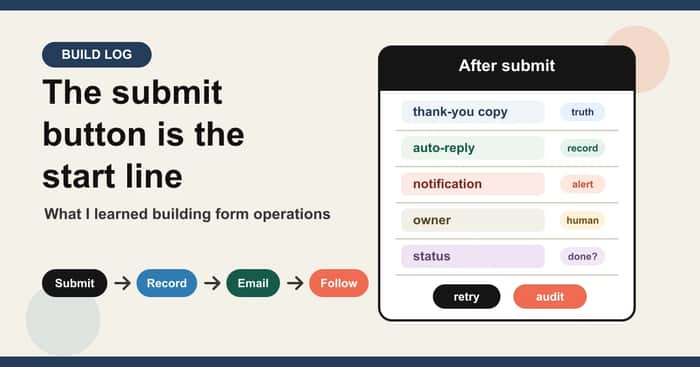
When I first started building FORMLOVA, I still had a form-builder-shaped mental model.
The job looked simple:
Create the form.
Publish the form.
Collect responses.
That is also how form tools are usually demoed.
You create a form from a prompt. You preview it. You publish it. Someone submits it. The success screen appears.
Demo complete.
But the more I worked on the product, the less the submit button looked like the finish line.
It started looking like the first moment the product becomes operational.
The Feature That Kept Pulling Me Downstream
The first version of almost every form workflow is a database insert.
Someone submits a response. The app validates the payload. The row is saved. A confirmation message is shown.
That is enough for a demo.
It is not enough for a business process.
The next questions arrive immediately:
Did the respondent get an email?
Who on the team saw this?
Is this a real inquiry or a sales pitch?
Was it added to the spreadsheet?
Did anyone reply?
Is it still open?
Should it be excluded from analytics?
What happens if the Slack notification fails?
None of those questions are about form creation.
They are about what happens after the form exists.
That is the product surface I underestimated at the beginning.
The Mistake: Treating Notifications as Progress
One of the most tempting shortcuts is to send form responses to Slack.
It feels like progress.
The message appears in a channel. The team sees it. The response is no longer hidden in an inbox or a spreadsheet.
But a notification is not ownership.
This is the failure mode I kept seeing in my own product thinking:
Posted to Slack = handled
That is not true.
Posted to Slack only means the alert was created. It does not mean someone read it, owned it, replied, or closed it.
The same problem appears with auto-replies.
Auto-reply enabled = respondent received the email
Also not true.
Enabled is configuration. Sent is an operation. Delivered is another state. Read by the respondent is another thing entirely.
Once I separated those states, the product started making more sense.
The Product Became a Set of States
I used to think about form responses as rows.
Now I think about them more like events with a lifecycle.
For example:
response saved
thank-you message shown
auto-reply pending
auto-reply sent
team notification sent
owner unassigned
status new
status in progress
status done
excluded from analytics
This sounds obvious once written out.
But it changes the product.
It means the dashboard is not just a place to view responses. It is a place to see operational state.
It means the chat interface is not just a place to create forms. It is a place to ask for the next action:
Show me new pricing inquiries that are not sales pitches.
Send reminders to webinar registrants who have not confirmed, but show me the recipient count first.
Notify the team only for implementation questions, and keep Sheets as the record.
That is not form building anymore.
That is form operations.
The Small Copy Details Started to Matter
This also changed how I look at form copy.
For example, a booking form thank-you message can say:
Your booking is complete.
or:
Your preferred appointment time has been received.
This does not confirm the booking yet.
We will check availability and send the confirmed time by email.
Those are not just different words.
They describe different operational states.
If the system only received a request, the page should say received.
If the booking is confirmed, the page can say confirmed.
If an email will be sent later, the page should not pretend the respondent already has every detail.
I used to treat that as UX copy.
Now I treat it as product-state copy.
Why This Changed the Positioning
This is why I keep coming back to the same positioning line:
FORMLOVA is not trying to be only a faster form builder. It is trying to handle the work after the form is live.
AI makes form creation easier.
That is useful, but it also makes creation less defensible. Every form tool can eventually add "generate a form from a prompt."
The more durable product depth is downstream:
- auto-replies
- response status
- Slack notifications
- Sheets records
- spam or sales-pitch classification
- owner assignment
- reminders
- analytics exclusions
- human confirmation before risky actions
This is less flashy than a prompt-to-form demo.
It is also closer to the work users actually need finished.
The Founder Lesson
The lesson I am taking from this is broader than forms.
For many products, the visible action is not the real workflow.
In a form product, the visible action is submission.
In an invoicing product, it might be creating the invoice.
In a scheduling product, it might be booking the meeting.
In a CRM, it might be adding the lead.
But the product often becomes valuable after that visible action:
Was it acknowledged?
Was it routed?
Was it followed up?
Was ownership clear?
Was the state updated?
Was the risky action confirmed?
Can someone audit what happened?
That is where product depth accumulates.
As an indie founder, it is easy to over-optimize the demo moment because that is what gets screenshots and launch posts.
But the workflow after the demo moment is where the user decides whether the product is actually useful.
What I Built Around This
The recent work on FORMLOVA has been about making those downstream states explicit.
The English guide layer now has separate articles for:
- sending form responses to Slack
- setting up auto-reply emails
- designing thank-you pages
- managing contact-form operations
- updating response status
- exporting or syncing responses to Sheets
I also wrote a technical companion on DEV about modeling post-submit form workflows as a state machine:
Designing Post-Submit Form Workflows as a State Machine
That article is more implementation-focused. This post is the founder version of the same lesson.
What I Would Do Differently
If I were starting this product again, I would not start by asking:
How do we make form creation faster?
I would ask:
What happens after the first real response arrives?
That question exposes the product faster.
It forces the conversation away from fields and themes and toward:
- ownership
- timing
- notifications
- records
- status
- trust
- follow-up
Those are harder to demo.
They are also harder for competitors to copy with one AI feature.
Where This Leaves the Product
I still care about creation.
A product has to make the first step easy. If someone cannot create and publish a form, none of the downstream workflow matters.
But I no longer think the first step is the center of the product.
The center is the operational loop after submission.
That is the product bet I am making:
The submit button is not the finish line.
It is where the real workflow starts.

Funny how the real work shows up after someone hits submit. I ran into the same wall and realized people treat forms like mini workflows, not one-off moments. The shift you made toward states and ownership feels like the thing that actually saves users time. Folks rarely say it out loud, but they expect tools to quietly handle the messy middle for them.
The "quietly" part is the sharpest piece. Users rarely describe the middle workflow in advance — they only feel it as friction when something breaks. The moment someone asks "did they ever reply to that?" you know the form tool stopped at the submit button.
That is also why creation-first demos look strong but struggle on retention. The demo never enters the state where the tool actually has to do work. The product only earns trust once the messy middle is no longer the user's job.