I'm building a meeting assistant with no bot in the call. Audio was the hard part
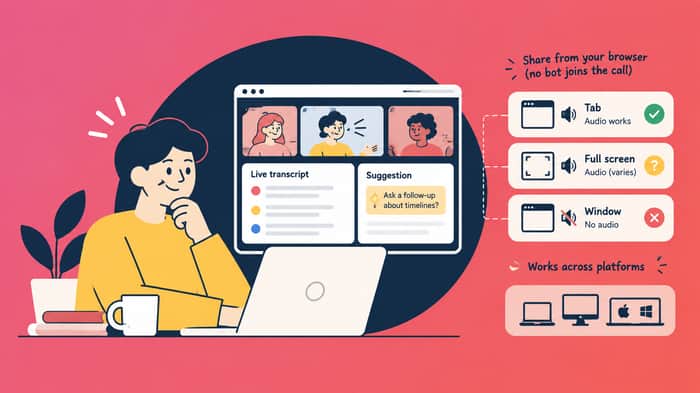
Most AI meeting tools send a bot into the call, record the whole thing, then email a summary afterwards. I wanted help while people are still talking. Transcription runs live, and suggestions show up on your own screen: a clarification, a question that might be worth asking, a word that's missing because the meeting isn't in your language. The rest of the call doesn't see them.
No bot in Zoom or Teams. The app runs in the browser and only uses audio chosen in the share dialog.
I didn't get stuck on the LLM. The weeks went into something dumber: where the audio actually comes from.
Browsers don't treat the three sharing options the same way:
- A Chromium tab has audio on any desktop OS, and the checkbox is usually already ticked.
- Full screen can include system audio, but only on Windows and ChromeOS, and only if that box gets ticked by hand.
- A window: no audio. Ever.
That last one is the trap. Share the Zoom window, the preview looks right, the stream shows up, the session is silent. The browser doesn't warn. Nothing in the code can detect it either. Mac and Linux have no system audio at the browser level. Run the meeting in a Chromium tab and share that tab, or install a virtual audio driver. I'm not going to ask a first-time user to do that.
I request system audio explicitly when I call getDisplayMedia. The flag doesn't create a capability the platform doesn't have. A lot of the remaining work is UX: which button to click in a dialog I don't control, and saying that Chrome or Edge on desktop is the setup that actually works.
I also got the trigger wrong at the start. A suggestion on every finalized transcript is too eager. Conversation doesn't arrive in tidy chunks. Someone says "I think the real issue here is..." and the point only shows up in the next sentence. Generate too early and the model answers half a thought. Do it on every transcript and the screen is just noise. It now waits until enough new information has shown up since the last suggestion. The first one of a session has a lower bar, because an empty screen looks like a broken product.
Still pre-traction, so no revenue number to post here yet. Shared audio does make it all the way to a suggestion on screen. I'm spending the time on when to generate, and on telling people which OS does what, before anyone hits a silent session.
It's at livesuggest.ai.
If you've shipped anything that depends on getDisplayMedia, how did you handle the Mac case? I haven't found an answer I'm happy with.

The audio rabbit hole in meeting apps is brutally underappreciated — most devs assume screen sharing means audio, and the first time a Mac user shares a window and gets silence with no warning, it's a terrible experience. Your instinct to lower the suggestion bar for the first prompt is exactly right; an empty screen genuinely reads as broken to a first-time user. The no-bot-in-the-call angle is also a real differentiator — privacy-conscious teams hate bots joining their calls. Rooting for LiveSuggest!
The Mac case is the one I've never seen solved cleanly either — every workaround I've tried either asks the user to install a virtual audio driver or quietly degrades to "record your own mic only," which defeats the point. Your instinct to lower the bar for the first suggestion in a session is smart; an empty screen genuinely reads as broken to a first-time user. Curious whether you've measured how often people bail specifically at the "share this tab, not the window" step.
Hey, saw your LiveSuggest post and really liked the no-bot-in-the-call approach.
I did a quick check on how it shows up in AI search. Asked ChatGPT “best AI meeting assistant / live meeting notetaker tools in 2026” and it came back with Otter, Fireflies, Fathom, Granola, Read AI, etc. LiveSuggest didn’t come up.
One thing that stood out though: Granola is pretty close to what you’re doing with the bot-free angle, and it’s the one that shows up. I actually think that’s a good sign. It suggests “bot-free” is already a recognized category people are looking for, rather than just the way you’re describing the product.
So the issue might be less about the positioning and more about getting LiveSuggest into the sources these AI answers pull from like comparison articles, communities, directories, etc.
Happy to take a closer look at where Granola and the other bot-free tools are getting mentioned from if useful, once you’re through the current audio/UX work.
The “no bot in the call” part immediately makes this more interesting to me. A lot of meeting assistants work well, but having another participant visibly join every meeting can feel intrusive, especially when talking to customers or people outside your company.
I can imagine audio capture becoming much more complicated once you remove the bot approach though, especially across different operating systems, headphones, microphones, browser calls, and conferencing apps. If you can make that part reliable without creating a complicated setup process, it feels like a meaningful UX advantage over the typical meeting assistant.
Make the unsupported state visible before the meeting starts. I'd add a 10-second audio check with a live input meter and a clear result: audio is coming through, or this capture option can't provide audio on this machine. A stream can contain an audio track and still be useless. A quick level check lets people catch the problem before they spend an hour in a silent session.
I reckon the Mac case needs to become an onboarding branch rather than another warning.
Ask first: “Is the meeting running in a browser tab or a desktop app?” If it is a Chromium tab, guide them directly to tab sharing. If it is Zoom or Teams desktop on a Mac, say plainly that browser-only capture is unsupported instead of letting them discover it through silence.
You can still fail faster after selection by checking whether the returned stream contains an audio track and refusing to start when it does not. That will not solve every silent-track case, but it should catch the window-share trap before the user spends a meeting blaming the transcription.
The trigger timing problem is change detection, not scheduling. A timer fires whether or not anything meaningful happened. A change threshold fires when enough new semantic content has accumulated. The difference matters because pauses in conversation carry information — someone thinking is not the same as silence, and generating during a thinking pause makes the tool feel tone-deaf.
We hit a parallel in SEO auditing. A page that looks indexed but gets zero impressions produces no error. The site owner checks Google's index report and assumes everything works. We ended up front-loading the "this is broken and here is why" message before any data, because users who see green metrics first never scroll down to the red ones.
Your documentation burden is the same shape. The person who needs the warning will only see it if you show it before they hit the silent failure, not after.
The core problem here is visibility - not of audio, but of capability. You've discovered that the system can't tell you what it can't do (the silent share trap), so you have to design backwards from what users will actually see on screen. Most AI tools hide this - they assume the platform works the same way everywhere. Your UX solution (explicit os-level guidance) is really measurement made visible: "here's what this setup can actually measure," which becomes the signal for which path to take.
The silent window share would make me close the tab and blame the product. Preview looks fine, so I think the model is dumb, not the browser. I hit the same wall capturing a call in Chrome on a Mac. System audio just isnt there unless you set up a virtual cable, and nobody is doing that. Are you telling people to share the meeting tab only, or is window share still in the picker? If window is still an option I'd hide it. Users pick the thing that looks right.
The trigger timing seems more consequential than the audio plumbing. Have early users acted on suggestions often enough to validate the current generation threshold?