Launched a Website for my Newsletter Content
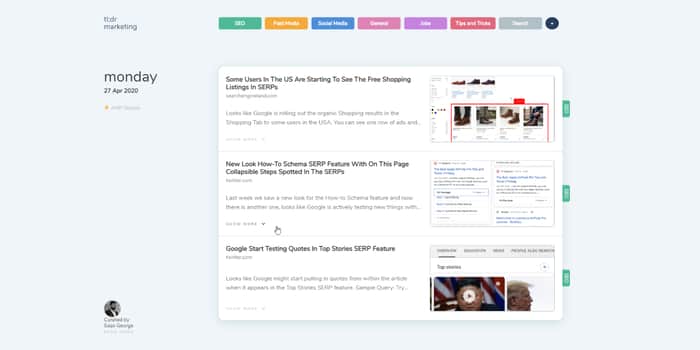
Check it out and let me know what you all think https://tldrmarketing.com/
What is tl;dr Marketing?
Every weekday you get an email from me with the latest updates covering organic, paid, social and other digital marketing topics that are super important.
There’s no fluff. There’s nothing like a 2000-word backstory on grannies fruit cake before you get to the ingredients and instructions on how to make the damn thing.
Nope, none of that.
What you get is a highly curated SEO Newsletter with summaries from the best sources and a link to them. It saves you time and helps keep you up to date.
I used to brief colleagues on what’s new in search through meetings IRL and Slack/Skype messages. I also give monthly talks at the Melbourne SEO Meetup on what’s new in search.
Eventually, I decided to start a newsletter with that content and that’s how tl;dr Marketing was born. It’s taken on many formats and designs over time. I have used services like elink, curated, getrevue, custom react solution, and now it’s on WordPress.
Also trying out the Web Stories (formerly AMP Stories) format from Google. It's automatically generated based on the newsletter content.

I just signed up for this yesterday. Great work!
👍
Very nice UI. But I would suggest you to make your newsletter sign up menu more visible. I had a hard time finding it :D
Thanks
I really like the design of the site. I've never seen something like it. Keep up the good work!
Thanks it’s heavily inspired by sidebar.io
I like the site. Useful resource.
But....
How do I sign up to the newsletter?
I can't see an opt in form anywhere.
Am I being incredibly dumb and missing it (also am using an iPad if there’s a technical reason your opt in isn’t showing).
Haha, I was confused like you about where the optin is. So, If you look carefully, There is a menu in the right-sidebar as well. That's where is the link to newsletter. Or simply, https://tldrmarketing.com/subscribe-to-our-newsletter/
@SaijoGeorge, Maybe you should make the fonts bold for your side menu bar?
Ah, I see it now. Thanks.
Think it needs to be much more in your face
When you scroll down it should loads the option form between every days content.
Hey, I was wondering how did you manage to automatically generate AMP stories?
custom built that
Hey there, really digging the UI. Just a quick question, is that fully custom CSS implemented from scratch or is there a starting point somewhere?
it was custom designed and built
I was thinking of starting a newsletter but I think your's newsletter was the last kick for doing this. I am greatly inspired by your domain name, website design, about us, and content too.
Surprisingly I also want to start a newsletter around marketing. 99% chances I will do it within a week and equal chances for copying your design (aka sidebar's too) and little bit about us. Will you allow me to do so?
go for it mate :)
if you mention it was inspired by tldrmarketing, that would be awesome :D
Thank you for allowing me.
But the main problem is I have a long path for creating it myself as I am just learning HTML and CSS now.
I subscribed to your newsletter (Not checked inbox for any confirmation link)
I would suggest minor changes.
thanks for the tips.
Yup, I got this tools list and buymeacoffee link in newsletter. one thing is missing on your site i.e. your social profile links.
And the best way to do is by using makerbadge.com , a indiehacker product.
2nd I thought of approaching you on Twitter, but it's off.
Can you please share your site theme name etc? I will add inspired by Tldrmarketing.com in my blog for a good duration.
This comment was deleted 6 years ago