Launched the most powerful tab/bookmark manager for Chrome & Firefox 🎉
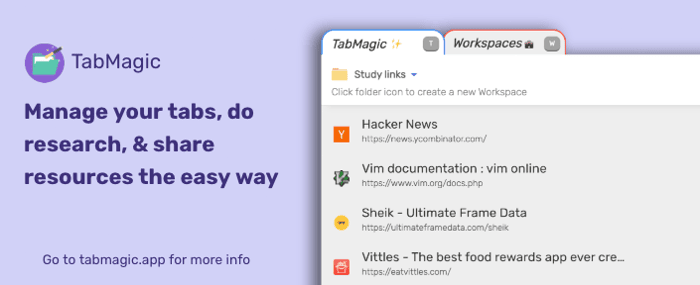
** First I want to say that TabMagic is still in early beta, so anyone who comments here this month with their username and feature request, I would like to award with a free TabMagic Pro account!
Hey everyone! I've always been the kind of person to let their tabs get out of control, and I wanted an easy way to not only get my tabs under control, but also a way to easily manage them should I want to remain disorganized!
You can think of TabMagic as a tab manager + Firefox's Pocket app. It's a way to bookmark things you find on the web and reference them later, with an increased level of organization and shareability.
Some of the features include:
🗄 Organize your tabs into workspaces with just a few clicks
📚 Keep bookmarks and tabs saved no matter what browser you use
⌨️ Manage all your saves directly within the Magic Panel
📂 Reopen workspaces at any time
👁 Privacy-friendly service that only stores info for tabs and notes
👼 Easily kill tabs to free up memory until you need them again
🔗 Quickly share links to your workspaces for others to use
🔒 Create private workspaces for your eyes only
📝 Annotate saved links to add more context to your workspaces
🏷 Tag your bookmarks and find them later with super-fast tag search
❌ No need to import/export bookmarks ever again
And more!
TabMagic's functionality is centered around a "Magic Panel" that you can use at any time on any site to organize bookmarks, edit workspaces, and search & rename tabs. The user experience is heavily influenced by the text editor vim in that you can get a lot of your work done in just a few keystrokes.
All of the other tab managers either required you to open an external window or move over to the icon in the toolbar. Another thing I noticed in existing solutions was that they were predicated upon merely getting organized. The tutorial shows you how to use their app in a perfect scenario. The problem is that my workspace is far from perfect and isn't as straightforward to organize. What I like most about TabMagic is that I found myself using it as I was developing it, as it's easy to just use a little bit at a time and create and add to workspaces as you go.
Give it a try! I'd love to know what features you think would improve TabMagic for you. I'm open to adding things relatively quickly if it suits the app! You can download the extension easily from the landing page and a list of shortcuts is available at https://tabmagic.app/#shortcuts

Hey, how is TabMagic doing now?