🧨 MARKETER'S ULTIMATE RESOURCES POST
Hello marketers!
Joaquín here from Argentina 🙌 I am the founder of a clothing E-commerce and a 360 Marketing Agency. For the past 8 years I have worked on and collaborated with different Marketing Agencies. My life turns around Marketing and Business Growth, I can't help it :D
This post is meant to give you some of my own e-commerce techniques and after reading them, the idea is that you add between 3 and 5 of your own and then comment on the other's if you like to. 3, 2, 1...go!
👉 1 - Understand the Bounce Rate! Always remember that bounce rates are completely relative.
First, understand the site's layout strategy. Let's say you are running a blog with no call to action. If your goal is give relevant information to the users and have a ONE-PAGE site, were acceptable bounce rates are above 82%, use heat measurers or scroll percentage objectives! Why? Not only to know if the user is getting to the important parts, but also to inform analytics that not all your visits without "interactions" or navigation are bounces. I will be posting a complete guide on GOOGLE TAG MANAGER FOR FREE.
👉 2 - This month Google has released GA4, Google Analytics 4.
Implement it alongside to the UA "Universal Analytics Tag" ASAP or you WILL BE MISSING OUT! The new functionalities and UX makes it GREAT to understand new data, that you (let's be honest, everyone) have probably never dedicated the time to investigate. These include a new way of organization of the menu, which is now broke down by the famous conversion funnel. It also includes a completely new conversions tab, which is kinda rusty if you ask me, but you can view the events generating conversions way better than before... and easy to set up !
👉 3 - MAKE USE OF GOOGLE DATA STUDIO - Most of you probably already do, if you love the subject; but do you really take advantage of it? I use it for:
  - Real Time monitoring of Sessions, Conversions/Sales and bounce rates. Yes! All of them combined in the single chart, different from what Analytics offers...
  - Quick Reporting: I use two type of sheets. One is for my own analysis, which simplifies and gives a faster insight of all platform's performance. The other one, is a monthly cumulated sheet that does not concentrate of deep KPIs but short briefs with nice graphics so that it is much easier to read for the client.
  - Merge Platform's Data: This is one of my favorites because it is a great and quick way of checking on the different platform's behavior and also, to know if a campaign has been paused or is not running. Of course, you can set auto-rules to be emailed when this happens.
 - #404 ERROR HITS: This is probably one of my geeky chart to use. I like to keep a close eye on the amount of error pages that have been activated in the past 2 weeks and act on them quickly.
👉 4 - As a marketer and business owner: How do I organize my day?
Well, this is a tricky one. It goes like this:
I Wake up between 8 and 9 -- Check budget fluctuations and adjust them accordingly (let me know if you want the formula to do this) -- Analyze the campaigns that are above or below the 70% compliance percentage (can be a wrong daily-budget input, payment issues, setup error preventing impressions such as too low cpc's, limited audience size, low volume keywords, etc.) -- Correct Them, Note Them and check back tomorrow and in a week -- Detect and optimize underperforming campaigns and learn from the well performing ones; this is important! I know lots of marketers who only check on red flags... -- Compare them grouped by campaign objective -- Find pikes on absolute metrics (non-calculated) such as sessions-impressions-clicks-exits-bounces-spend, within a range of 45 days behind and daily segmented. -- Compare Calculated Metrics (cpc, ctr, conversion rate, cpe, cpa, cpi, etc.) over the last 3-4 months divided by weeks, since it is not interesting to compare it on a daily basis segmentation (at least not for a quick morning check). -- Check out for new competitors on the Auctions Insights. -- Detect underperforming sitelinks / pages with the Landing Page Report on GA, in order to know if the Ad requires optimizations, the URL is not relevant or the site has a problem. -- Do some SEO with Google Search Console .
👉 5 - EXCEL IS MY GOD
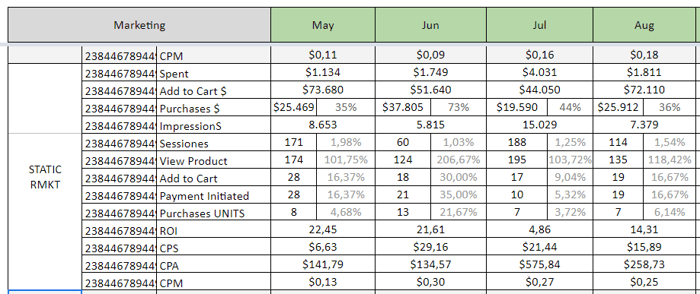
There is no way around it; this is the best software to manage everything for your marketing business. I use it to; compare different campaign conversion funnels (example image attached) - Follow on the customer's media plan as a GANT DIAGRAM - Fast Search Query Report (programmed by myself) to detect keyword opportunities and also, the unwanted ones, by triggering messages on a column with the correct course of action (decrease cpc, remove, increase cpc, check on destination URL, check on ad titles affecting QS, etc.). - The list goes on. I will expand on this on later posts.
👉 6 - If you have a marketing agency or work freelance, it is crucial that you understand what information the client needs (or what he says to need) and make a balance, not less, not more, but just right and balanced.
Normally as marketers, we get too excited to explain everything to our customer, as it happened to me on many occasions, but you have to understand that not only you are making them get confused, but probably also making them NOT EVEN READ your report, that might have taken at least 2 o 3 hours off your day! And what will happen? Not only they won't read it, but also not tell you that they did not understand it and all your work and time will not be visible and appreciated, not less understood.
And what will happen after that? They will probably cancel. NOTE: This probably applies in different ways depending on the type of campaigns you are running for the clients; for example, a 100% branding and awareness strategy might be more complicated to measure conversion-wise, and even harder to make the customer understand what the results are! So just keep in mind to always be clear, before you start working with them, on which are the main key points they want to focus on. After the first report, ask them if they have understood it and if they think some extra data should be included (or rather exclude some of it).
Thanks for reading!
On the next post, I will be talking about on how my career transitioned in the past 6 years and my completely personal "do's and dont's" that can come in handy and prevent you from making my same mistakes.
I want to read you too 👇 You know what to do:
