Mirror World Smart SDK - A Solution to Authentication, Marketplaces/Storefronts for Web and Mobile Dapps
Today we will be using our newest Web 3 game demo as a showcase of our All-in-one Web 3 dApp SDK covers the whole process of building a dApp. We will explain how we brought our newest game on chain and fully functional within a day using our SDK, and how you can utilize the same tool to maximize productivity in your own dApps that are not limited to gaming alone.
We will have the link to APIs of a specific function ready next to every function we mentioned so that you are able to have hands-on experience in building a dApp using Mirror World SDK with minimal friction.
About Mirrors Jump

Mirrors Jump is a mobile platform-jumping game demo we made to bring developers a closer view of what our Smart SDK can do. We strongly advice developers to download our gaming demo here and check out our features while enjoying the game.
SDK and On-Chain Integration
The overall principle of bringing a game on-chain with our SDK is simple. You build a game, you plug-in our SDK, and all the functions will be there for you to use.
Build a Game First
The first step to bringing a mobile game on chain is to build a traditional game with several outlets prepared to connect to the SDK. The outlet part varies depending on where you want the Web 3 features to take place. Take Mirrors Jump for example. We want our character, the Mirror NFT who is jumping in the game to be the interoperable asset, even independent from the game per se. That is where we leave the outlet for future connections.
Start Auth Integration
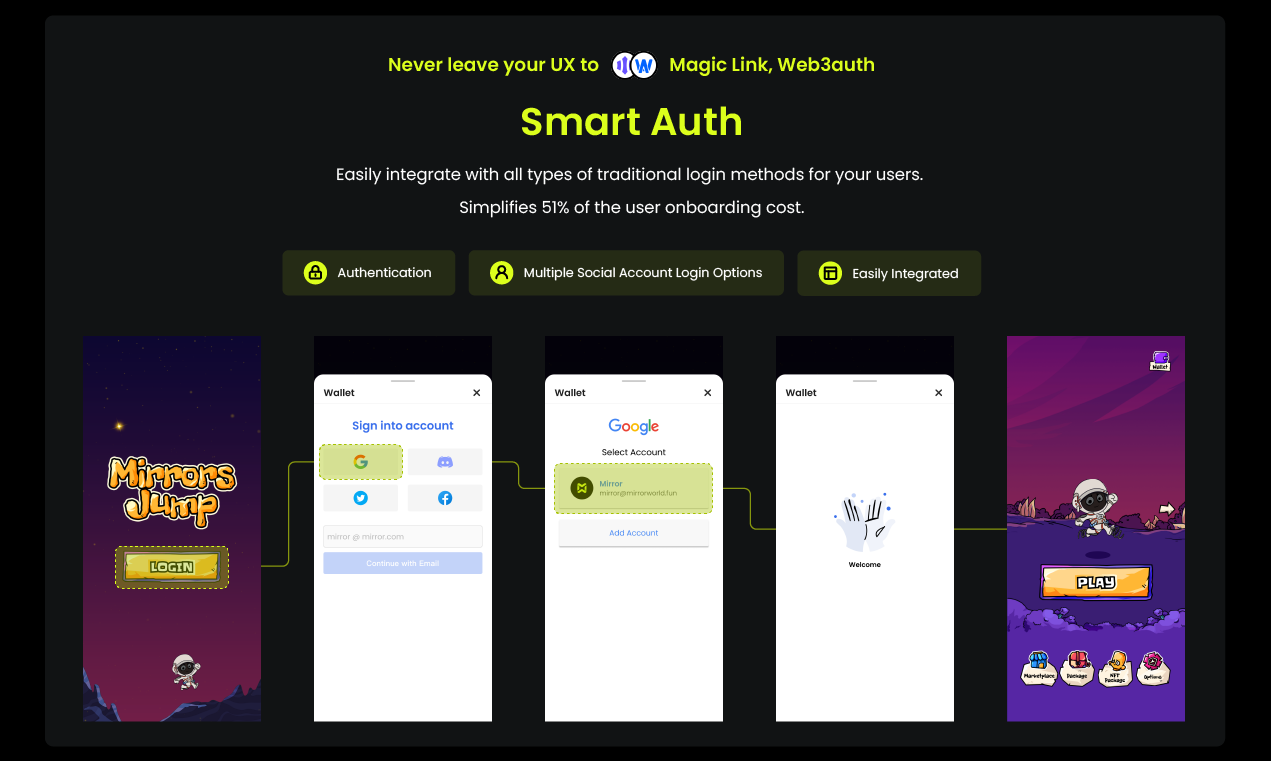
The on-chain integration of our game starts with Auth.
Being a Web 3 mobile game, you always want your game to have a broader range of users and bigger potential. Logging in with a method people are familiar with could bring much more potential customers to your game or Dapp. So we integrated both Web 2 login methods such as Discord, Facebook, Twitter, Google and Web 3 method, crypto wallet into Mirrors Jump. We completed this whole process solely using our Smart SDK, calling the APIs below.
Here are some basic APIs we used:
Token-Based Login
Transaction Approval Code
Change Email
Social Authentication
Change Email
Authenticate with external wallet
You can find a more detailed version in our HTTP API.
Since Mirror World Smart SDK is now open to developers for free. For different login APIs, you could just login into our creator dashboard, click the embedded link below and try them out right now. It is super easy to use and it shouldn't take more than a couple of minutes to deploy.
Start In-App-Wallet Integration
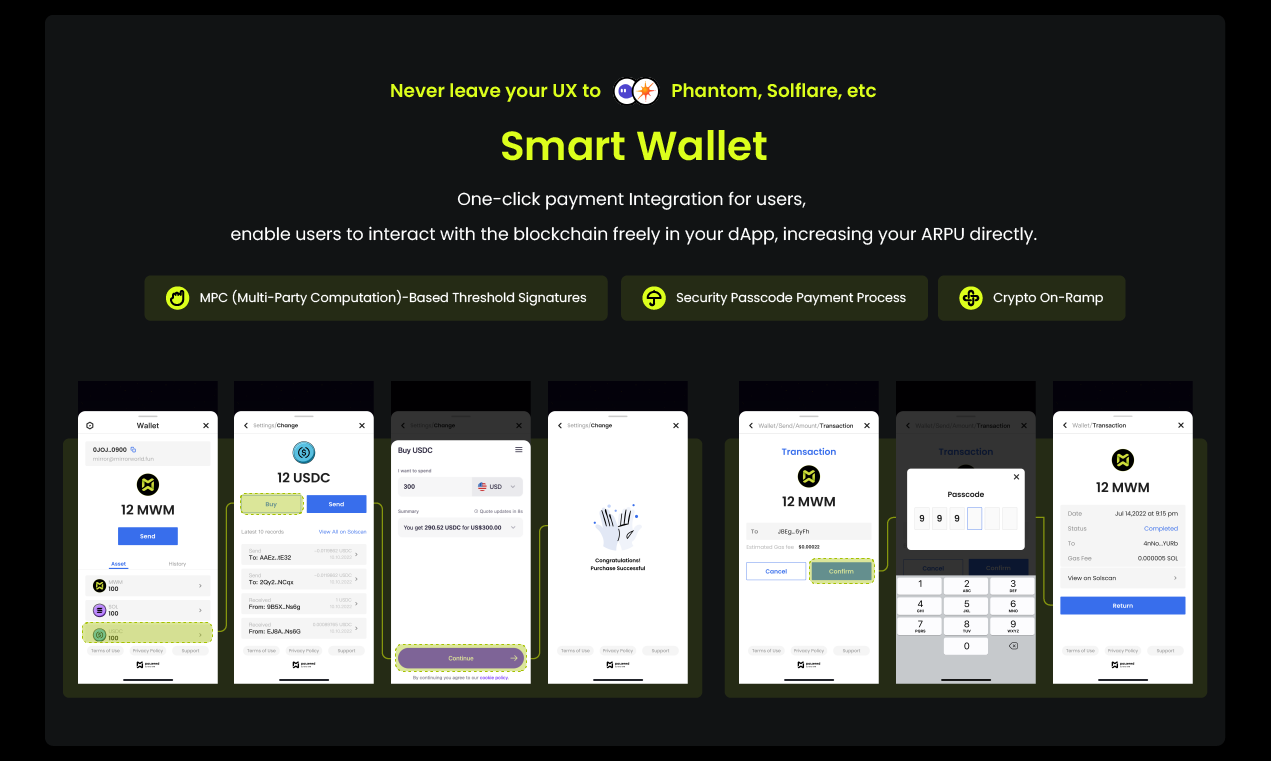
The second part of integration is to bring the Web 3 wallet into full operation in our mobile game. This part is partially done together with the login integration, but we still need to bring in the transaction, token as well as the on-ramp part of the wallet. Once all that is integrated, your customers will be able to perform all kinds of transaction-related actions without having to leave the dApp at all, which really drastically improves the purchasing experience.
Regarding security considerations, we are still developing a kind of safe wallet called an MPC wallet (multi-party computational wallet), which will be ready in the test environment next week.
For all of the wallet functions, feel free to login to the dashboard and try it out now.
About Our Wallet and Its Safety
This part intends to dive deeper into our wallet's safety configuration. For more information about SDK integration, you could scroll down to the next part.
In this MPC wallet, the private key is not actually stored in any form, because it doesn't exist. Whenever a new wallet is created, the public key is computed (in one direction) by a set of other trusted parties. In our case, we have multiple partners running nodes that participate in the process. We followed the EdDSA algorithm in our implementation of this TSS variant. This type of wallet is called a multi-party computational wallet.
So the user's private key is not actually stored in a database because there is actually no private key to store. However, we can prove that the user's public key has performed an action when multiple parties have signed a given transaction. The final signature generated by the transaction is an ed25519-compliant signature produced by computing the resultant signatures from all parties. So no one entity can perform an action alone on behalf of the user.
NFT Collection Creation

After the login and the transactions, we are now getting at the asset we are actually purchasing here in the dApp. In our case, it is the little jumper character——the Mirror NFT. The problem we are solving here is how to create an NFT collection, mint it so that it could exist as a digital asset independent from the game. We used our SDK to enable our in-app minting as well as creating your own NFT collection.
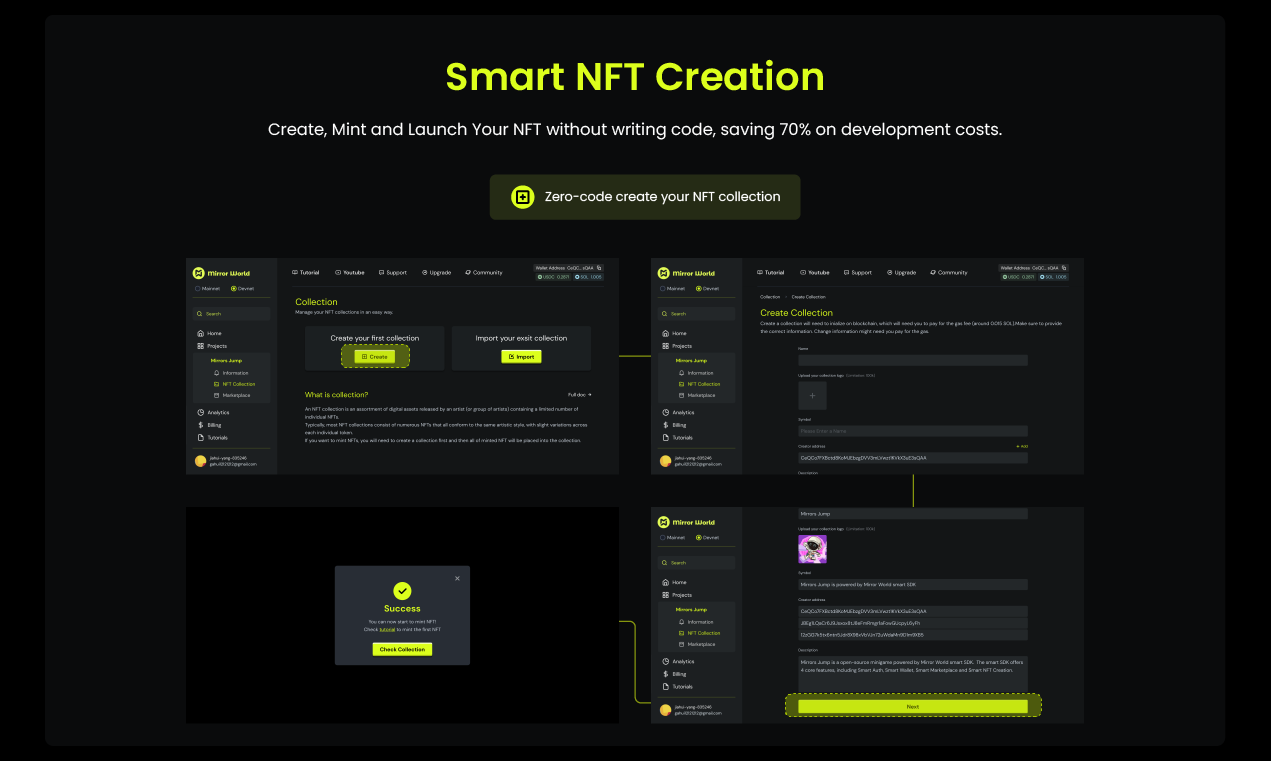
Below are some basic APIs we used for minting a new NFT collection and getting the NFT metadata.
Mint New NFT
Mint New Collection
Mint New NFTs on Collection
Update NFT properties
Get nft info
Get nft real price
They are all open to developers for free. You could try them out now by going to our dashboard by clicking here.
In-App NFT Marketplace
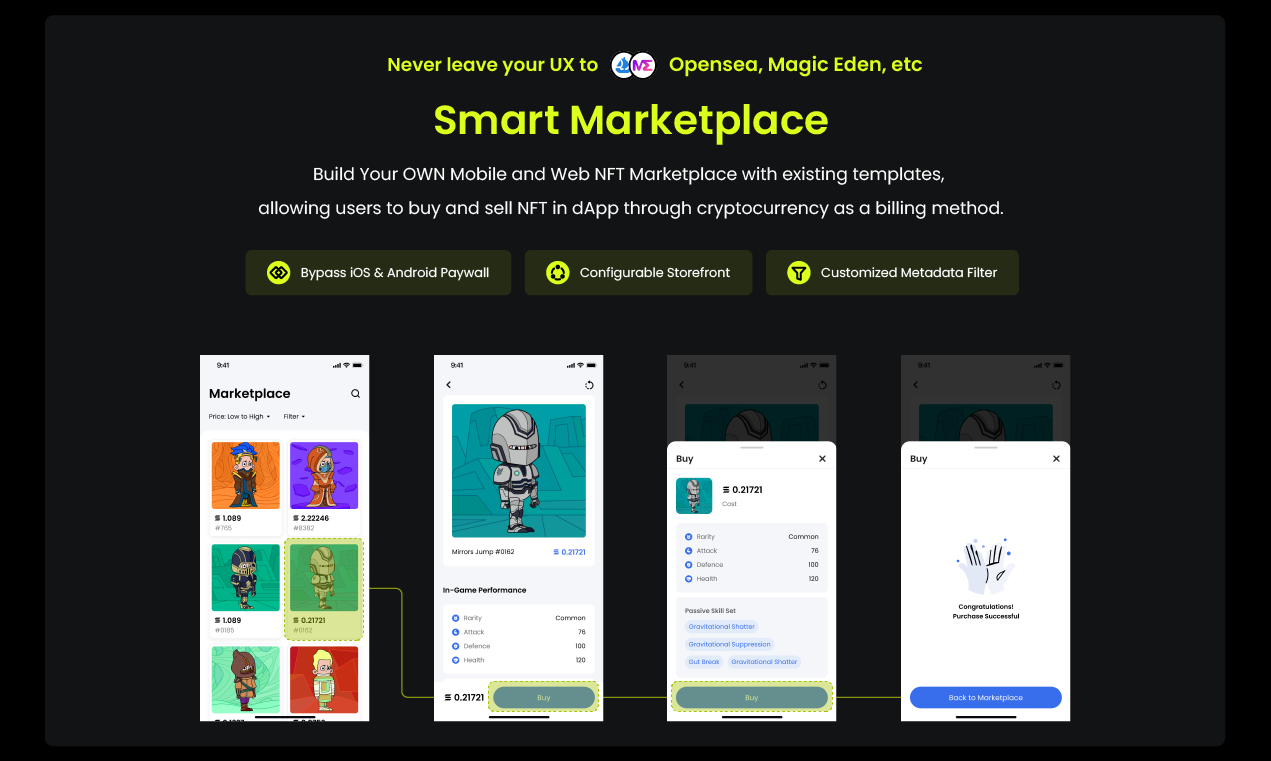
With the elements like NFT collection minting as well as metadata ready, we can proceed to take our final step of adding Web 3 elements onto our game——enable listing and purchasing NFT in an NFT Marketplace. Just like the wallet, our NFT marketplace and its operations are all completely inside the dApp as you can see in the Mirrors Jump demo. Users can browse, purchase, use on-ramp service, and list their NFTs inside the dApp, which makes the user experience extremely smooth.
Here are some APIs we used for building our NFT Marketplace for Mirrors Jump:
List NFT on the marketplace
Buy NFT on the marketplace
Update Listing of NFT on the marketplace
For the full set of APIs, you can visit our HTTP API here: https://developer.mirrorworld.fun/#intro
Smart SDK also provides a dashboard for basic color and layout modifications, though you could always make more delicate modifications in our open-source storefront.
Final Note
Above are all the steps you need to take to utilize our SDK better. If you do have an existing game ready, it shouldn't take more than 30 minutes for you to complete the whole on-chain process, and this could take a couple of months for a small developer team to build from the ground up. If you have specific questions regarding the API plug-in and so on, you can always contact our professional tech team for help. For more information regarding Mirror World, please visit the link below.
Official Website: https://mirrorworld.fun/
For our doc: https://docs.mirrorworld.fun/overview/introduction
Also, if you have any feedback on our product or questions of any kind, please let us know here:https://mirrorworld.fun/feedback
Originally published on Mirror World Blog: https://blog.mirrorworld.fun/p/how-to-integrate-blockchain-sdk-to
