Morse Code Translator: Convert Text to Morse Code Easily
Communication has changed dramatically over the years, but some methods remain fascinating because of their simplicity and historical importance. Morse code is one of those methods. It allows letters, numbers, and selected symbols to be represented through dots and dashes, making it possible to communicate messages using sound, light, or visual signals.
Today, you do not need to memorize every Morse code combination to create a message. A morse code translator can instantly convert ordinary text into Morse code, making the process faster and easier for students, hobbyists, educators, and anyone interested in coded communication.
Whether you want to translate a short word, create a hidden message, learn Morse code, or experiment with a traditional communication system, understanding how a translator works can make the experience much more enjoyable.
What Is Morse Code?
Morse code is a communication system that represents letters, numbers, and certain punctuation marks using combinations of short and long signals. These signals are commonly written as dots and dashes.
For example:
- A = .-
- B = -...
- C = -.-.
- D = -..
- E = .
- S = ...
- O = ---
One of the best-known Morse code combinations is SOS, represented as ... --- .... It became widely recognized as a distress signal because it is simple to transmit and easy to recognize.
Morse code can be sent through sound, radio signals, flashing lights, or other methods that can distinguish between short and long signals. Its flexibility helped it become an important communication system before modern digital communication became common.
How Does a Morse Code Translator Work?
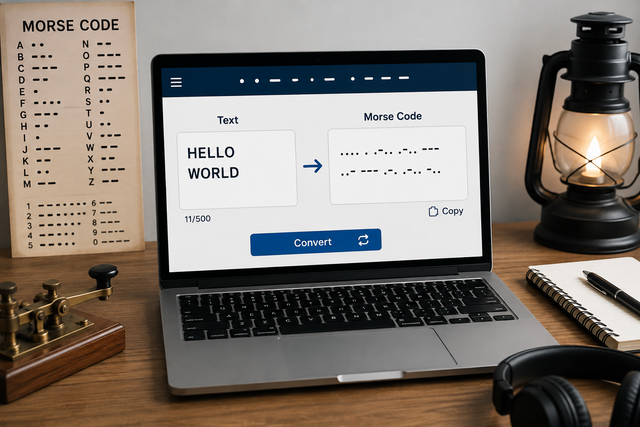
A morse code translator uses a predefined mapping between characters and their corresponding Morse code patterns. When you enter text, the tool examines each character and replaces it with the appropriate combination of dots and dashes.
For example, if you enter the word "HELLO," the translator produces:
.... . .-.. .-.. ---
Spaces are normally used to separate individual letters, while a larger separation can represent spaces between words. This makes the resulting message easier to understand.
The basic process is simple:
- Enter your text into the translator.
- The tool identifies each letter, number, or supported symbol.
- Each character is matched with its Morse code equivalent.
- The converted message appears as dots and dashes.
- You can copy or use the result wherever needed.
This automatic process eliminates the need to search through a Morse code chart for every character.
Why Use a Morse Code Translator?
Learning Morse code manually can be rewarding, but converting longer sentences character by character can take considerable time. A translator provides a convenient alternative when accuracy and speed are important.
A translator can be useful for:
- Quickly converting words and sentences
- Checking whether manually written Morse code is correct
- Creating puzzles and coded messages
- Supporting classroom activities
- Practicing Morse code recognition
- Exploring historical communication methods
- Preparing signals for radio or hobby projects
It can also be helpful for beginners who are still becoming familiar with the relationship between letters and their Morse code patterns.
Converting Text Into Morse Code
The most common use of a translator is converting regular text into Morse code. The process usually requires only a few seconds.
Suppose you want to convert the phrase "LEARN MORSE." The tool separates the phrase into individual characters and assigns a Morse representation to each one.
The result would be:
.-.. . .- .-. -. / -- --- .-. ... .
The slash can be used by some translators to indicate a space between words. However, formatting conventions may vary from one tool to another.
When converting longer messages, it is important to check the output before sharing it, particularly if punctuation, numbers, or unusual characters are included.
Converting Morse Code Back Into Text
Many modern translators offer two-way conversion. This means they can transform ordinary text into Morse code and decode Morse code back into readable language.
For example:
.... . .-.. .-.. ---
can be decoded as:
HELLO
This feature is particularly useful for students and people practicing Morse code because they can test themselves in both directions. You can write a word in Morse code, enter it into the decoder, and compare the result with your original message.
Two-way conversion also makes translators useful for solving Morse code puzzles and understanding messages found in books, games, educational activities, or online communities.
Morse Code for Numbers and Symbols
Morse code is not limited to the alphabet. It also includes representations for numbers and various punctuation marks.
For example:
- 1 = .----
- 2 = ..---
- 3 = ...--
- 4 = ....-
- 5 = .....
- 6 = -....
- 7 = --...
- 8 = ---..
- 9 = ----.
- 0 = -----
Many translators also support punctuation such as periods, commas, question marks, and other commonly used symbols.
Because support for less common characters can differ between tools, always review the output when your message contains special punctuation or symbols.
Morse Code in Education
Morse code can make lessons about communication, history, technology, and problem-solving more interactive. Instead of simply reading about the system, students can experiment with it themselves.
Teachers can use Morse code activities to encourage students to:
- Encode their names
- Decode short messages
- Create classroom puzzles
- Practice pattern recognition
- Explore historical communication
- Learn how information can be represented in different ways
A morse code translator can make these exercises easier to organize because students can quickly check their answers and focus on understanding the concept.
Morse Code for Fun and Creative Projects
Morse code is also popular outside educational settings. People use it to create personalized gifts, puzzles, artwork, jewelry designs, usernames, and secret messages.
For example, a short phrase can be converted into dots and dashes and incorporated into a bracelet or decorative design. Because the result may look like a simple pattern to someone unfamiliar with Morse code, it can add an interesting hidden element.
Writers and game designers can also use Morse code to create clues, mysterious messages, and interactive challenges.
Tips for Getting Accurate Results
Although translators are designed to make conversion simple, a few habits can improve your results.
First, enter your text carefully. Spelling mistakes will also appear in the converted output. Second, check whether the translator supports the punctuation or symbols you are using.
It is also useful to understand basic Morse code rather than relying entirely on automatic conversion. Knowing common characters such as E, T, S, O, A, and N can help you recognize simple patterns quickly.
When decoding Morse code manually, pay attention to spacing. The difference between individual letters and separate words is important for understanding the intended message.
Choosing a Useful Translator
Not every translator provides exactly the same features. If you are choosing a tool for regular use, look for one that has a simple interface and clearly separates letters and words.
Useful features may include:
- Text-to-Morse conversion
- Morse-to-text decoding
- Number and punctuation support
- Copy functionality
- Audio playback
- Clear spacing between characters
- Mobile-friendly design
Audio playback can be especially useful for learners because Morse code is often transmitted through sound. Hearing the timing of dots and dashes can help users develop better recognition skills.
Start Exploring Morse Code Today
Morse code remains an interesting example of how a simple system can communicate meaningful information. Although modern technology has replaced it for many everyday communication needs, its historical importance and creative possibilities continue to attract new learners.
A morse code translator removes much of the difficulty involved in converting messages manually. You can use it to learn the basics, check your work, decode messages, create puzzles, or simply explore a unique form of communication.
The best way to become comfortable with Morse code is to combine automatic tools with regular practice. Start with short words, learn a few common characters, and gradually move toward complete sentences. With consistent practice, those familiar dots and dashes will begin to look less like random symbols and more like a recognizable language of signals.
