Need advice: Building online form with spreadsheet features
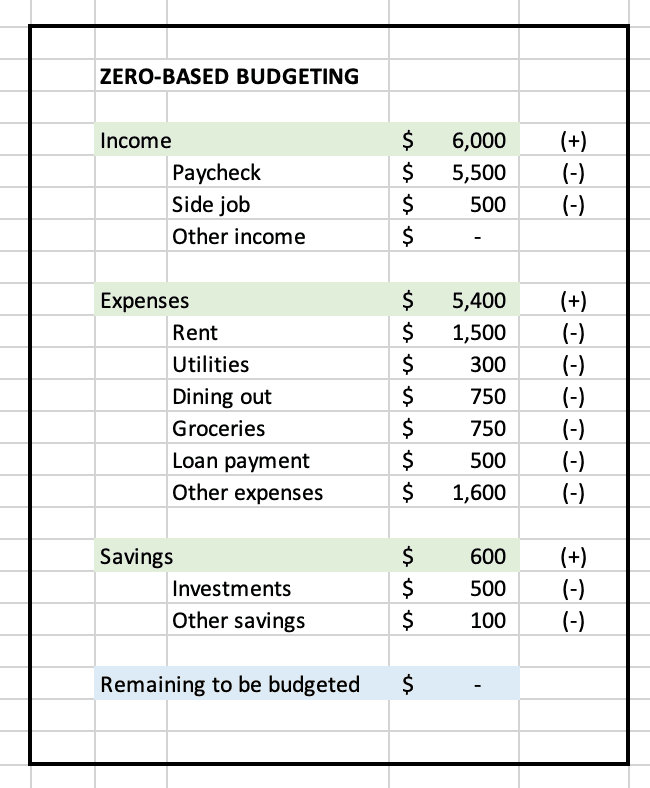
I'm trying to build an online form for my users to enter their financial budget. It's easy to build with a spreadsheet (see the mockup screenshot). Basically, there are budget categories, and under each, there are budget items. The user can add or delete the budget items. The totals are automatically calculated as the users change the numbers.
What is the easiest and fastest way to build a web page for this budgeting form? Is there a no-code solution that I can use?
Edit: FYI, I have some experience with FlutterFlow no-code platform. However, I haven't found a straightforward way for FF to handle the adding/deleting budget items and auto-calculate the totals.

Hi,
Yes, there are several no-code solutions available that can help you create an online budgeting form without requiring any programming knowledge. Here are a few popular options:
Google Forms: Google Forms is a free, user-friendly tool to create online forms. You can create a form with multiple categories and budget items for users to input their data. However, Google Forms may not provide automatic calculations of totals. You can export the form data to Google Sheets and perform calculations there.
Typeform: Typeform is another option for creating interactive online forms. It offers a more engaging user experience with a conversational interface. However, automatic calculations within the form may not be available. You can integrate Typeform with Google Sheets or other spreadsheet tools for calculations.
JotForm: JotForm is an online form builder with a wide range of features, including the ability to perform calculations within the form. You can create a budgeting form with multiple categories and budget items and set up calculations to update totals automatically as users input their data.
Microsoft Forms: Similar to Google Forms, Microsoft Forms allows you to create online forms quickly and easily. You can create budget categories and items, but automatic calculations may not be available within the form. You can export the data to Microsoft Excel for calculations.
Bubble io: Bubble is a no-code platform for building web applications. With Bubble, you can create a more customized budgeting form and set up automatic calculations using their visual programming interface. It may have a steeper learning curve compared to other form builders, but it offers greater flexibility and customization.
When choosing a no-code solution, consider factors such as ease of use, customization options, and the ability to perform calculations within the form. Some platforms may require integration with spreadsheet tools for calculations, while others can handle calculations directly within the form.
Hi @Devshed thanks. I don't believe Google and Microsoft Forms can do calculations like a spreadsheet. I know Typeform and JotForm are more advanced, but I'm guessing online forms solutions don't allow the end user to add/delete new fields to the form (i.e. add/delete budget items). Correct me if I'm wrong.
Bubble looks powerful enough, but I was hoping for something simpler than that :-D I've tried using FlutterFlow, and it requires workaround to do what I want to do.