Need help with a chrome extension I'm building
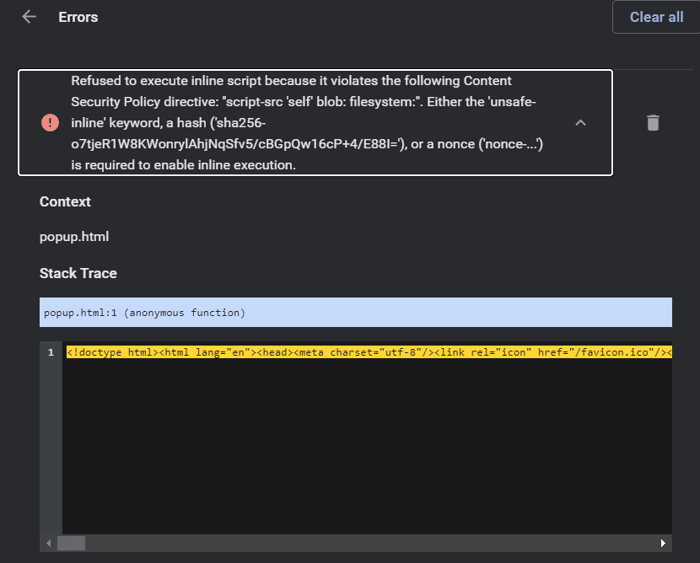
Hey guys, I'm building a chrome extension that needs to be able to read the user input from a text area like the gmail editor but I'm getting an error I can't figure out
"Refused to execute inline script because it violates the following Content Security Policy directive: "script-src 'self' blob: filesystem:". Either the 'unsafe-inline' keyword, a hash ('sha256-o7tjeR1W8KWonrylAhjNqSfv5/cBGpQw16cP+4/E88I='), or a nonce ('nonce-...') is required to enable inline execution."
Has anyone faced this before? I tried stack overflow but the solutions are outdated and don't work anymore

You need to add something like this to your manifest.json file:
"content_security_policy": "script-src 'self' https://fonts.googleapis.com/css 'unsafe-eval'; object-src 'self'"
Not sure about the exact one for blob, but I hope that gives you a hint.
Example from my code:
manifest.json
{
"name": "",
"version": "1",
"description": "",
"manifest_version": 2,
"permissions": ["activeTab", "webNavigation", "storage", "tabs"],
"icons": {
"128": "assets/icon_128.png",
"48": "assets/icon_48.png",
"16": "assets/icon_16.png"
},
"background": {
"scripts": [ "background.js","runtime.js", "scripts/jquery-3.4.1.min.js"],
"persistent": true
},
"content_scripts": [
],
"browser_action": {
"default_icon": "assets/icon_16.png",
"default_popup": "index.html"
},
"content_security_policy": "script-src 'self' https://fonts.googleapis.com/css 'unsafe-eval'; object-src 'self'"
}
As mentioned before, it would be good to see the code.
I am probably not the best person to help, since I created my first extension this week (waiting for the review from Chrome/Firefox store), but maybe this will help.
My extension:
So, on my (2) popup.js:
On the same (2) popup.js file, I have that function ("getFormFields"):
People would need to look at code in order to solve a dev bug. One common reason for this error is when you try to run inline javascript instead of including it via file, as it is mentioned in the error.
So make sure you js is extracted to an external file and included in html file via script tags.
Thanks for the reply. Can I DM you some follow ups?
Sure
This comment was deleted 5 years ago