Our White Label AI Widgets now support AI Image Generations
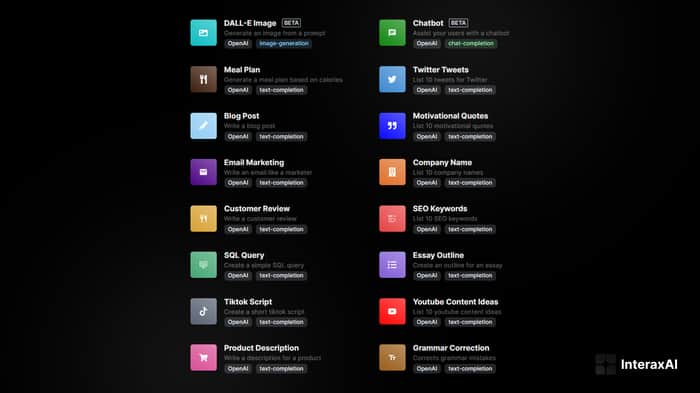
👋Hey guys, if you are looking to integrate AI Widgets on your website. I would recommend checking out our website, interaxai.com.
InteraxAI is a No-Code White Label platform that offers monetizable and embeddable AI Widgets. We offer a wide range of AI widgets that can be easily integrated into your website, blog, or social media pages. For example, you can add a widget that allows your audience to generate a random quote or a widget that allows them to generate a blog post. You can also add a chatbot widget that allows your audience to interact with your website or blog.
😮What else?
InteraxAI is fully monetizable, allowing you to earn revenue by offering AI widgets to your audience. You can enable direct payments which require connecting a Stripe Connect account.
Website: https://interaxai.com/
Documentation: https://docs.interaxai.com/

Cool
Nice! please consider adding your product to IH. Much easier for us to see your timeline, growth path.. how you tracking. Good, bad and ugly. it is what we are here for -- to help.
Hello @catalystNewbie, definitely! Just waiting for approval now :)
Wow very big potential project. Ever thought about making it into a marketplace of some kind. Let other developers post their widgets, you get a cut. Or let users create their own widgets via a no code template/solution
Hi @mralicicek, thank you so much for your feedback! You can already somewhat do this by editing the prompt! we offer customizable API for our subscribed users where you can edit the fields sent to the API provider like OpenAI.
Feel free to checkout our docs :) https://docs.interaxai.com/getting-started/configuring-your-widget#provider-tab
Congrats on the launch! Do you have a plan to add img gen with stable diffusion as well?
Evoke is a pretty good option when it comes to img gen for that. In addition, we're also cooking something soon that will provide better imgs than midjourney.
Hey just tried out the interaxai platform on the side project I'm working on
Your tool is super easy to install and it worked good however when I installed the script into the head of my Webflow website it caused the home page (which uses input fields to capture emails and search) to crash (well really blocked it with Interaxai's branding) and said the page had too many input fields.
My biggest fear/problem now is that if I integrate interax wrong no one will be able to use the rest of the site or at least specific pages on the site.
Is there a way to avoid this issue?
If so I'm very tempted to upgrade to get access to the advanced API features
---
Also please note on the page where I embedded the generator into Webflow InteraxAI worked just fine
Hi there! Thank you so much for checking out InteraxAI and for reaching out to us about the issue you encountered. We're glad to hear that our tool was easy to install and worked well for you.
Regarding the issue you mentioned with the script causing your home page to crash, we apologize for the inconvenience. We believe the problem may be related to the script expecting Interaxai's element to be on every page if you put it on the header tag. We recommend removing the script code within the header tag and putting it inside a custom element instead. Please watch the following video as a reference: https://www.youtube.com/watch?v=2umigemplRQ&t=220s
If you have any further questions or concerns, please don't hesitate to reach out to us on our https://interaxai.com/contact page or just simply reply here. We're always here to help! Thanks again!
Hi found some time to try again and the same problem occurred except this time it's only on the page with the widget embed:
https://www.brandesaurus.com/generators
I checked out the video on youtube to make sure I did everything correctly
Hello @vintually, it looks like the number of elements you have is more than expected. I took a look at your website and see that you are using the blog post widget. The blog post widget only consists of the following elements:
Your website has double that. If you want to use multiple widgets on one page, we just released a new update today! you can now use an iframe code. Please go to your widget's config and under the Embed tab, choose iframe as the preset.
Thanks for the feedback as this will truly make our product better! Let me know if you have further questions :)
Sorry for the notifications, but did you all also add more AIs?!
Pretty sure I'm seeing some fun new ones to try :D
Yup, we actually did! we've added chatbots for fitness, health, education, and more. You can actually create your own for your own use cases. We offer API configuration, so you can simply edit the prompt or system to fit your brand.
Interesting no idea where these extra inputs are??? If you could let me know that'd be great XD
When I copy the standard/webflow code from Interax it has the same as the code above
But good news is the iframe update worked!
I'd recommend adding instructions for the height as when I first added it the height was messed up however I found work arounds to get it going (though knowing best practices would be great)
Outside of the above your phenomenal support has been great! You'll be getting a new customer within the next few days :)
I also work with a few diversity focused startup accelerators so I'll make sure to share your website in their communities
I'm glad to hear that the iframe code worked for you. It's possible that the extra inputs are contained within a container that is not visible within Webflow's editor. This is because the size of the container must be 0 by 0 to be hidden from view. You can actually see it at the bottom if you look at the code
view-source:https://www.brandesaurus.com/generators. I suggest looking at Webflow's navigator tab and you should be able to see it.I also suggest using the dark theme on your blog post generator by changing the URL theme and bg param to
theme=dark&bg=090101.Thank you for your kind words and for considering us as your new customer. We greatly appreciate it. If you have any further questions or concerns, please don't hesitate to reach out to us. We're always here to help!
Cool this makes a lot of sense! I'll start testing around with it over the next few days
Thank you for the quick support :)
Interesting side project! If you're looking to integrate img generation, you can also try out Evoke API
Awesome blog. I enjoyed reading your articles. This is truly a great read for me. I have bookmarked it and I am looking forward to reading new articles. Keep up the good work! nytimes crossword
Here we are showing Zaxbys Menu With Prices including Gluten Free Menu, Kids Menu, Alcohol Menu, Ultimate Feast Price, Endless Shrimp, Biscuit Price, Special Menu, Catering, Nutrition, Lunch Menu along with accurate information about menu prices. Collected by our team
zaxbysmenuprices.info