Raspberry Pi Line Following Robot: A Real-World Robotics Case Study
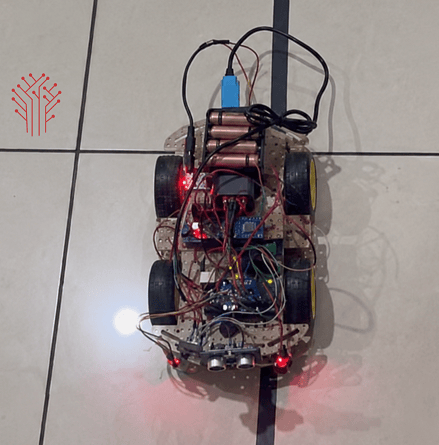
Robotics projects are often the best way to combine hardware, software, and real-time decision-making into a single working system. When we see our surrounding areas we will notice everything in this world is modern based or IoT Based and robotics based. Recently, our team at DigitalMonk developed a Raspberry Pi–based Line Following Robot capable of autonomously navigating a predefined path using infrared sensors and intelligent motor control. Thai robot is a real example of an IoT smart automation system.
The goal of this project was simple: create a robot that could detect a path, make instant decisions, and adjust its movement without any human intervention. While line-following robots are commonly used in robotics education, the same concepts are widely applied in warehouse automation, industrial AGVs (Automated Guided Vehicles), and smart logistics systems.
The Challenge:
Traditional robots that rely on manual control are limited when operating in repetitive environments. We wanted to build a system capable of:
• Detecting a predefined line in real time
• Making autonomous navigation decisions
• Adjusting motor speed dynamically
• Maintaining stability on curves and turns
• Providing a scalable architecture for future enhancements
The project also served as a practical demonstration of how Raspberry Pi can be used for embedded robotics applications beyond simple prototyping.
System Architecture
In this robot Raspberry Pi is used as a main controller of this line following the robot. The main function of raspberry pi is :
• Read data of IR sensor
• Decision making
• Motor control
• Real time processing
The robot was designed around four major layers:
- Sensing Layer
Multiple IR sensors continuously monitor the surface beneath the robot. These sensors detect the contrast between the track and the surrounding area. Dark surfaces absorb more infrared light while lighter surfaces reflect it, enabling accurate path detection.
- Processing Layer
A Raspberry Pi acts as the central controller. Python-based algorithms process sensor data and determine whether the robot should move straight, turn left, or turn right.
- Control Layer
Motor driver modules receive PWM-based commands from the Raspberry Pi. This allows smooth speed adjustments instead of abrupt movements.
- Actuation Layer
DC motors execute the movement commands and keep the robot aligned with the detected path.
Technologies Used
• Raspberry Pi
• IR Line Tracking Sensors
• DC Motors
• Motor Driver Module
• Python
• GPIO Libraries
• PWM Motor Control
• Embedded Linux Environment
Key Engineering Challenges
Sensor Accuracy Under Different Lighting Conditions
One of the biggest challenges was maintaining reliable line detection under varying ambient light conditions. Sensor readings could fluctuate depending on the environment.
To solve this, we implemented calibration and filtering techniques that normalized sensor values and improved consistency.
Smooth Navigation
Basic motor control caused the robot to overcorrect and oscillate around the path.
We introduced dynamic PWM-based speed adjustments, allowing gradual corrections and smoother movement during turns and curves.
Real-Time Decision Making
At higher speeds, even small processing delays can cause a robot to lose the track.
By optimizing the Python control logic and reducing unnecessary computation, we achieved near-instant sensor-to-motor response times.
Results
https://youtu.be/lDtuEKTcXGk
The final robot successfully achieved:
• Fully autonomous navigation
• Reliable line tracking across multiple test surfaces
• Smooth corner handling
• Real-time motor control
• Modular architecture for future expansion
The platform can easily be upgraded with:
• Obstacle detection
• Computer vision
• Wireless communication
• Cloud monitoring
• AI-based navigation
Real-World Applications
Although this project started as a robotics prototype, the same principles are used in commercial systems today.
Potential applications include:
• Automated Guided Vehicles (AGVs)
• Warehouse transportation systems
• Manufacturing automation
• Educational robotics platforms
• Research and development projects
• Smart logistics solutions
What We Learned
This project reinforced the importance of balancing hardware reliability with software intelligence. Even a seemingly simple robot requires careful consideration of sensor calibration, motor control, power management, and software optimization.
More importantly, it demonstrated how Raspberry Pi can serve as a powerful embedded computing platform for autonomous robotics projects.
For businesses and startups looking to build custom robotics solutions, embedded products, or industrial automation systems, working with an experienced team can significantly reduce development time and technical risk.
If you're planning a robotics or automation project, you can hire raspberry pi developer to accelerate development and bring your idea from prototype to production.
Conclusion
The Raspberry Pi Line Following Robot successfully showcased autonomous navigation using real-time sensor processing and intelligent motor control.
Beyond being a demonstration project, it represents the foundation of many industrial automation systems used today.
By combining Raspberry Pi, IR sensors, Python, and embedded control techniques, we built a scalable robotics platform capable of evolving into more advanced autonomous solutions in the future.
