Remember the problems encountered when deploying SSE message push to Cloudflare
Preface
The situation is like this, when I am developing MagicBee, I need to implement real-time message notification and task distribution functions.
After a comparison of technical solutions, it was decided to use SSE (Server Send Events) to achieve.
After a week of overtime development, everything is perfect in local testing, and I can’t help but want to boast: I’m a genius! 😄
Finally, it’s time to deploy and go online. As usual, this project still uses a stand-alone service, then uses Cloudflare DNS to resolve, and then distributes it to all parts of the world through its edge network.
For the sake of safety, I decided to go to the pre-release environment to test it first, and then release it to ensure nothing goes wrong.
Copy a copy of the Nginx configuration, modify it, the -t test passes, and then restart Nginx to make the configuration take effect.
Finally, in Cloudflare’s configuration panel, point the domain resolution to your own server IP.
In this way, the deployment of the backend service is completed.
Problems Encountered
I can’t wait to open the MagicBee extension, feeling a little flustered and looking forward to it…
Open the console, switch to the Network panel, and see the 401 error that flashes every second, thinking 🤔 It’s over.
I was stunned for 3 seconds, and I suddenly came back to my senses, it’s restricted access, Oh ~~ Hey, I haven’t logged in yet!
So, open the login page calmly, enter the account & password, and press the Enter key.
Go back to the Network panel, press F5 to refresh it, there is no error, secretly happy, continue to observe…
After 1.1 min, the SSE connection was disconnected. It may be due to network fluctuations, and there is a retry mechanism to guarantee it. Keep calm and continue to observe…
After the next 1.1 min, the connection was dropped again, it seems that this is not an accident!
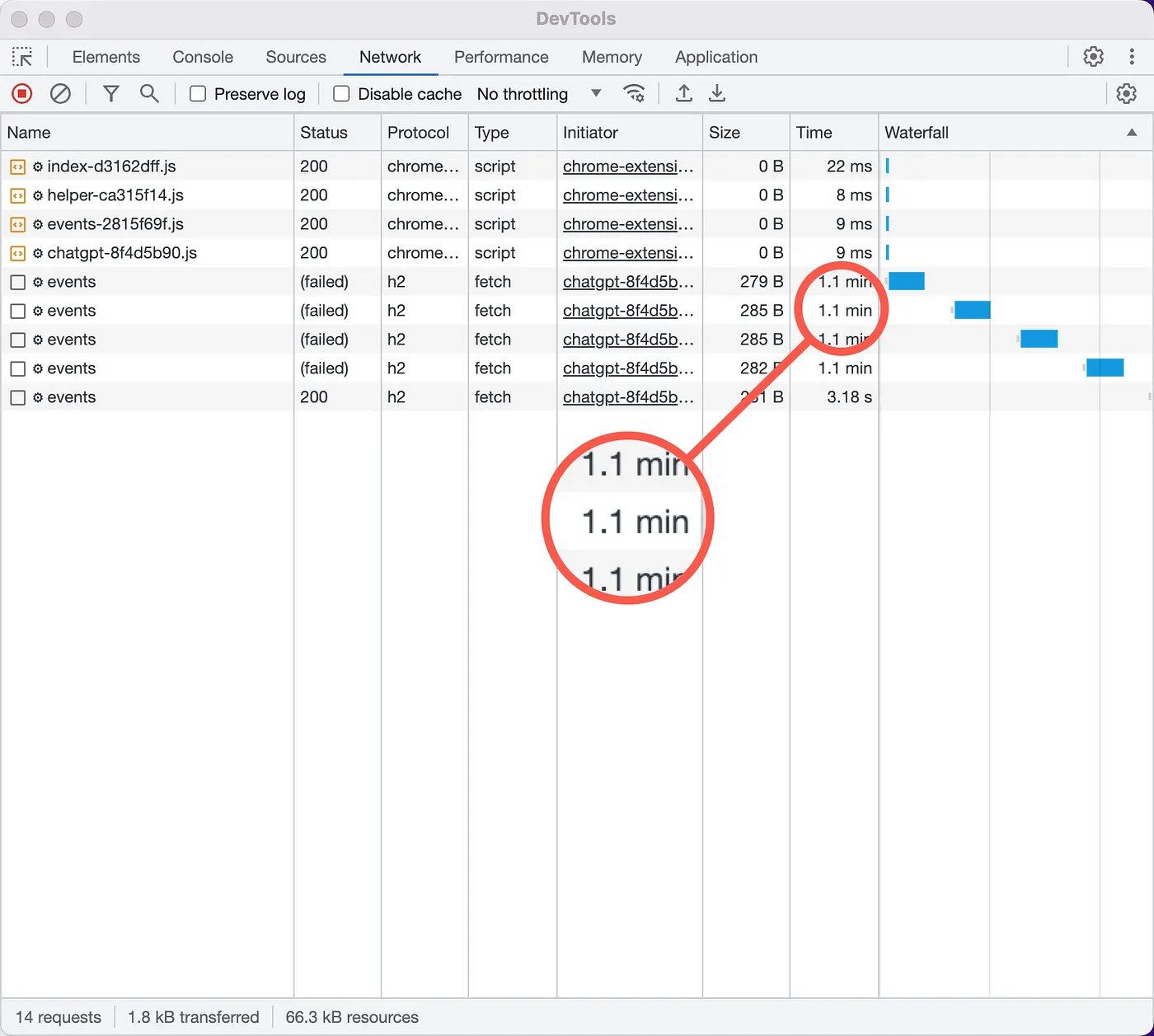
My first thought was that the configuration of Nginx was wrong, so I quickly checked the configuration.
I found that proxy_read_timeout 1m; is set to 1 minute, it must be playing tricks, so I changed it to 8h, and disconnected 3 times a day, which is acceptable!
Continue to observe, and after 1.7 minutes, the connection is disconnected in an orderly manner.

Ah ~~ 😵 What is the reason this time? ? ?
After searching frantically, I tried over and over again, various solutions, but unfortunately none of them worked for me!
For example, to change the Nginx configuration:
proxy_http_version 1.1;
proxy_set_header Connection '';
chunked_transfer_encoding off;

proxy_buffering off;
proxy_cache off;
In the response header of the source (upstream) service add:
X-Accel-Buffering: no
I’m going crazy! In order to confirm that this is the problem caused by Cloudflare, I had to install a Nginx locally, and tested with the same configuration without any problems.
Well, now that we know what the problem is, there is a solution!
After another frantic search, I learned that Cloudflare does not support SSE very well, but it supports WebSocket very well.
Ah ~~ Do you want me to change the technical solution?
- Using traditional polling?
- Or long connection?
- Or WebSocket?
- Or disabled Cloudflare?
If the code needs to be refactored, I’m stuck in a depression! 😥
Solution
Just when I was about to give up the SSE solution, I decided to read the official Cloudflare documentation carefully, and finally my hard work paid off, and I found such a description.
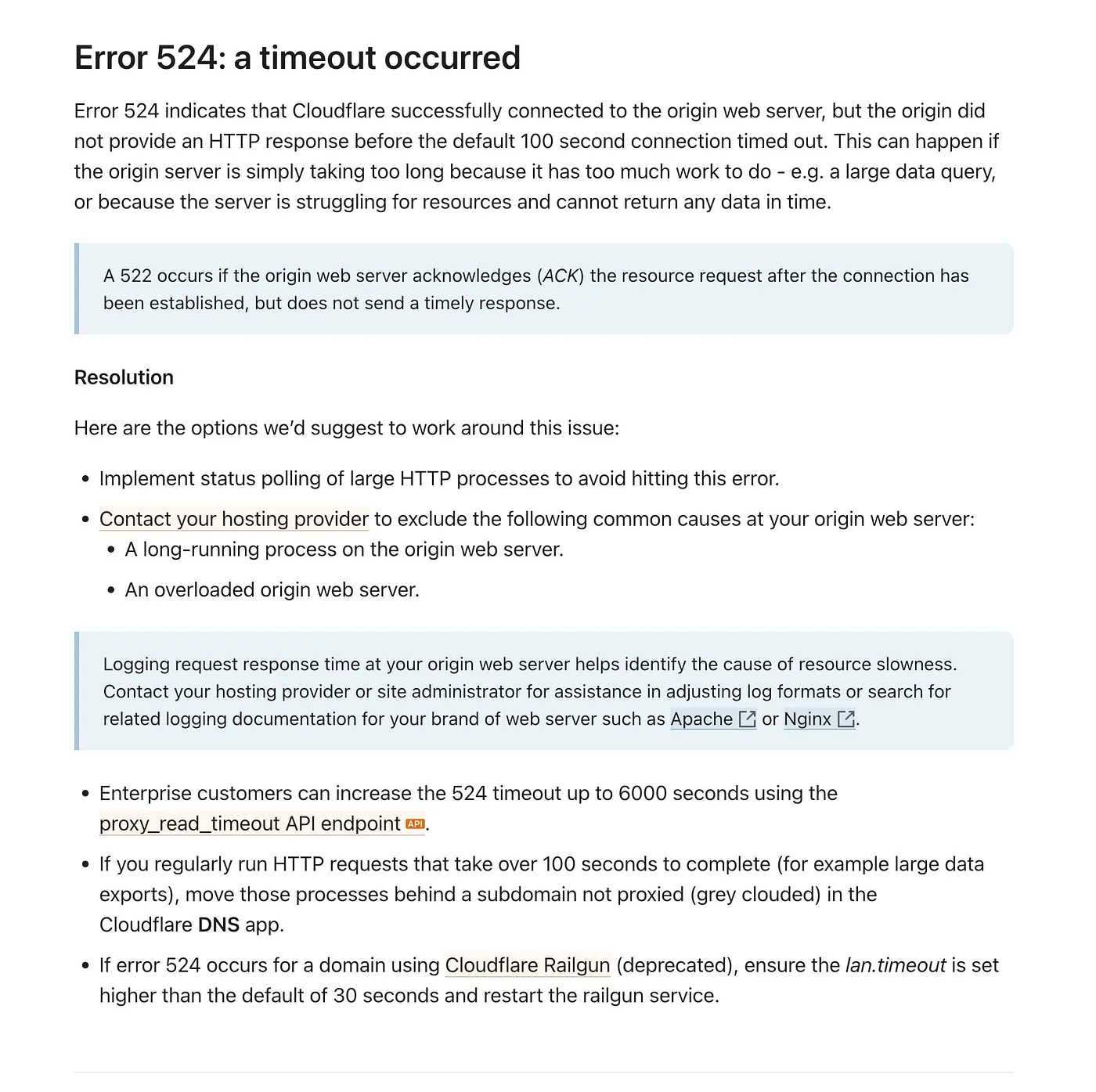
Meaning Cloudflare successfully connected to the origin server, but didn’t respond within 100 seconds, so a timeout occurred.
100 seconds? Doesn’t that translate to 1.666… minutes, which rounds up to exactly 1.7 minutes? This is very consistent with the problem I encountered!
Continuing to look down, Cloudflare also provides several solutions for this time-consuming task:
- Use short polling to avoid this error
- Enterprise users can set proxy_read_timeout to 6000 seconds
- Turn off Cloudflare’s edge network distribution, and the request goes directly to the origin server
Neither of these are the solutions I’m looking for. I think about it carefully, is it good to have a response within 100 seconds.
So, I quickly modified the message push code and started a clock to send a keepalive empty message every 30 seconds.
After deploying, continue to observe, um ~ this time, it is stable!
The connection dropped after 1.5 hours, again due to the computer hibernating, but it was enough.
As long as it can reach the hour level, coupled with the reconnection mechanism, this is an acceptable result.
Conclusion
This is an experience of deploying SSE message push to Cloudflare. I encountered many problems in the middle, did a lot of tests, and then eliminated them one by one.
Every time, it was on the verge of collapse and the technical solution was changed. Fortunately, I finally overcame many difficulties and got what I wanted.
If your application scenario is similar to mine, the request chain is as follows:
Client -> Cloudflare -> Nginx -> Server
- Please set the response header X-Accel-Buffering: no in the Server to close the Nginx response cache
- Do a response every 30 seconds to avoid Cloudflare’s 100 second unresponsive timeout error
All right! I will share it here today. If you have any questions, please communicate in the comment area.
