Show IH: I built a menu bar app because Claude Code kept silently dying on dropped connections
https://www.metulon.com/apps/netcheck
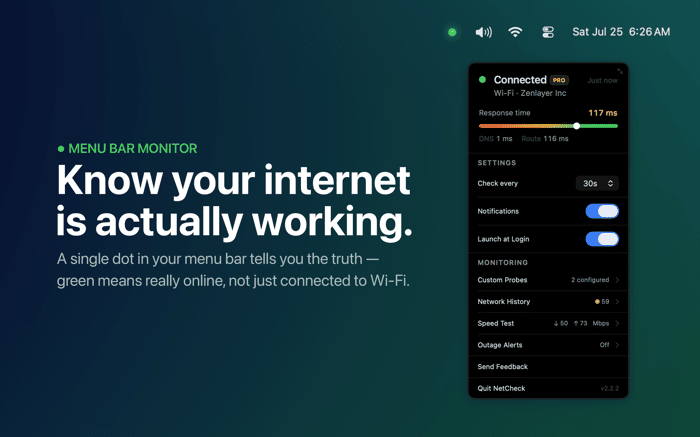
Built this because Claude Code kept dying mid-session whenever my connection dropped, macOS still showed Wi-Fi connected. NetCheck is a macOS menu bar dot, green or grey, checking real reachability not just Wi-Fi. Free app; Pro adds history and an iPhone alert when back online.

At first glance I thought this was a phone screenshot because of the narrow crop, but I see now it’s actually macOS. The menu bar UI threw me off for a second. Cool idea for keeping track of real connectivity!
I'm glad that you liked it :)
A few months ago I was a few hours into a long Claude Code session and it just stopped making progress. Turned out the internet had dropped ten minutes earlier. macOS still showed Wi-Fi as connected the whole time, because it was connected, just not to anything that actually worked.
That's the gap NetCheck fills. It's a single dot in the menu bar, green when you actually have internet, grey when you don't. Not Wi-Fi status, real reachability, checked on a short interval in the background.
Started as a one day build. Since then it picked up a proper network path check (is it your Mac, your router, or your ISP), a real speed test, and on the Pro side, a push notification to your iPhone the moment your Mac's internet is back, telling you exactly how long it was down, plus a reliability history so you can actually see the pattern instead of just feeling like your internet has been flaky lately.
Free tier does the core job — no account, no data collected, nothing to sign up for. Pro is a one time $9.99, no subscription.
App Store: https://apps.apple.com/app/netcheck-menu-bar-monitor/id6777047408
Demo: https://youtu.be/xFlBAON9iA8