Show IH: I ported my Android camera app to iOS in 11 days using Google AI Studio. Here's where I had to ignore the AI.
Hey hackers,
Porting a native camera app from Android to iOS is usually a nightmare. You’re translating entirely different APIs and rendering pipelines. As a solo dev running Muxixi Studios, I didn't have months to spare.
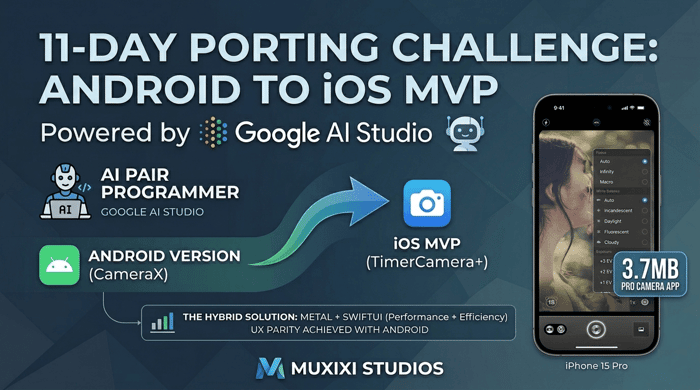
To speed up the iOS port of TimerCamera+, I ran an experiment using Gemini 3.1 Pro Preview as my senior pair programmer. The result? Zero codebase to a live App Store MVP (v1.1) in exactly 11 days.
Here is what the workflow looked like, the tools I used, and where I had to push back against the AI:
1. The Secret Weapon: Repomix + 1M Token Context
How do you feed an entire Android project to an AI without it losing its mind? Even though Gemini 3.1 Pro Preview has a massive 1 Million token context window, dumping raw folders into a prompt is a recipe for disaster.
I highly recommend a tool called Repomix. It allows you to pack specifically targeted directories (in my case, my Android CameraX logic) into a single, clean, AI-readable file. Crucially, Repomix gives you a clear sense of the codebase's token magnitude before you hit send. You know exactly how much of that 1M context window you are eating up.
I passed this perfectly structured context to Gemini and prompted it to map the architecture to Apple's native APIs. It provided a remarkably solid foundation almost instantly.
2. The SwiftUI vs. Metal Debate (Ignoring the AI)
Here is where the model and I had a fundamental disagreement. Gemini strongly pushed me to rewrite the entire camera preview and UI layer purely in SwiftUI.
I refused. Instead, I insisted on building a Metal + SwiftUI hybrid architecture.
I used native Metal exclusively for the core rendering pipeline to keep it lightweight, and restricted SwiftUI purely to the main layout and interactions. I used Gemini to generate the boilerplate Metal shaders, then manually refined the integration.
Why I'm glad I stuck to my guns:
This hybrid decision was the game-changer. It solved the performance bottlenecks immediately while keeping UI development blazing fast. More importantly, it allowed me to make the UX and interactions almost 100% identical between the new iOS version and my mature Android version (currently v1.5.6).
3. The Result: A 3.7MB Powerhouse
Because I didn't rely on heavy third-party engines or bloated pure-UI rendering, the final iOS app size is a ridiculously small 3.7MB. It’s a hands-free selfie timer with zero ads and zero data collection.
AI is incredible for accelerating cross-platform ports, but this 11-day sprint taught me two things: a tool like Repomix is essential for managing context, and a developer's architectural intuition is still the most valuable asset.
Has anyone else here tried Repomix for feeding code to LLMs? How do you manage your context windows?
🍎 If you want to see how the Metal/SwiftUI hybrid turned out, here’s the iOS link: https://apps.apple.com/app/id6768857092
P.S. If you have any suggestions or feedback for TimerCamera+, please send them my way. It is incredibly important to me and helps shape the future of the app!

This matches my Android experience: AI can accelerate a lot, but device behavior and edge cases still need real runs. With Kinetic Override, the tricky parts are also concrete-device details — permissions, timing, tap/swipe replay accuracy — not just getting screens generated.
Spot on. Couldn't agree more with your observation.
During our 11-day migration, translating Kotlin views to SwiftUI or mapping data models took very little time thanks to AI. However, we spent a significant portion of those days with physical devices in hand, debugging the exact issues you mentioned.
For instance, matching the kinetic feel of the zoom slider, resolving PhotoKit's asynchronous loading states when assets are hosted on iCloud, and handling the transition of permission states (especially the 'Limited Access' introduced in iOS 14) required meticulous manual tuning.
AI is an incredible copilot for getting us to 80% quickly, but that last 20%—the timing, the hardware-specific gestures, and the OS edge cases—still demands deep platform knowledge and real-world testing.